Introducción

Usa esta guía para calibrar los joysticks de tu Steam Deck desde dentro de la SteamOS.

Valve recomienda hacer esta calibración de software después de instalar nuevos joysticks.

NOTA: Es posible que las calibraciones del gatillo y del joystick de Steam Deck no funcionen a partir de la versión 3.3 de SteamOS. Está previsto que la funcionalidad vuelva en una versión futura.

  1. uhnouyuMtRXeBFfr
    uhnouyuMtRXeBFfr
    nDWVThGH6mgDsQ2i
    • Si aún no estás en el modo escritorio, ve al Menú de SteamEncendido, y selecciona Cambiar a escritorio.

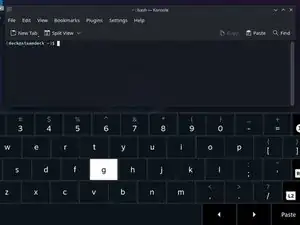
    • Si no tienes un teclado conectado a la Steam Deck, tendrás que usar el teclado en pantalla.

    • Presiona el botón Steam + X para habilitar el teclado en pantalla.

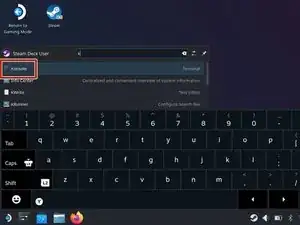
    • La calibración del joystick se realiza dentro de una ventana del terminal, usando la consola de SteamOS, llamada Konsole.

    • En el menú Buscar, busca y abre Konsole.

    • Si es necesario, mueve la ventana de Konsole para que el teclado en pantalla no la oculte.

  2. LqoUNTfBC3Eeutd1
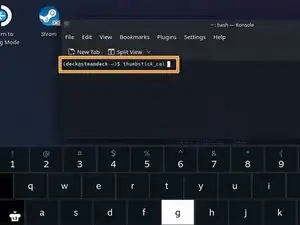
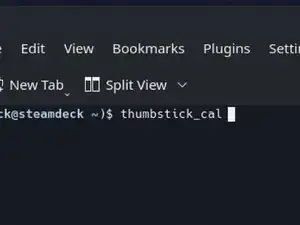
    • Dentro de Konsole, escribe thumbstick_cal.

    • Alternativamente, escribe thum y luego presiona Tab para completar automáticamente.

    • Presiona Enter.

    I get a command not found error when using the above script in Konsole.

    Josh Cedillo -

    Solved - must be using “stable” os channel vs “beta” for this to work.

    Josh Cedillo -

    I am in stable and in a recent update this command is indeed not available ;( (was before)

    Aurélie Violette -

    Hello, I was able to solve this issue it is in a dedicated comment on this step.

    Mark Taylor -

    I was able to calibrate my thumb sticks in multiple update channels recently. The command in this guide, thumbstick_cal_v1_1, no longer exists as it's now named simply, thumbstick_cal.

    However, even then I needed to run the commands sudo steamos-readonly disable and then sudo chmod +x /usr/bin/thumbstick_cal (both of these commands will require the user to have set their user password with the command passwd before executing them). Executing the command sudo sudo steamos-readonly enable after this is recommended unless you know what you are doing.

    For whatever reason the calibration program wasn't executable (auto-complete will not work on non-executable files if they are they first thing being typed in the shell, and non-executable files will give a 'permission denied' error while trying to be executed).

    After that I was able to run the command like normal. From my experience, this will have to be done every update until Valve ships the program with the executable flag set.

    Mark Taylor -

    Does changing it from read only allow it to actually function properly and save the changes? I found a different method to run thumbstick_cal on Reddit, and while it would run, the new calibrated values didn't seem to do anything.

    joshuafrichards -

    New Method

    How to calibrate your thumbsticks if it gives you permission denied on konsole:

    1. Go to your rootfs folder

    2. Go to you usr folder

    3. Go to bin folder

    4. Now look for the thumbstick_cal file and copy it

    5. Paste it anywhere you like (desktop, micro sd, etc)

    6. In this case I paste in the root of my micro sd

    7. Next go to properties then permissions and check the is executable box

    8. Go to konsole and copy then paste the thumbstick_cal file

    9. And done you're ready to calibrate your new gulikit thumbsticks without any errors or any permissions.

    Hope this helps anyone having drift on their steam deck.

    John Lock -

    Im still getting the permissions denied on mine after following your steps

    Ssgss Drew -

    I copied it to my desktop made it executable. I then dragged it to a command prompt and ran it from there worked like a champ no permission change is needed

    PETE BUKA -

  3. THQPAMcFpPuswXqc
    THQPAMcFpPuswXqc
    qvCOdTD4Fj11ioA2
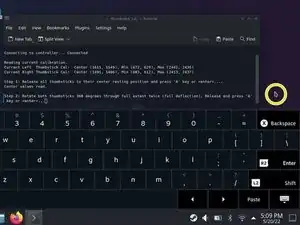
    • El software calibrará primero la posición de reposo de los joysticks.

    • Asegúrate de que ambos joysticks estén intactos y centrados. Presiona Enter.

    • El software calibrará luego el rango completo de movimiento de los joysticks.

    • Toca un área en blanco del escritorio, para mover el cursor fuera de la ventana de Konsole. Asegúrate de que Konsole no esté enfocado.

    • Gira cada joystick en una rotación completa (360 grados) dos veces.

    • Toca la ventana de Konsole para volver a enfocarla. Presiona Enter.

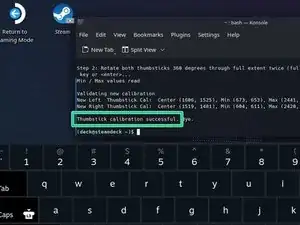
    • ¡Listo! Tus joysticks ya están calibrados. El terminal debería poner "Calibración del joystick realizada con éxito".

    I get permission denied when I try this Help

    Retro VeteranGamer -

Conclusión

Haz clic en here para volver a la guía de sustitución del joystick izquierdo. Haz clic en here para volver a la guía de sustitución del joystick derecho.

¿La reparación no salió según lo planeado? Prueba algunos Resolución de problemas básicos, o pide ayuda a nuestra [enlace|https://www.ifixit.com/Answers/Device/St...|Comunidad de respuestas de Steam Deck] .

Carsten Frauenheim

Miembro Desde 10/03/20

88878 Reputación

8 comentarios

Hey, bei mir fehlt dieses Kalibrierungsdtool irgendwie.

Habe einen factory reset gemacht und nun spinnen bei mir einige Sachen.

Hat jemand 'ne Idee woran das liegen könnte, oder woher ich das Tool bekomme?

Niko Inkog -

nevermind

Nach einem erneuten firmware reset war das Tool plötzlich wieder drauf. *klatsch* *klatsch*

Hatte gehofft es hilft bei meinem Snapback-des-Todes Problem beim linken analog stick.

Leider nichts gebracht. Trotzdem danke für das Tutorial, bzw. die Übersetzung davon!

Niko Inkog -

If you get an error about command not found when you try to run the joystick_cal_v1_1 script, this is likely due to you being on a beta OS, or just Valve decided to move it? not sure...


In any case, you can still run the calibration with the following commands (Thanks to dorsey6250 on Reddit for this workaround)


``cp /usr/bin/thumbstick_cal ~/thumbstick_cal_v1_1

``(This will copy the script from a system copy to your local home folder)

``chmod +x ~/thumbstick_cal_v1_1

``(This will make the script executable)

./thumbstick_cal_v1_1

(This will actually run the script)


Valve needs to either put it back where it was, or iFixIt needs to include these instructions in addition to what they have.

Hope this helps someone!

-WACOMalt

Ben Sumner -

I have the Hall effect sticks and wonder if I need to do this? They have a physical button on them for calibration.

Zach -

I replaced my analog sticks with the Hall effect sticks and the calibration won't work with the buttons on the Hall effect circuit boards or from the konsole. When I try the calibration through the konsole I get a "Permission Denied". Why is this and what do I need to do to calibrate them?

Randy Salsman -

The script has been locked for some reason there are instructions within this comments thread to enable it again. Can confirm it works as I’ve done it myself.

Justin Rowe -

Making an account just to say that this guide is now incorrect, or Valve has done something and changed how to do this. I've tried everything on this page including a factory reset, and the guide from user Ben Sumner/WACOMalt and nothing has worked.

Cody Dockum -