
Introducción
Video: https://www.youtube.com/watch?v=Av3EaFp6...
¿Estás harto de que Microsoft Edge te espíe? ¿Simplemente quieres eliminar la suciedad que Microsoft te obliga a mantener? En caso afirmativo, sigue esta guía para eliminarlo.
-
-
Luego, ves a Microsoft en la carpeta Archivos de programa (x86) y elimina todos los archivos de allí.
-
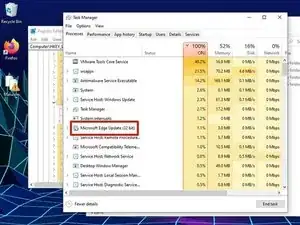
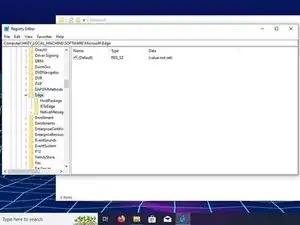
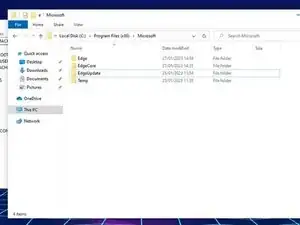
¡Felicitaciones, te has liberado de las prácticas monopólistas de Edge y Microsoft!

15 comentarios
For more technologically impaired users like me: to find your browser version, open Edge, click the … icon, navigate to settings, and click “about Microsoft Edge on the left. The version number will be near the top of that page in small text.
I have a question—in step 2, which format should the browser version be entered in? Say if MicrosoftEdge_X64_108.0.1462.54 is installed on my computer, should I type that entire application name in the “insert your browser version” space, or should I start from X64, or 108?
Jo L -
Never mind, I figured it out after a bit of trial and error. Typing 108.0.1462.54 in the “insert your browser version” space worked. It did NOT work if I included any part of MicrosoftEdge_X64_ in front of those digits.
Jo L -
Followed steps, restarted PC, it's still here. Jan-16-23
joe -
Guides like these need updating sometimes. I will update it soon.
I've used this before to uninstall an earlier version of Edge and it worked, but now with it being version 109 and above it won't work. Is there another way or am I missing something? I'm on Windows 10, by the way. Please help!
Wade -
Microsoft probably saw my guide and patched it. I'm working on finding a new way to delete Edge.