Introducción
Usa esta guía para poner la Steam Deck en modo de almacenamiento de batería desde su BIOS.
Antes de abrir la Steam Deck para hacer reparaciones internas, Valve recomienda habilitar el modo de almacenamiento de batería, para aumentar la seguridad y minimizar cualquier riesgo de daño al dispositivo.
Si estás habilitando el modo de almacenamiento de batería para el almacenamiento a largo plazo del dispositivo en lugar de reparaciones, descarga (o carga) tu batería al 50-60 % antes de habilitar el modo de almacenamiento.
Mientras esté en modo de almacenamiento, tu Steam Deck no responderá a las pulsaciones del botón de encendido. Para salir del modo de almacenamiento, conecta la Steam Deck al cargador.
-
-
Apaga la Steam Deck.
-
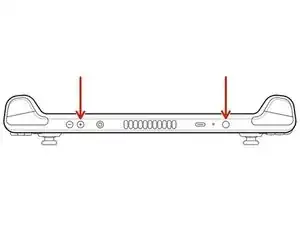
Una vez apagada, mantén presionado el botón de subir volumen (+) y presiona el botón de encendido.
-
Suelta ambos botones.
-
-
-
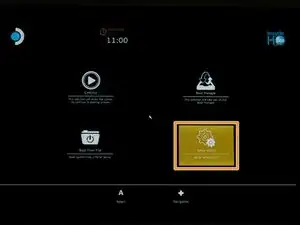
Ve a Utilidad de configuración.
-
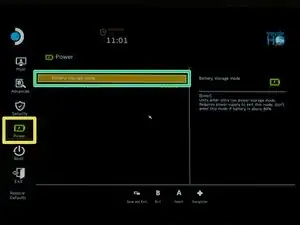
Desplázate hasta el Menú de Encendido.
-
Selecciona el modo de Almacenamiento de batería.
-
Selecciona Sí para confirmar.
-
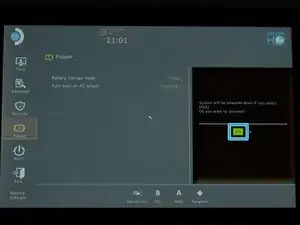
Para salir del modo de almacenamiento, conecta tu Steam Deck al cargador.
¿La reparación no salió según lo planeado? Prueba algunos Resolución de problemas básicos, o pide ayuda a nuestra [enlace|https://www.ifixit.com/Answers/Device/St...|Comunidad de respuestas de Steam Deck] .

7 comentarios
I thought that this mode is also for when you not going to use your Steam Deck for more than a week. And if so, what is the percentage of battery you should leave the Steam Deck with before putting it in storage.
The help page valve provides via the device indicates not to engage the mode above 80% state of charge.
From my personal experience with other devices and the state of charge the device ships at, I'd recommend something around 50% to 60% as a desirable storage point for best battery life during long-term storage
Lithium batteries usually needs to be stored at around 50% SOC, however when you want to store such a battery, you also have to keep in mind the self discharge rate, and the fact that once over-discharged (even through self discharge) a lithium based battery could be dead and should never be recharged as it could burst in flame. That's why 60-65% is a good choice, as it will allow you to store it a lot longer without reaching over discharge state.
Help! I followed these instructions to a T and also replaced my SSD following that guide to a T and now I'm presented with this message:
"Default Boot Device Missing or Boot Failed. Insert Recovery Media and Hit any key
Then Select 'Boot Manager' to choose a new Boot Device of to Boot Recovery Media."
I don't know what any of this means and I can't find a single straight answer anywhere.
Dane H -
You need to install an OS.
See Valve's instructions - https://help.steampowered.com/en/faqs/vi...
Rich -