Introducción

Este tutorial es solo para computadoras que ejecutan Windows. Hacer esto en una Mac con Windows a través de BootCamp funcionará, pero no en un Mac a través de VirtualBox o cualquier otra máquina virtual en un Mac.

Es posible instalar Rockbox a través de una computadora con macOS o Linux, sin embargo yo no he podido realizar una instalación con éxito en macOS o Linux. Si eres valiente y tienes tiempo para intentarlo, aquí está el sitio web para obtener instrucciones sobre cómo hacerlo.

  1. mXa6IewhRV1qpmpT
    • Conecta tu iPod en modo normal (iTunes/transferencia de archivos).

    • Cierra iTunes por completo si se abre cuando conectas tu iPod, ya que iTunes intentará interferir con este proceso si se deja abierto.

    • Si en Mac. asegúrate de ejecutar Rockbox Installer como usuario root.

    • Descarga el archivo EXE de Rockbox en el siguiente enlace. Ejecuta el archivo EXE de Rockbox y haz clic en Aceptar a través de los diálogos.

    • Descarga el archivo EXE de Rockbox desde aquí

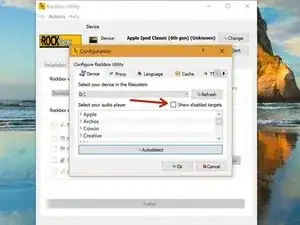
    • Una vez que estés en esta pantalla, haz clic en "Mostrar objetivos deshabilitados" y haz clic en Aceptar en el diálogo.

    • No te asuste con el diálogo... incluso si algo saliera mal con este proceso, aún podemos volver atrás y restaurar tu iPod.

  2. QxIPVCQeJJRjCbSh
    QxIPVCQeJJRjCbSh
    3WGPOyGIOtU1WqCe
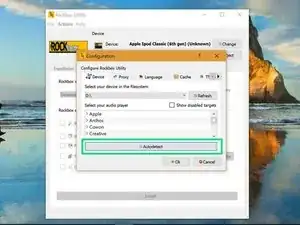
    • Una vez que hayas habilitado los objetivos deshabilitados, haz clic en el botón "Autodetectar" y el modelo de tu iPod debería estar resaltado en el menú de arriba.

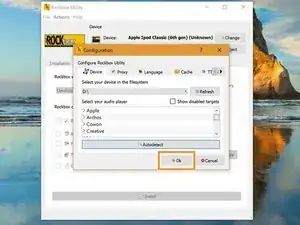
    • Una vez que hayas seleccionado el modelo de tu iPod, haz clic en Aceptar.

  3. 6khyl2cwjRHHCMrq
    6khyl2cwjRHHCMrq
    OMHPw3yuX3qeknNm
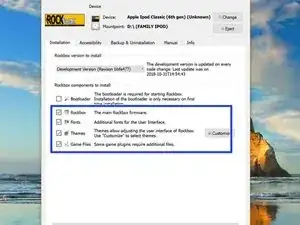
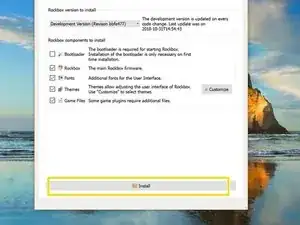
    • Para los próximos pasos, instalaremos todo menos el gestor de arranque. Nos ocuparemos del gestor de arranque más adelante.

    • Marca todas las casillas seleccionadas en el cuadro azul.

    • Después de marcar todas las casillas que son necesarias, haz clic en instalar.

    • Toma un sorbo de tu bebida o un bocado de tu comida mientras se completa este proceso. No debería tardar mucho tiempo.

  4. T4CR2xyCIKI1qPEE
    T4CR2xyCIKI1qPEE
    hGkgCSUh1WVxNwpv
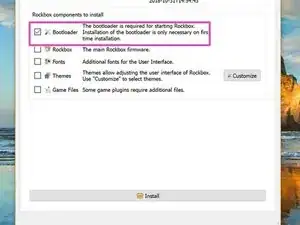
    • Una vez que se haya completado la instalación del firmware, los temas y los juegos, es el momento de la parte más desafiante... el gestor de arranque.

    • Marca la casilla de verificación del gestor de arranque.

    • Haz clic en instalar de nuevo.

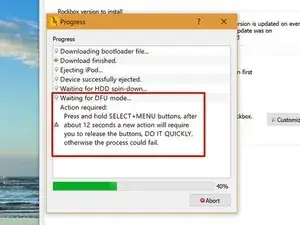
    • Debes seguir las instrucciones en pantalla para que esto funcione. Presta mucha atención a la consola. Haz la ventana más grande para que puedas interpretar el texto más fácilmente.

    • Cuando aparezca este mensaje en la consola, mantén presionado el botón MUTE y SELECT hasta que haya un mensaje en la consola que te indique que sueltes los botones.

    • Es importante hacer esto rápidamente, de lo contrario, el proceso puede fallar y debes volver a hacer todo lo de este paso.

    • Si este proceso ha tenido éxito, verás que Rockbox se ha iniciado en tu iPod y aparecerá un mensaje de éxito en la consola.

    • Otra cosa de mi experiencia es que la consola puede tardar demasiado en decirte que la instalación fue exitosa, pero el iPod está ejecutando Rockbox perfectamente. Debería estar bien para quitar su iPod de todos modos.

    Where is the MUTE button on an Ipod classic?

    Andy Smith -

Conclusión

Hazme saber si tienes problemas para instalar Rockbox con esta guía en los comentarios. Trataré de atender cada pregunta que vea.
[deleted]

Miembro Desde 28/08/18

25074 Reputación

13 comentarios

Rockbox failed to install on mine. I followed every step but never got the message to press and hold select and menu for the bootloader. It said it had installed sucessfully but when it booted up I just got error -3. I put it in disc mode and deleted the software but it didn’t put it back to factory settings. Tried to install again but got the same thing except it said bootloader was already installed when I tried the last step. I’m afraid it is now bricked. :(

jdennis61 -

From my experience if you run into trouble like that youll need to detete the MBR (master boot record) then delete all partitions. Next you create a new Fat32 Partition and finally you will Format the Partition also as Fat32 all I use is AOMIE Partition Assistant and its FREE. Then Apple iTunes will detect it soon as you start your ipod and plug in to computer, will be detected as an iPod in recovery mode. From there I think you know the rest from there. I hope that helped even if a little to late for supper. Lol

Ms. Danielle Rae

Danielle Rae Goodman -

Hi,

I am running rockbox release 15e1f592D-170118 on my Ipod Classic 7th gen. Soundwise should I look for a newsest release

also would you know at which frequency and range works the Rockbox ‘‘bass’’ setting

Thanks a lot

Denis

Denis Ménard -

I tried to install Rockbox onto my iPod Classic 160GB, and I got no results , as a matter of fact; I got negative results asuch as I am not able to restore my iPod Classic in iTunes on my Mac, and I can’t listen to any of my music on the device, even though it appears as though my music is still there. Please help 911 because this is one of my favorite Apple devices of all time!

Dennis Porter -

How do i uninstall rockbox and restore my ipid?

Brant Mcgregor -

Can you put this on a 7th gen classic?

Eli Stettner -

I quite literally hit install on everything unplugged it at 99 percent because everything was done at that point then booted it up in normal iPod mode and plugged it back in and it loaded the rest of the files on to the iPod. Then proceeded to boot up Rockbox and to my amazement it was successful. Now enjoying my Rockboxed iPod because screw iTunes.

GoldRaider97 Gaming -

I have gotten as far as installing the Rockbox, themes, fonts, games installed on my ipod 6 classic with a 1TB iflash quad.

can’t get the bootloader to be ungreyed to install it, any ideas what i’m doing wrong?I’m on a macbook pro with High Sierra.

TIA

ericrobinson00 -

From what I understand from both reading and discussion with others. If you try to do that big of an install from a Mac, oddly enough the iPod/iFlash/Rockbox will generally fail. However if you can get your hands on a Windows machine you should have no issues. I know, weird huh being the iPod and Mac's are BOTH Apple!!!!

Ms. Danielle Rae

Danielle Rae Goodman -

So, do I no longer sync my ipod with itunes? And will Rockbox save all the data from itunes? The plays, the dates added, the ratings etc?

Willie -

No you shouldnt boot into Apple iOS on iPod 6 or 7 gen. In most cases youll loose everything and have to do it all over again.

Ms. Danielle Rae

Danielle Rae Goodman -

It works completely fine until I try to install the bootloader but it says Could not open Ipod: permission denied

nate young -

I’m having the same issue did you manage to fix it ??

Jose Figueroa -