Introducción
Antes de tomar medidas más drásticas, debes intentar simplemente limpiar una bola de desplazamiento que se comporta mal desde el exterior del mouse.
Herramientas


-
-
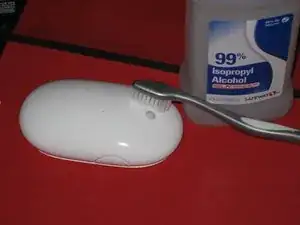
Antes de desarmar el mouse, primero intenta frotar la bola del mouse con un cepillo de dientes y alcohol isopropílico. Asegúrate de colocar las cerdas entre la bola y la carcasa, ya que esto ayudará a eliminar la suciedad y el polvo que obstruyen los rodillos en el interior.
-
También puedes intentar soplar en el "agujero de la bola" con una lata de aire comprimido.
-
Permite que el mouse se seque durante unos minutos antes de volver a encenderlo para probarlo.
15 comentarios
In order to clean perfectly the scrollball, you can hold the mouse upside down, and roll very quickly the scrollball on a white A4 papersheet (As if you wanted to colour the papersheet with the scrollball). Normally, you'll see some grey stripe of dust on the paper sheet!
Ludal -
Wow - Ludal's advice actually worked! I'm amazed. Paper -- just a plain sheet of paper.
I can't believe I just found this post in 2015, gotta say thank you for saving $53 bucks!
I actually did both things but I used one of those wipes for eyeglasses which have alcohol in them after rubbing it on paper. Worked great.
Thanks a loit. Even in 2020 it helped ;-)
Amazing, after months of frustration - rub for 5 mins on a plain sheet of paper - working perfectly. Thanks
Yeah, props to the author for the thorough cleaning recommendation, but that paper trick is great!
Mike -