Introducción
Hice una guía aparte para esta MacBook Pro en particular porque tiene el nuevo chip Apple T2 y requiere un procedimiento diferente al de otras portátiles Mac.
-
-
Ve al menú de Apple > Apagar equipo.
-
Luego de que tu Mac se apague, presiona y mantén el botón de encendido por 10 segundos.
-
Suelta el botón de encendido, luego espera unos segundos.
-
Presiona el botón de encendido de nuevo para encender tu Mac.
-
-
-
Ve al menú de Apple > Apagar equipo.
-
Luego de que tu Mac se apague, presiona y mantén la tecla Mayúsculas (Shift) izquierda y las teclas Option y Control izquierdas por 7 segundos. Luego sigue manteniendo esas teclas mientras presionas y mantienes el botón de encendido por otros 7 segundos.
-
Suelta las tres teclas y el botón de encendido, entonces espera unos segundos.
-
Presiona el botón de encendido otra vez para encender tu Mac.
-
-
-
Apaga tu Mac.
-
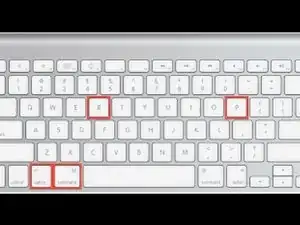
Luego enciéndela e inmediatamente presiona y mantén estas cuatro teclas al mismo tiempo: Option, Command, P y R.
-
Puedes soltar las teclas luego de 20 segundos, durante los cuales tu Mac podría parecer que se está reiniciando.
-


¿Aún no funciona luego de estos restablecimientos? Nuestros amigables usuarios en el foro de Respuestas quizás puedan ayudarte.

19 comentarios
Macbook Pro 2018, 15” (I presuming no difference in operation).
After your Mac shuts down, press and hold the right Shift key, the left Option key, and the left Control key for 7 seconds. Then keep holding those keys while you press and hold the power button for another 7 seconds.
The Macbook fires up as soon as the touchbar power button is pressed. Depressing all ⇧⌃⌥⎋ together, or depressing ⇧⌃⌥ and then adding ⎋ makes no difference. Depressing! ,-)
Icarus -
got the same in MBP 2018 Touchbar!!!
Bart -
Nope. Doesn’t work on a 2018 MacBook Pro with Touchbar. Pressing any key boots up the computer and holding Command-Option-P-R doesn’t have any effect as it did on previous models.
j’ai un macbook pro touch bar 15” 2018 qui se relance quasiment dès qu’il s’est éteint. Ventilos toujours à fond. Du coup impossible d’effectuer ces manip pour réinitialiser la SMC…
Gambini -
Bonjour, comme vu sur cette documentation officielle https://support.apple.com/fr-fr/HT201295 effectuer l’étape 2 de ce tutoriel devrait résoudre votre problème compris si l’ordinateur s’allume pendant la manipulation
Cajuteq -