Introducción
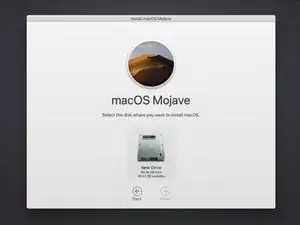
Internet Recovery tiene varias aplicaciones útiles. Esta guía te mostrará cómo usar Internet Recovery para instalar una copia nueva de macOS en una unidad SSD en blanco o dañada.
"Internet Recovery" sólo está disponible en computadoras Apple fabricadas después de 2009. Si tu computadora se lanzó en 2010 o 2011, es posible que tengas que actualizar a la última versión de macOS para habilitar Internet Recovery".
-
-
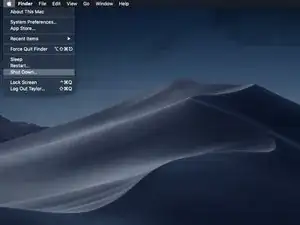
Apaga la computadora.
-
Si estás instalando MacOS en una nueva unidad con recuperación por internet, puedes saltarte este paso.
-
-
-
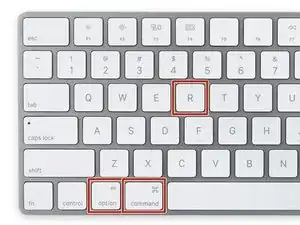
Cuando la computadora esté completamente apagada, presiona el botón de encendido, entonces presiona y mantiene inmediatamente la combinación de teclas cmd + option + R.
-
-
-
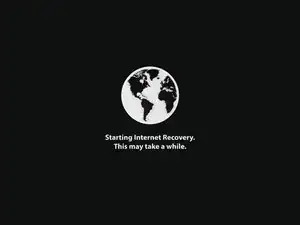
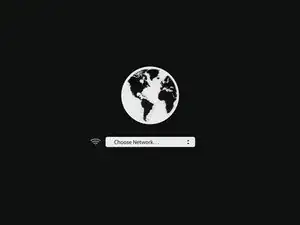
Cuando la animación del globo rotando aparezca, puedes soltar las teclas.
-
El globo rotará mientras el modo Internet Recovery se inicia. Si no estás usando una conexión cableada a internet, un cuadro de elija conexión aparecerá. Usa este menú para conectar la computadora a una red WiFi.
-
-
-
Cuando una conexión a la red haya sido establecida, una barra de progreso aparecerá debajo del globo que rota.
-
Este proceso es propenso a agotarse. Si recibes un error, inténtalo nuevamente usando una conexión por cable para conectarte a Internet en lugar de por WiFi. Dependiendo de tu modelo, es posible que necesites un adaptador para lograr esto.
-
-
-
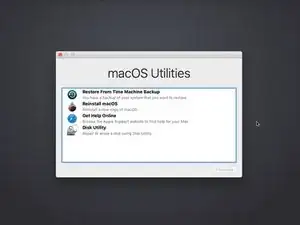
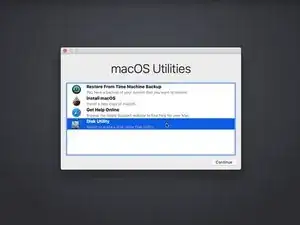
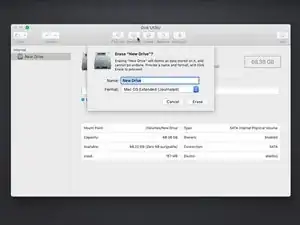
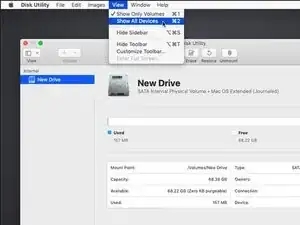
Abre Disk Utility en el menú de recuperación, selecciona la unidad y haz clic en el botón Borrar hacia la parte superior de la ventana de la Utilidad de disco.
-
Inventa un nombre para la unidad y asegúrate de que el formato esté configurado como Mac OS Extended (Journaled) o APFS. Si hay una opción "Scheme", elige GUID Partition Map.
-
Una vez formateada la nueva unidad, pulsa Comando + Q para salir de la Utilidad de disco y volver al menú de recuperación.
-
-
-
Sigue las instrucciones de instalación de macOS, seleccionando el disco recién formateado como objetivo de la instalación.
-

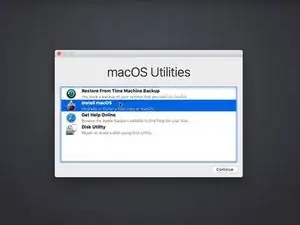
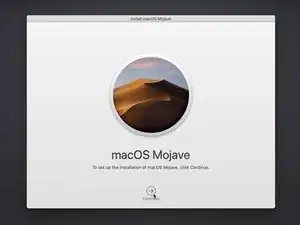
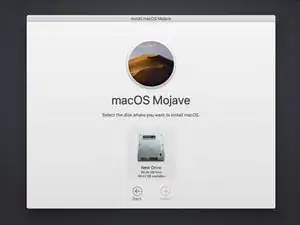
Tu computadora puede reiniciarse varias veces durante la instalación del MacOS. Una vez completada la instalación, puedes utilizar el asistente de migración para transferir datos de tu antigua unidad al nuevo.

34 comentarios
Perfect, it is soooooo easy
Cheers
Michael
Hi there, will this work when upgrading an Early 2011 Macbook Pro with a new SSD and RAM? I don’t want to keep or clone any data that I currently have on the computer. I just want to do a clean install of MacOS without transferring over any old files. Thank you!
Fiona B. -
Fiona, the Early 2011 MacBook Pros didn’t ship with internet recovery, but as long as it had a recent-ish version of MacOS before the SSD upgrade the firmware should have updated, which enables internet recovery! This is a great method for installing a fresh copy of MacOS to a new SSD.
Hello. Thank you for the article Taylor. I use a MBP 9,2 and wish to replace my ageing 500GB HDD with 500GB SSD and undergo a clean install of macOS. I’ll follow this article and install by the Internet Recovery method. I have a Time Machine backup, from which I want to restore only certain files and folders pertaining to my studies and work. I also want to restore only Keychain. Can you advise me regarding these or direct me by providing helpful links? Thank you.
I thought this guide is for a completely new SSD, but in this example MacOS appears to already be running. Is the target SSD connected internally via SATA or is this guide for a USB based second SSD that will also run the OS?
In the latter case, is the intent to run internet recovery on the new SSD and then open the machine up and connect it directly, replacing the old disk?
orun bhuiyan -
Sorry for the confusion, Orun! The new SSD guide shares a few steps with the general “boot to internet recovery mode” guide. If you’re installing MacOS to a new drive, you can skip this step. :)
Taylor Dixon -
Just to clarify, I have a late 2009 MacBook 6,1 running El Capitan and will be upgrading to a new SSD. Will Internet recovery work with this computer? The article states “after 2009”. Also I want to upgrade to High Sierra at the same time is there an option to select which OS or how does it decide?
nathan davis -
My current hard drive won’t read. I don’t care about saving anything on the computer at all and had planned on starting fresh. Can i just install the drive then do internet recovery mode or do i still have to have a backup usb with the os preinstaled?
J H -