Introducción
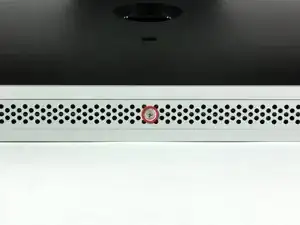
Quitar la trampilla de acceso para reemplazar la memoria RAM o acceder al interior de nuestro iMac
Herramientas

-
-
Apoya tu iMac con la pantalla hacia abajo y con la parte inferior mirando hacia ti.
-
Soltar el unico tornillo Phillips ubicado en el centro de la trampilla de acceso
-
Quitar la trampilla de acceso del iMac
-
Conclusión
Para reensamblar tu dispositivo, es necesario seguir estas instrucciones al revés.

The grid won't fall off by itself. You'll have to help it. Use the smallest screwdriver you have; the Torx 6 worked fine for me. It should enter in one of the many holes composing the grid. Use it as a lever to ploy the grid a little bit. You may catch it with your fingers and that's it.
Be carefull not to damage the hole by a too strong leverage.
Laurent -
much more safer to use duct tape, instead of torx 6. (glue it along the length of the grid and pull). it will loose instantly and smooth;)
Hofmann78rus -
Anyone know a guide to replace the plastic piece this screw connects to? I accidentally forgot this step - went to remove the front bezel and bent the plastic piece the access door connects to.
Jason Augustin -