Introducción
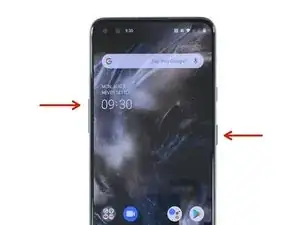
Usa este método para forzar el reinicio en un OnePlus Nord en caso de cuelgue, atasco en los menús o congelación de la pantalla.
-
-
Presiona simultaneamente y mantén el botón de subir volumen y el botón de encendido.
-
Suelta los dos botones cuando veas aparecer el símbolo de OnePlus.
-

9 comentarios
what is this weird problem one plus nord suddenly get switch off while on call ..
kindly advice to get ride of this problem for forever .
My mobile has hanging & automatically switch off/on please solve problem
It worked! Great help! Thank youuu
Finally - THAT worked!! Thanks. Other fixes from other sites tell you to press the “power off button”. Duh! Screen not responsive! Kudos for your research and answers.
freerealm -
As you suggested i did it . Finally i got my mobile started.
Epic Hemang -
I find charging port is too loose and does not connect with charging cord.. Battery charge runs out. What should I do?
amicuscurious -
Most of the time its because there is dust in the charging port that causes that. Gently try to clean that and it should be good as new.
Sparky -