Introducción

Esta es solo una guía prerequisito para desconectar la mayoría de los conectores y remover la mayoría de los tornillos para sacar la placa madre. Las fotos están tomadas de manera tal que no puedes ver si el motor táptico está fuera o no.

Nota La placa lógica de cada iPhone y el sensor de huella digital ID Táctil están acoplados de fábrica, así que si reemplazas la placa lógica, inhabilitarás el ID Táctil "al menos que" también instales un botón de inicio de reemplazo que haya sido acoplado apropiadamente en la nueva placa lógica.

Abrir el iPhone 8 dañará los sellos herméticos en la pantalla. Si no reemplazas los sellos adhesivos, tu teléfono funcionará normalmente pero no será impermeable.

  1. fBkYimJSyuQUTs3Y
    fBkYimJSyuQUTs3Y
    2mwxZyuAjalqsABR
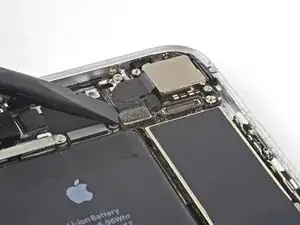
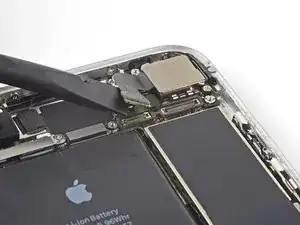
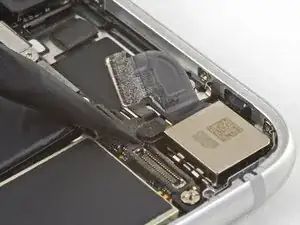
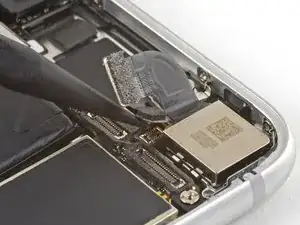
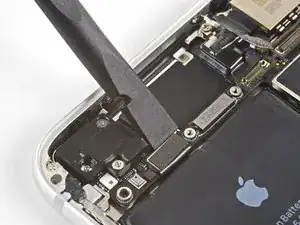
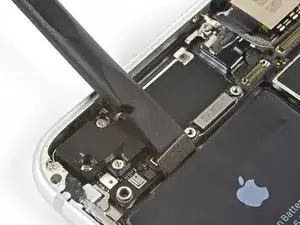
    • Usa el extremo plano de un spudger para hacer palanca y desconectar el conector de cable de cámara de su zócalo.

    When replacing, used iFixit tweezers to gently hold/bend the cable, and used my finger to press the connector back in place. This was the best way I could get the connector lined up and seated properly.

    Habel -

  2. aimokbie2aoPneTg
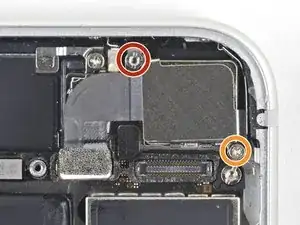
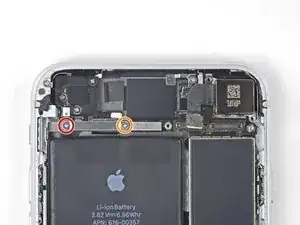
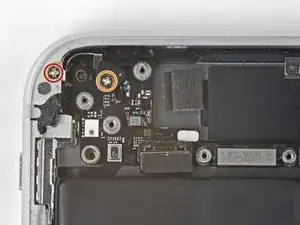
    • Remueve los dos tornillos que sujetan el soporte de la cámara trasera:

    • Un tornillo separador Phillips de 3.0 mm

    • Un tornillo Phillips de 3.1 mm

    • Los tornillos de separación se quitan mejor con un destornillador o broca de separación.

    • Si no hay otro remedio, un pequeño destornillador de cabeza plana hará el trabajo—pero ten precaución extra para asegurarte de que no se resbale y dañe los componentes que lo rodean.

    The screw and standoff are the other way round in this step. The photo shows the small screw removed and the standoff securing the logicboard is circled incorrectly. Also you may find that the standoff screw is not magnetic, making it a little tricky to replace!

    Michael Millington -

    Hi Michael,

    You are correct; thanks for catching that! The original image was correct, and for some reason the image was updated, and no longer correct. I have reverted it back to the original image.

    Arthur Shi -

    wrong Screws in Picture

    mmiller -

    Be careful when reassembling. These screws came demagnetized for me in the process, and they’re really hard to put in if that happens.

    Nick Cox -

    These screws are not magnetized! If you are trying to put them back, use some tweezers to align them, and while still using the tweezers, grab your standoff driver and push down, then you can screw it in with ease.

    Lua Tech -

    Thanks for the tip.

    Habel -

    I used a 1.5mm flat screwdriver to do the one with the standoff bit.

    Habel -

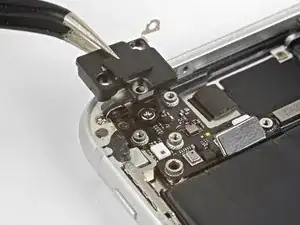
  3. G3NTgbRppKnO3Vvs
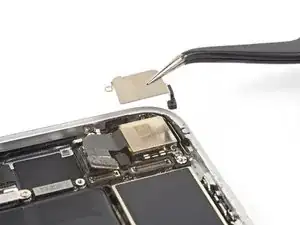
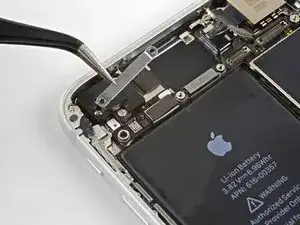
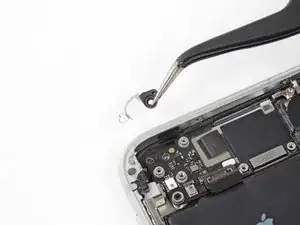
    • Remueve la soporte de la cámara trasera.

  4. Sw1lIUFX6vUIHCBQ
    Sw1lIUFX6vUIHCBQ
    ofFfpAW1RgsRpANJ
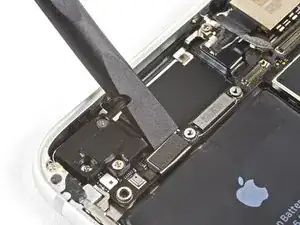
    • Usa la punta de un spudger para hacer palanca y desconectar el conector flash de su zócalo.

    The small connector is not actually for the flash, the flash and mic module are just below that and connect to the same cable as the power button.

    Bonrad C -

  5. avsyRIbNSUDPbQH1
    • Remueve los dos tornillos que sujetan el soporte de cable superior:

    • Un tornillo Phillips de 2.9 mm

    • Un tornillo Phillips de 1.3 mm

    Logically - one wouldn’t need to take out all these things to take out something at the bottom of the phone - but in order to get good access to it, you must remove the logic board - which is long and all the way up at the top connected to the antenna. Follow the steps - it works.

    Chris Rainone -

  6. YIULCN3G3pOOh2PK
    • Remueve el soporte del cable superior.

  7. 6ipn3yVCkkSsFvpT
    6ipn3yVCkkSsFvpT
    2sPCFUfxWjVb6SQ2
    • Usa el extremo plano de un spudger para hacer palanca y extraer el conector de cable de su zócalo.

  8. Py1VN1v4AL6JCXpZ
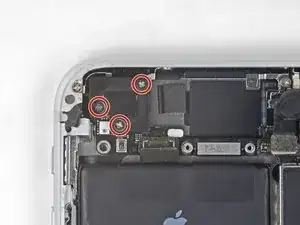
    • Remueve los tres tornillos de Phillips de 1.3 mm que sujetan el componente de antena superior izquierda

    1,2mm ! not 1,3mm ! thx

    Boni Zei -

  9. 2MqZMfFGSCPfrufm
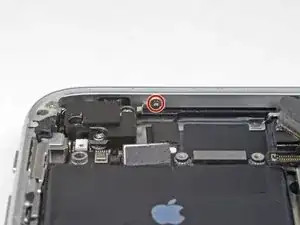
    • Remueve el tornillo de 1.4 mm que sujeta el componente de la antena al borde superior de la caja.

    Be careful not to strip this screw...I did and I'm going to try to proceed without taking off the antenna component.

    Jacob Steineke -

    Update: You can still go on with the replacement if you do not take off the antenna component

    Jacob Steineke -

  10. o1lJobSGWjCAoarS
    • Remueve el componente de antena.

  11. CwGxGAWfNwrGDx2S
    • Remueve los dos tornillos que sujetan el clip de toma a tierra en el borde superior izquierdo de la placa lógica:

    • Un tornillo Phillips de 1.5 mm

    • Un tornillo Phillips de 2.6 mm

  12. FbVuHIZAOCBN6hFQ
    • Remueve el clip de toma a tierra.

    what happen if don't put this part?

    albert saens -

    Hi Albert,

    It’s hard to tell. Most phone functions will probably work, but you may start getting quirky problems.

    Arthur Shi -

    If it comes out it must go back in *no spare parts *

    Josh Brito -

  13. mphtGZonpROuQLJq
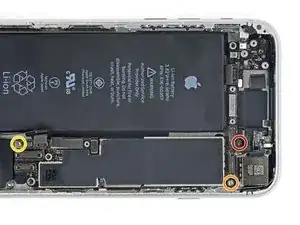
    • Remueve los tres tornillos que sujetan la placa madre:

    • Un tornillo Phillips de 1.8 mm

    • Un tornillo separador de 2.5 mm

    • Un tornillo separador de 2.2 mm

    The One 1.8 mm Phillips screw was buried under some gasket material. It took some twezzer work to get that material off.

    I.T. Service Desk -

    this is probably the most difficult part because the ‘top 2.5 mm on my version was under a piece of ribbon cable that had to be pulled back. Also notice - this picture is inverted. So the locations are reversed (obviously for clarity)

    Chris Rainone -

    The 1.8mm was indeed buried.

    fotoband -

    Buried 1.8mm Phillips easily located under the gasket material by zooming in on the photo to see position relative to connectors. Material is fibrous, so be patient.

    Ben Sandness -

    I’ve been searching on internet about the black stickers on those parts in the phone and I found nothing about them, what are they? Electrical Tapes? Does it make any differences if we remove them? If yes is, there anything else we can use to replace them? We’re they are for any specific purposes? Thanks in advance if anyone can help me understand

    EverWill -

    Used a 2.5 mm flat screwdriver for both of the standoff screws. There was definitely black adhesive covering the 1.8mm Phillips. As Ben Sandness said, take your time, keep working at it.

    Habel -

  14. wXtgJV1PR6pFVMNO
    wXtgJV1PR6pFVMNO
    cgJYaoRCSMIUmJeh
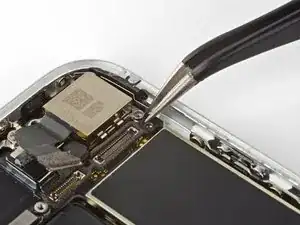
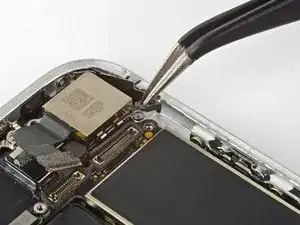
    • Usa una pinza para doblar cuidadosamente el soporte de toma a tierra de la placa lógica fuera del camino.

  15. DhlVnBjIRFmBVTLe
    DhlVnBjIRFmBVTLe
    pPYRMetrPaRsdlHW
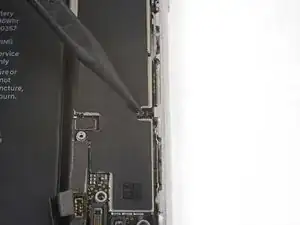
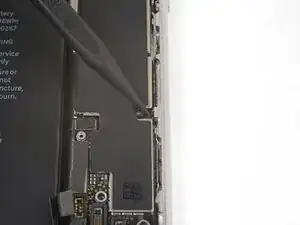
    • Una la punta de un spudger para mover el tapón de eyección de la tarjeta SIM fuera del camino.

Conclusión

Para volver a ensamblar tu dispositivo, sigue los pasos mencionados arriba en orden inverso.

Lleva tus residuos electrónicos a un centro de reciclaje electrónico.

¿La reparación no salió como planeabas? Fíjate en nuestra comunidad de Respuestas para ayuda de resolución de problemas.

Arthur Shi

Miembro Desde 03/01/18

219093 Reputación

0 comentarios