Introducción


-
-
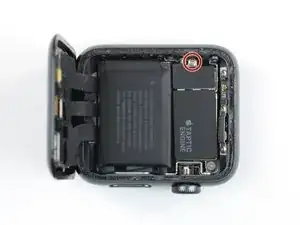
Utiliza un destornillador Y000 para quitar el tornillo de tres puntas que sujeta la placa de cubierta de metal.
-
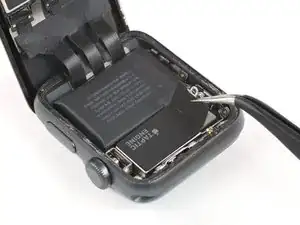
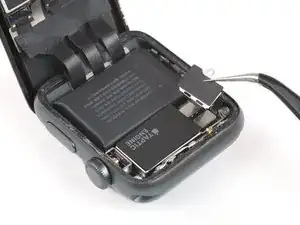
Usa un par de pinzas para remover la tapa.
-
Primero abre la tapa para desenganchar las dos solapas.
-
Luego ciérrela a la mitad para retirarla completamente levantándola.
-
-
-
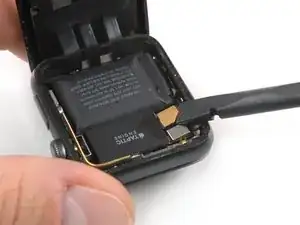
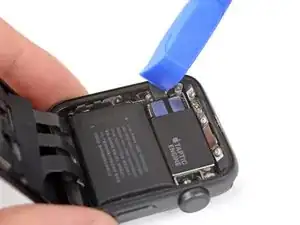
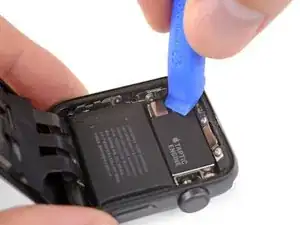
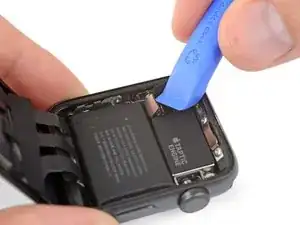
Desconecta la batería haciendo palanca en su conector hacia arriba.
-
Dobla el conector ligeramente hacia arriba para asegurarse de que no haga contacto por accidente.
-
Conclusión
Para volver a ensamblar tu dispositivo, sigue estas instrucciones en orden inverso.

Pictures are the GPS version. Cellular doesn’t have the gap and separate removable plate on the “taptic engine” section.
Ryan Holt -
What if I’m unable to unscrew the screw? I’m using the right tool, but it just won’t do it. It feels like it can’t “lock in” if you know what I mean in order to be able to get enough grip to turn the screw. Any suggestions?
Cade Capper -
Once you have the driver set properly in the screw you have to lean into it to get it to turn. The screw is coated with LockTight.
mailghall -