Introducción
Apple anunció un trio de laptops nuevas y nos está manteniendo nuestra mesa de desmontaje bien ocupada. Comenzamos con la MacBook pro de nivel entrada "Escape Edition," y hoy hemos llegado a la de primera línea. Con el doble de ventiladores, más de un millón más de pixeles, y la nueva Touch Bar que intenta reemplazar las teclas de función. Todo esto solo puede significar una cosa: es hora de desmontar la nueva MacBook Pro 15" con Touch Bar.
¿No puedes tener demasiados desmontajes? Síguenos en Facebook, Instagram, o Twitter para mantenerte al tanto con los desmontajes más recientes y las últimas noticias de reparación.
Herramientas


-
-
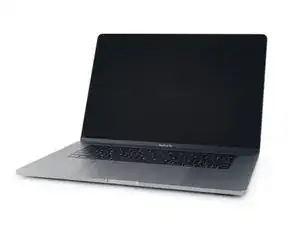
La MacBook Pro de 15 "contiene un millón de píxeles más que los modelos de 13 pulgadas que ya hemos desmontado. Aquí hay una vista previa de la tecnología que esperamos encontrar hoy:
-
Pantalla de Retina con retroiluminación LED de 15.4" con resolución 2880 x 1800 (220 dpi), con gama de colores P3.
-
Procesador de cuatro núcleos 2.6 GHz Skylake Intel Core i7 (Turbo boost de hasta 3.5 GHz) con Radeon Pro 450 integrado con 2 GB de memoria GDDR5.
-
16 GB de 2133 MHz LPDDR3 de memoria integrada.
-
256 GB de SSD integrado basado en PCIe (Configurable hasta 512 GB, 1 TB, o 2 TB SSD)
-
Cuatro puertos Thunderbolt 3 (USB-C) que soportan cargas, DisplayPort, Thunderbolt, USB 3.1 Gen 2
-
Touch Bar con sensor Touch ID integrado
-
Force Touch trackpad
-
-
-
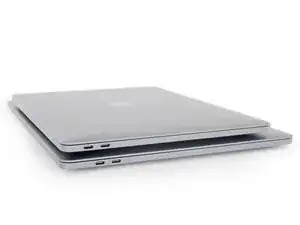
Apílalas si las tienes. Aquí tenemos la MacBook Pro de 13" superpuesta a la atracción principal de hoy, la MacBook Pro de 15" y, aparte de la diferencia de tamaño, parecen casi idénticas. Estamos ansiosos por ver qué tan similares (o no) están dentro.
-
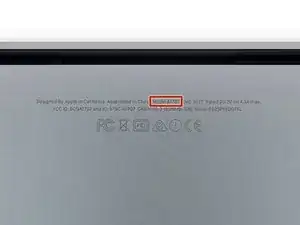
El MacBook Pro 15 "se identifica como el modelo A1707, que se ajusta muy bien entre el A1706 y el A1708 de nuestros dos desmontajes anteriores.
-
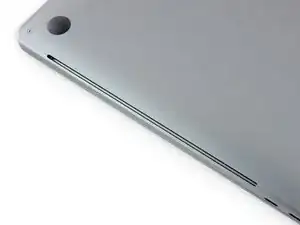
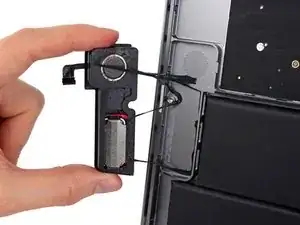
Al igual que en la línea MBP anterior, hay salidas de aire largas en los lados izquierdo y derecho. Si esta computadora se parece en algo a su hermana pequeña, estas rejillas de ventilación deben servir como una doble función de salidas para altavoces.
-
-
-
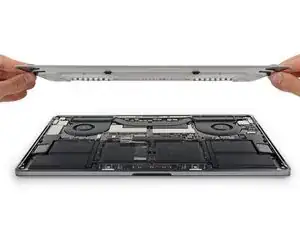
¡Houston, hemos despegado! Este desmontaje llegó a la primera fase de separación.
-
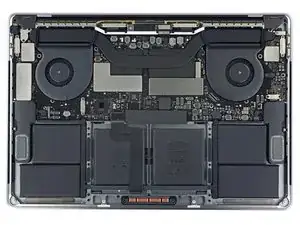
En la inspección inicial, la MBP de 15"parece una versión ampliada del modelo de 13". Notamos una diferencia en el diseño de la batería, pero en general es como mirar a dos gemelas.
-
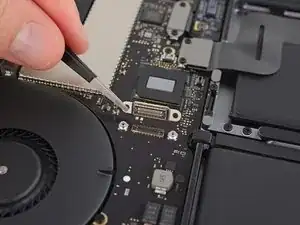
¡Mira con quién nos encontramos de nuevo! El conector hacia ningún lado.
-
Aún así preferimos ver un SSD extraíble/actualizable, especialmente en una máquina dirigida a los profesionales, pero de esta manera, si tu placa lógica estira la pata, puede haber alguna posibilidad de recuperar tus datos con la ayuda de Apple. Sigue haciendo esas copias de seguridad sin embargo.
-
-
-
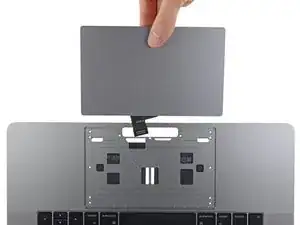
Eliminar el trackpad requiere tan poco esfuerzo como con otros dos modelos de MBP de 2016: solo giramos trece tornillos T5 y el trackpad es nuestro.
-
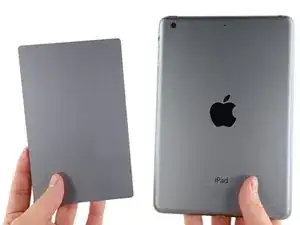
Y este es un monstruo, casi tan grande como un iPad mini 2.
-
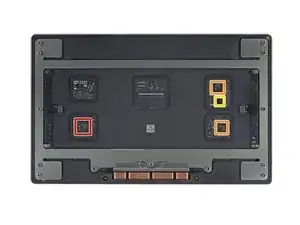
No nos sorprendió encontrar los mismos circuitos integrados en este trackpad como lo hicimos en ambos MBPs de 13". Sin embargo, con el aumento de tamaño, Apple tuvo que agregar un segundo controlador táctil para digitalizar todo ese trackpad extra:
-
STMicroelectronics STM32F103VB ARM Cortex-M3 MCU
-
Controlador Táctil x2 Broadcom BCM5976C1KUFBG
-
Maxim IntegratadoMAX11291ENX de 24 Bits, 6 canales Delta-Sigma ADC
-
-
-
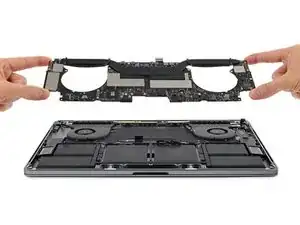
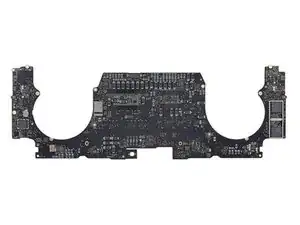
Avanzando, es hora de sacar esta placa lógica. Es un poco más ancho en el medio, pero comparte la misma simetría con bigotes de su hermana menor.
-
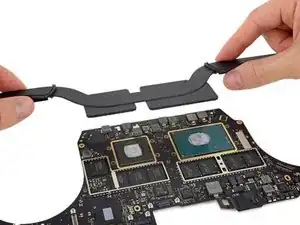
Al retirar el nuevo y mejorado disipador de calor (de nuevo, atornillado a través de la parte posterior de la placa lógica), se exponen la CPU y la GPU.
-
-
-
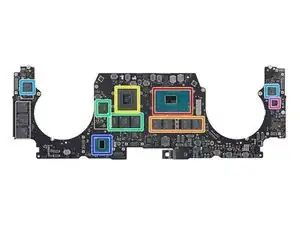
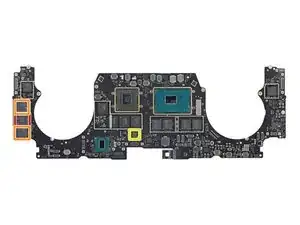
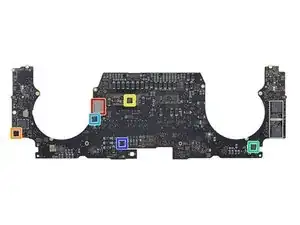
Hora de ver lo que hace que esta laptop sea la líder de su línea. Se destaca:
-
Procesador de cuatro núcleos Intel Core i7-6700HQ 2.6 GHz (hasta 3.5 GHz)
-
Micron MT52L1G32D4PG-093 4 GB LPDDR3 (cuatro chips por un total de 16 GB)
-
AMD Radeon Pro 450
-
Elpida (Micron) EDW4032BABG-70-F 512 MB GDDR5 RAM (cuatro chips por un total de 2 GB)
-
Controlador Intel JHL 6540 Thunderbolt 3 (uno por cada set de puertos USB-C)
-
Intel SR2NH (como núcleo de controlador de plataforma)
-
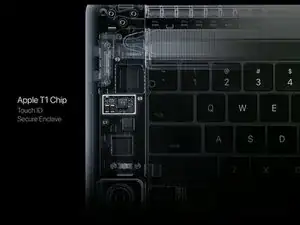
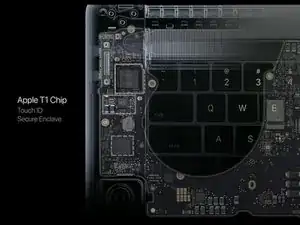
Texas Instruments CD3215C00 69AV2TW (etiquetado como chip de Apple T1 en su keynote)
-
-
-
Otros chips que se encuentran en este lado de la placa:
-
Samsung K4E4E32512 MB LPDDR3 DRAM, posiblemente con un controlador SSD hecho por Apple.
-
Almacenamiento flash Samsung K9PHGY8 (dos chips 64 GB por 128 gB en este lado)
-
Microcontrolador familia Renesas R4F2113XLG H8S/2113 f
-
-
-
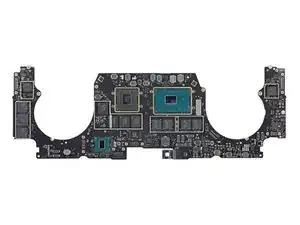
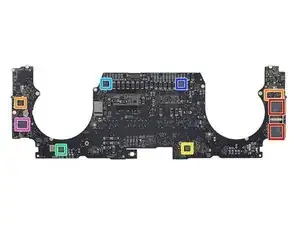
Echando un vistazo al reverso de la placa lógica encontramos:
-
Almacenamiento flash de Samsung K9PHGY8 (dos más chips de 64 GB para 128 GB y un total de 256 GB)
-
Texas Instruments CD32 15C00 69C2HQW
-
Memoria flash serial WinBond SpiFlash 25Q64FVIQ 64 Mb
-
Controlador buck síncrono Texas Instruments TPS51980A
-
Intersil 95828 HRTZ X630MSW
-
Intersil 95828 HRTZ X630MSW
-
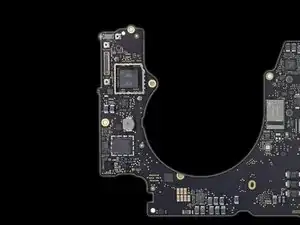
Apple APL1023 343S00137 (el mismo chip apareció en nuestro desmontaje de de MBP 13" con Touch Bar, y es muy probable que sea el controlador T1 que ejecuta la Touch Bar)
-
-
-
Y la fiesta de circuitos integrados continúa:
-
Módulo Wi-Fi Murata/Apple 339S00056 (muy similar a este chip Murata)
-
Apple 338S00193-A1 16348HIP
-
Texas Instruments TMP513A PMIC
-
S2FPS04X01 A1632
-
969A0 TI67J P6EH
-
9239HI B632E7
-
-
-
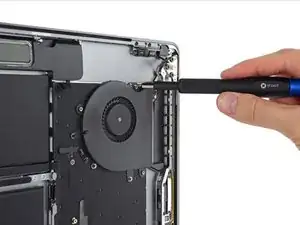
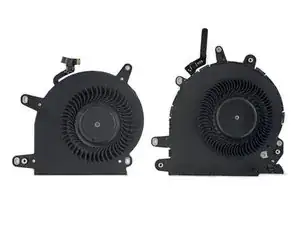
Ansiosos por echar un vistazo a la tercera versión de la arquitectura térmica rediseñada de Apple, liberamos a los ventiladores de los cuatro tornillos T3 que los sujetan a la caja posterior.
-
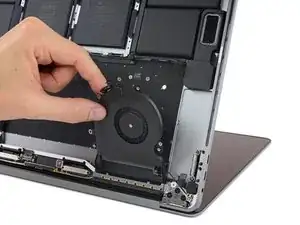
Y salen sin problemas. ¡Este cachorro no tiene pegamento!
-
Este ventilador también tiene aletas completamente diferentes a las que encontramos anteriormente.
-
-
-
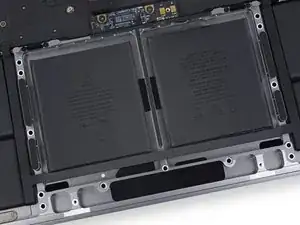
Luego de recientemente lucha para liberar la batería fuertemente adherida en la MacBook Pro con Touch Bar de 13", decidimos dejar pegada esta batería en su lugar.
-
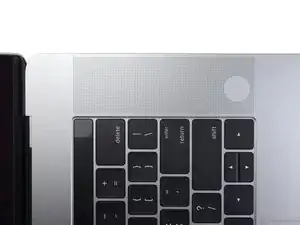
Este MacBook Pro de 15" tiene una rejilla de altavoz similar en comparación con su contraparte más pequeña de 13". La mayoría de la rejilla no incluye orificios completos, lo que nos lleva a preguntarnos por qué los hoyuelos, ¿Apple?
-
La encuesta dice: ahorradores de peso para que vaya más rápido cuando le pones ruedas.
-
-
-
Después de que, una vez más, separamos accidentalmente el digitalizador del panel OLED, dirigimos nuestras herramientas a la pantalla LED.
-
Dos ingenieros de desmontaje, una púa de apertura, un cuchillo X-Acto, alcohol isopropílico, una pistola de calor y un iOpener llegaron a esta fiesta de desmontaje OLED, pero el adhesivo de Apple aún era demasiado para nuestro equipo de separación de pegamento.
-
-
-
La MacBook Pro 15" con Touch Bar obtiene un 1 de 10 en nuestra escala de reparabilidad (10 es lo más fácil de reparar):
-
El trackpad es fácil de acceder y sencillo de reemplazar.
-
El uso de tornillos pentalobe patentados hace que el servicio y la reparación sean innecesariamente difíciles.
-
Todo el ensamblaje de la batería está fuertemente pegado en la caja, lo que complica el reemplazo.
-
El procesador, la memoria RAM y la memoria flash están soldados a la placa lógica.
-
La barra táctil (Touch Bar) agrega una segunda pantalla para dañar, difícil de reemplazar.
-
El sensor Touch ID funciona también como el interruptor de alimentación y está emparejado con el chip T1 en la placa lógica. Reparar un interruptor de alimentación roto puede requerir la ayuda de Apple o una nueva placa lógica.
-





113 comentarios
looks like space fro 32GB ram and slightly bigger battery next year. expecting it.
Kim Zhou -
Apple calls this a "pro" laptop? What a joke!
askudra -
Why is it NOT a "pro" laptop?
Eric -
U are a joke lol
A horse walks into a bar, and the bartender asks, "Why the long face?"
Now THAT is a joke.
Permanently soldered on RAM, SSD drive, limited to 16 GB RAM, lacks ports that are in still in common use, gimmicky touch bar, no function keys, crappy keyboard, everything glued together, nothing repairable, and they call this a professional laptop! Nope, just an overpriced, disposable, anorexic, consumer laptop that's a bit faster than the rest of their laptop line. This is not what us professionals want. I'm sticking with my 17" MacBook Pro.
askudra -
because its built like a disposable device such as a phone. Soldering the SSD is going to far. M.2 NVME could have been used, and it would have been much cheaper on the bill of materials.
Solid State devices like DRAM and FLASH memory are all very reliable, soldering them to the circuit-board to save space by eliminating a connector makes perfect sense. As for the RAM limit, I'm a pro Software Developer and can work fine with only an 8GB Dual-Core MacBook Pro. I have to wait a bit longer for full builds, but that's not the biggest part of my job. And finally, how many Windows PC laptops are there with FOUR Thunderbolt 3 ports? This laptop is more Pro than any other.
Eric -
The very things that you object to are exactly what will make this machine phenomenally reliable.
@Eric: FWIW, my work early-2013 MBPro Retina a few months ago suddenly stopped booting reliably or even getting to the Apple logo. It probably had the problem listed at https://www.apple.com/support/macbookpro.... Fortunately, the helpdesk at my work had an identical vintage machine in storage, so we just swapped SSDs, and I was good to go in under 20 minutes.
Try that if the SSD is soldered to the mobo.
cwerdna -
As a pro of 40 years+ standing, I consider 4x Thunderbolt 3 to be ideal.
Where else can I get that?
@Cwerdna
Most likely it was the connector that was faulty. In which case you wouldn't have needed to.
@Eric: Also, don't care about 3 Thunderbolt 3 ports. They're of 0 use to me w/o adapters. I work on iOS software. I use the Thunderbolt 2 ports and Magsafe on my work laptop each day, since I have 2 Thunderbolt displays. I plug in USB iOS devices sometimes directly into the laptop. I also at least daily plug in a USB 3.0 external hard drive for Time Machine backups. We sometimes project at meetings via Thunderbolt 2 or HDMI. Now I need to be a "pro" by needing a wad of adapters.
With one of these new laptops, my displays can't power my laptop and the extra Magsafe brick will become useless. I'll need to spring for a $79 brick + $19 USB-C cable. And, if I don't scavenge a power cord from a retired machine (so the brick doesn't block a bunch of outlets), it's another $19 for a cord: https://9to5mac.com/2016/11/10/opinion-m....
cwerdna -
Ummm, 4 USB-C ports that happen to carry Thunderbolt isn't "pro"... You will need adapters to use them with current Thunderbolt gear anyway in which case you can use adapters on the older MacBook Pro's to add more ports anyway... What's the difference? At least with the older MacBook Pro you don't NEED adapters to use HDMI, USB, SD Card reader or Thunderbolt.
djlobb01 -
Which other laptops have Thunderbolt 3? A complete list would be too long: Asus, Acer, Dell, HP, Lenovo, Razer, etc. But here's a list of TB3 laptops ranging from 13' ultra books to 17' professional machines.
http://www.ultrabookreview.com/10579-lap...
As you can see, most of them have REMOVABLE SSDs. Many have CPUs equivalent to the new MacBook Pro, and with a similar size/weight but at much lower prices. There are even quite a few that have 32GB RAM available.
(And with a removable SSD, it's easy to upgrade a laptop to a HD as fast as the new MBP next year.)
I've been a long time Apple enthusiast, but the new MBP is underwhelming and disappointing.
for all those interested, the SSD isn't actually soldered. It's just a special form factor; not M.2 or anything common. All modern laptops have soldered processors, it is unfair to ding Apple for doing this when Dell, Lenovo, MSI, ASUS, Acer, Razer, HP, and other companies all do it too. People can easily get a dongle for the USB C, c'mon guys, you're spending ~$4,000 like me, you can afford a single adapter from amazon. The battery life is already significantly better than almost all windows laptops, the only exclusion may the Lenovo ThinkPads. Very few companies offer displays as bright/colorful as Apple.
Lastly, M.2/NVMe would mean sacrificing the speed that these MacBooks ships with today. Why would you rather have a slower SSD with a common form factor when you can have a super fast SSD with a specialized form? They're SSDs anyway, it's highly unlikely for them to fail unless you're writing to the disk and reading from it 24/7/365.
Norton -
@norton12 You must be thinking of a different model. This is not an SSD with a custom form factor, it's just a handful of ICs soldered directly to the main board—both sides of it, in fact.
Askudra, I do whole-heartedly agree with you and every pro knows the MBP is not really a “Pro” device; its only a buzzword for marketing. Though before I continue, just take thought for a second that Apple® known as innovators have always created designs that are far more advanced then the technology available creating a conflict, and the other side is that what technology is available would be way to expensive for consumers if used which partly explains why there is always a delay on new tech from Apple®
As for the MBP lacking the needs of a Pro, I agree the loss of hardware personalization is a tragedy. The new era of Apple has lead cosmetic design to come before device functionality, a poorly designed thermal system that allow temperatures to reach 212F / 100C and cause potential hardware damage, an inefficient firmware and very soon the loss of Intel Chips…
We all suffer from the conflicts of Apple’s inability to create a MBP that meets the everyday needs of a Professional. Not sure that will ever change.
Does this model have a removable touch id (power button) as the 13" model did?
Yes it does.
No it doesn't.
Though that depends on what you mean by: "removable". Is it theoretically removable, meaning that there is a small chance that Apple can replace it, instead of giving you a new MacBook? Possibly.
Can you do it yourself or in a repair shop? Not a chance in !&&* with all that glue. At least not in one piece. And you won't be able to get parts.
We didn't show it in the teardown, but to reiterate: the Touch ID / power button is perfectly removable. Unlike the Touch Bar it's secured with screws, not glue. It's still presumably paired to the logic board at the factory for security reasons, so you can't replace it yourself without disabling Touch ID—but if the question is simply "Can you remove it?" the answer is yes.