Introducción

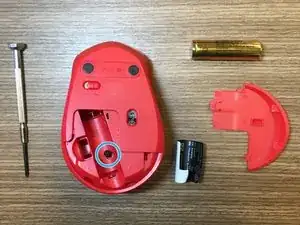
Esta guía es para ayudarte a desarmar el ratón (mouse) Logitech M331/M330 y limpiar la rueda del mouse.

  1. LLITmqCek1fCotJ3
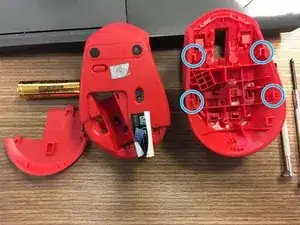
    • Separa con cuidado la carcasa superior y la carcasa inferior del mouse sujetando la carcasa inferior y levantando la carcasa superior y luego tirando de ella hacia atrás.

  2. SGZcqGWcweQeIyVe
    • Separa con cuidado la carcasa superior y la carcasa inferior del mouse sujetando la carcasa inferior y deslizando la carcasa superior hacia adelante.

    (Sorry about my english :))

    And there is one little Lock down right. You can unlock it with a flat screwdriver.

    Bane -

  3. Sundw6BnCVT5lAIT
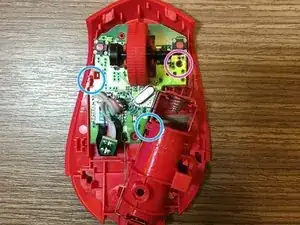
    • Desenrosca el tornillo del círculo morado y suelta los pasadores de plástico de los círculos azules para quitar la placa de la cubierta de plástico.

  4. 2wE2riHKT1pHlTLt
    2wE2riHKT1pHlTLt
    twZGmxQ2xyxINes4
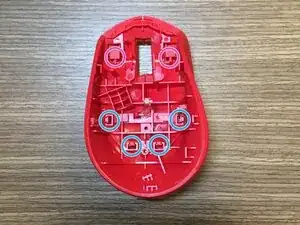
    • Para desmontar la carcasa superior del ratón, separa los pasadores de plástico ubicados en los círculos azules. Los dos pines ubicados en círculos morados se soltarán automáticamente una vez que se suelten los cuatro pines azules.

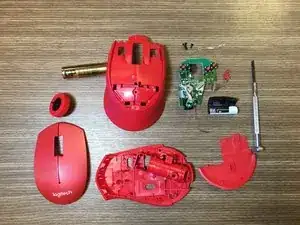
    • Para desmontar el propagador de luz, separa el pequeño pasador de plástico en la parte inferior de la carcasa del mouse y la conexión del propagador de luz.

Conclusión

Para volver a armar tu dispositivo, sigue estas instrucciones en orden inverso.

garfieldknight

Miembro Desde 13/02/19

731 Reputación

7 comentarios

first time using ifixit

this was just what i needed thanks!

Prentiss Johnson -

Thanks for the guide! I was able to clean the scroll wheel properly and fixed the annoying inaccurate scroll issue.

Gabriel Louie Cubelo -

Exactly what I needed, a clear and direct guide. Thank you so much!

Zıbın Zıbınoğlu -

Finally my mouse-wheel has stopped ghost scrolling, I used to have this problem where when I scrolled down and up it would go the opposite direction, at first I thought it was a bug but turns out on my other wired logitech mouse, it worked normally.

Upon following this instruction manual (A++) I managed to put some WD40 in the mouse wheel scrolling part, from the inside (not the wheel but the thing it’s attached to) and scrolled it a couple of times, now it works normally :)

Thanks to the author!

TAY CHU TSE ANDREW -

Thanks, cleaning up my M331 and put nachi tape on right-mouse-button so it works again (after it deform slightly).

yayanm 1k -

Scroll wheel for my mouse has become sticky , is not smooth while scrolling…. Are there replacement scroll wheels available ?

Don’t you think, given the resource crunch on the planet - companies should offer spare parts, rather than use and throw ?

Agasthya -

My mouse is not working even after disassembling and then reassembling. I tried checking what the problem is, but even though I tried different batteries, the mouse wouldn’t start. Can someone help?

Harshil Dari -