Introducción

This guide will lead you throughout the process of the replacement of the charging port in Huawei M750

  1. rapQTrfV5WZISEjN
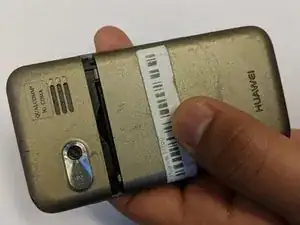
    • Depress the top of the battery cover, and pull downwards towards the base of the phone.

  2. JOlAjUZVMkOGMpvs
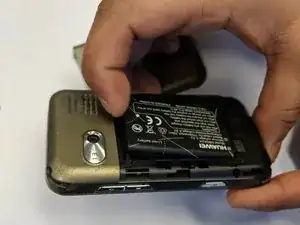
    • Remove the battery by levering the battery out, using the cut just below the camera.

  3. eSqEJFLHPxEisxCZ
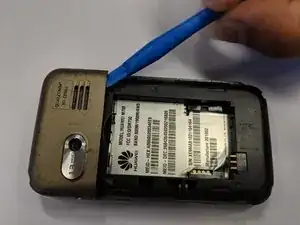
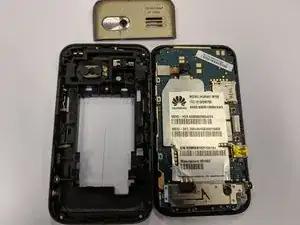
    • Use the opening tool to start prying the camera and speaker cover, starting from the battery side.

    • Work the opening tool around the border of the camera and speaker cover, until it comes loose.

  4. eODPBKbBuOJMCvJ1
    eODPBKbBuOJMCvJ1
    tJjrs3VdXeHmHLhM
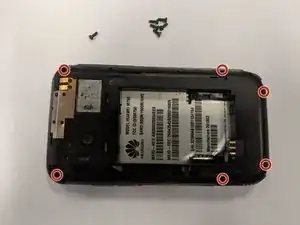
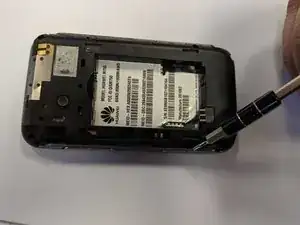
    • Using the T5 Torx screwdriver, remove the six 6mm screws.

  5. 3TQvuQYmOxJPYXZh
    3TQvuQYmOxJPYXZh
    HMqWTNYLuSUJB2g1
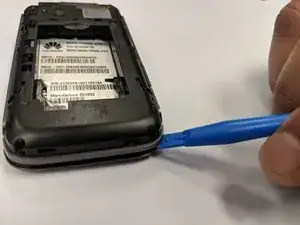
    • Using the opening tool, pry the back panel from the front panel.

    • Work your way around the phone until the panels separate evenly.

    • This step may require a substantial amount of leverage.

  6. Ofh1YNQKReBOhbba
    Ofh1YNQKReBOhbba
    NuvcZ6mhgrNTUJva
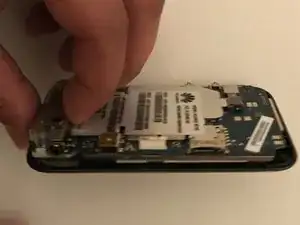
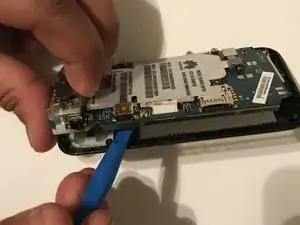
    • Using the opening tool, start prying out the motherboard from the front panel along the border.

    • When the motherboard seems separated from the front panel, pull it outwards.

  7. NW64YUEZDJaqaRub
    NW64YUEZDJaqaRub
    Cq1v1yi2dQAXunsN
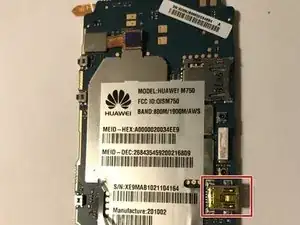
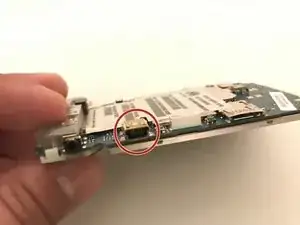
    • The charging port is soldered to the motherboard, use this guide to do the replacement.

Conclusión

To reassemble your device, follow these instructions in reverse order.
Kshitiz Thapa

Miembro Desde 11/02/18

389 Reputación

0 comentarios