Introducción

Guía creada por KimJongIan

Con la ayuda de los usuarios de iFixit Andrew y MervDervis

Esta guía no sería posible sin el script creado por el usuario tai1976 de gbatemp.net

  1. ZyT1pPiogk6Gknrg
    • Antes de realizar cualquier actualización o cambios en el disco duro conectado a la placa base, asegúrate de que se encuentren bien conectados, de lo contrario estropearías la placa base y es posible que requiriera una nueva.

    Updating the console without the optical drive in place will brick the console? Are we certain about this? I know that the motherboard and optical drive board are paired but didn't think that the console would brick if updated without the drive plugged in. Thanks for the help - Richard

    Richard -

  2. S5xPdf6V2BoXxgXT
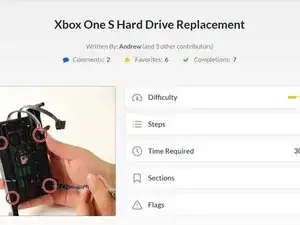
    • Antes de empezar esta guía, lo mejor es leer los pasos para la parte de hardware, como lo muestra el usuario de iFixit Andrew, en el siguiente enlace.

    • Reemplazo del disco duro de Xbox One S

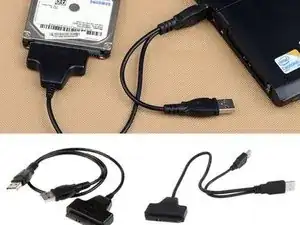
    • También necesitarás una PC con Windows y un lector de disco duro (Sata Data y Sata Power a USB)

    • Se conoce que las unidades Seagate causan problemas con el software de XBox One.

    The original drive in the Xbox is a Seagate drive. The support forum for the script also does not mention this at all.

    gogocons -

    Seagate drives have been known to cause issues with XBox One software. << what you mean by that … not to by any seagate driver?

    doscarri -

    which hard disk do you recommend

    drkanu198300 -

    Seagate had a bad batch this/last generation. Many of my repairs/replacements were Seagate. Western Digital has been most reliable this decade. Esp the ‘raptor' drives, if not doing SSD.

    Thor -

  3. 41r42uCpFGvGZFpq
    • Conecte el nuevo disco duro al PC. Asegúrate de que el HDD esté en un lugar donde no se desconecte accidentalmente.

  4. ITBmEjYMGNG1RaHy
  5. uJWNtpP2o1Z3Usyr
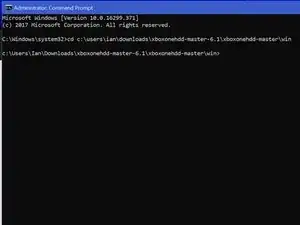
    • Presiona la tecla Windows/menú Inicio y escriba "CMD", haz clic derecho y seleccione "Ejecutar como administrador"

    • Escriba el comando "cd C:\Users\(Su Nombre)\Downloads\xboxonehdd-master-6.1\xboxonehdd-master\win"

    • Reemplaza (Tu nombre) con el nombre de tu perfil de usuario.

  6. uGdA2vaxGOYZ6TUu
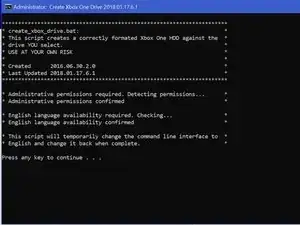
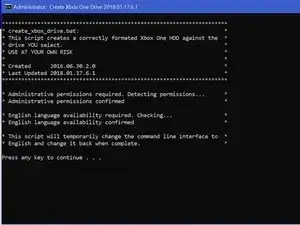
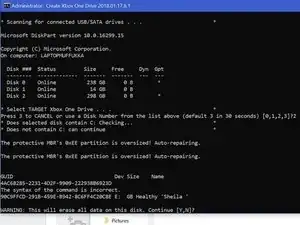
    • Ejecute el comando "create_xbox_drive"

    • Los siguientes pasos son crear una unidad que tenga almacenamiento de 500 GB, 1 TB o 2 TB. Si en algún momento te confundes, hay un archivo Léame en la carpeta que extrajiste que también puede ayudar.

    I have a 480 gig ssd. Can this be used with your script?

    Paul -

  7. JOHHeFTQKMeTO5k2
    JOHHeFTQKMeTO5k2
    jajrRROIUQnxgAbc
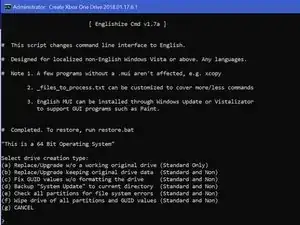
    • Para este tutorial, estamos utilizando la primera opción (a) Reemplazar/Actualizar w/o una unidad original que funciona.

  8. 1IO1MGrSwBqQYRNT
    1IO1MGrSwBqQYRNT
    KLRRUhqZytDHxdiK
    5FEMKIZHh6RSROFZ
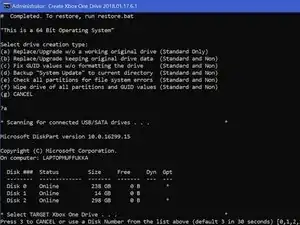
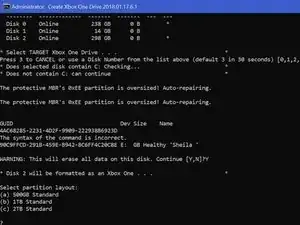
    • Asegúrese de elegir la unidad correcta para formatear. El Disco 0 es casi siempre su sistema operativo. NO ELIJA EL DISCO 0.

    • Le pedirá que confirme su selección.

    • Luego deberá elegir el tamaño de la unidad que ha creado.

    What if Disk 0 is your only option?!

    Emily Clark -

    So the computer we are using isn’t even recognizing the drive as being connected. The drive makes noise and lights come on the connector we have but the computer can’t find it. I have no idea what is wrong or how to fix this.

    Emily Clark -

    We figured it out! For anyone else struggling, We ended up having to plug in the USB in the BACK of the computer instead of the front ports. It connected immediately and it’s been a success since (haven’t actually tried it in the xbox yet though)

    Emily Clark -

  9. yjUHlbuOChXc2OAL
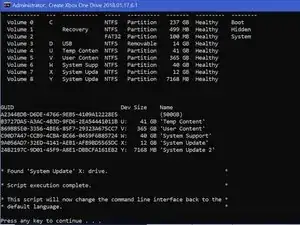
    • Una vez que la línea de comando muestra 6 líneas de números largos con "GUID" en la parte superior, las líneas de comando finalizan.

    • Si esto no funciona, limpia el disco con diskpart, enlaza a continuación e intenta nuevamente.

    • http://knowledge.seagate.com/articles/en...

    i am getting a message saying Missing Drive x: System update.

    i have reformatted the drive and cleaned the ssd with diskpart. but still get the same message.

    Jonathan Murnion -

    Salve, da me non esce found system update ma Missed.. Come risolvo?

    Francesco De Grandis -

  10. ACDsi52GIQaVLZXV
    ACDsi52GIQaVLZXV
    kAK2NmoQ4CMQBHGu
    SwWUrwuh2Q2hOOGK
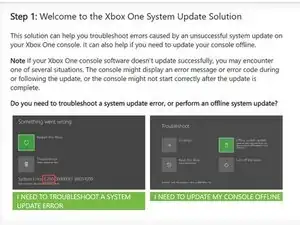
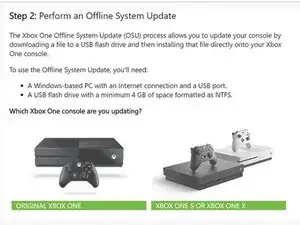
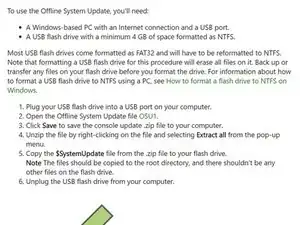
    • Debes ir al sitio oficial de XBox y descargar un archivo llamado OSU 1.

    • https://support.xbox.com/help/hardware-n...

    • Selecciona "Necesito actualizar mi consola sin conexión"

    • Selecciona "Xbox One S o Xbox One X"

    • Haz clic en el enlace verde "OSU1" para iniciar la descarga.

  11. f4NAxODyNZU4hWJs
    f4NAxODyNZU4hWJs
    JvlCxIgAVAKrD4uI
    U1OWLVQBQ55EBIBS
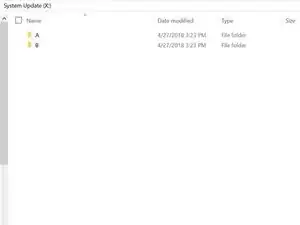
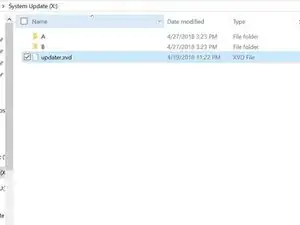
    • Ve a la unidad de Actualización del Sistema (X) y crea 2 carpetas, una etiquetada "A" y otra "B"

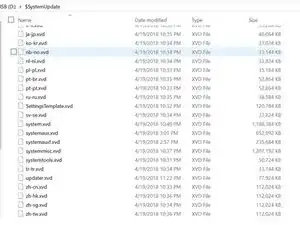
    • Extrae todos los archivos de OSU1 y copia todo en $SystemUpdate, excepto "updater.xvd"

    • Pega estos archivos en las carpetas "A" y "B" que creaste anteriormente.

    • Copia "updater.xvd" de $SystemUpdate y pégalo en la raíz de System Update (X)

    Where is system update x

    Jonathan Murnion -

    It is created when formatting the new drive in command prompt using the steps above.

    Dale Peters -

    Hello,

    Thank you for the write up as it was very helpful. there are some updated steps needed though. Especially if getting error code E102 and E101. Follow this video ararting at 14:10. https://youtu.be/J1xX6WgJhVA

    Basically I followed your steps and kept failing to load HHD. To find out needed to add the boot animation needing to be added to both A and B filter along with just copy the updater.xvd to the main folder not delete from A and B folder. I still got the E106 error but that's expected. Then next step after restart from E106 error required offline update using OSU1 offline system update from Xbox.

    https://support.xbox.com/help/hardware-n...

    Hope that helps.

    Jeff Brown -

    Where is the bootanim.dat file?

    uBreakiFix Woodbridge ON -

    grazie ifixit seguito passo passo le vostre istruzione funziona al 100%

    xbox one S hdd 500 gb

    grazie e ciaoooooo

    saxon -

    I don’t have enough space on the partition to copy all of the files. How do I fix this? Also, where can I find the bootanim.dat file?

    Jeffrey Russell -

    Hello Jeffrey,

    I had the same issue today. Just connect the old hard drive, opened Disk Management, set it online.

    Then you can copy all files on “System Update (X:)” - drive to the new SSD “System Update (X:)”.

    Turbo -

    I’ve got the same issue, lets me copy files into folder ‘A’ but when pasting into ‘B’ it says there’s not enough space? I am happy to do the offline update with a USB - but do I need to clear everything off the HDD before I run it?

    slcoleby -

    This is not needed anymore. Just skip this step. Just make sure your USB device has the newest software on it. Run the update from the USB when the Xbox asks for it.

    koppie007 -

    Exactly as @dan0 says, you can skip this step. Save the $SystemUpdate file from the OSU1 onto a USB stick and perform as an offline update. Worked a treat! :0)

    slcoleby -

    How do I add bootanimations after that?

    Goose Boi -

    HI

    there is no enough space on system update (x) for coping files in both a and b folder

    can you guys help me

    goog tvv -

    its say not enough drive space....this method is total rubbish.

    Prince Formas -

  12. KtLkeeTAOBvhRWtV
  13. rWx3oUZV1GJya11L
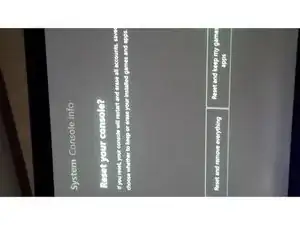
    • Algunos usuarios han experimentado problemas de inicio de sesión después de una actualización de SSD. Si esto ocurre, simplemente reinicia la consola (mantén juegos y aplicaciones si es necesario) eso debería resolver el problema.

    • Aquellos que tienen su Xbox configurada en modo "ahorro de energía" durante el inicio pueden experimentar una pantalla en negro de 20-30 segundos antes del arranque. Cambiar esta configuración a "encendido instantáneo" resuelve este problema.

    • Ahora disfruta de velocidades de r/w 20 veces más rápidas y tiempos de carga de una fracción de lo que un HDD estándar puede alcanzar.

  14. 22RjMrO5Iyfmo56i
    • ¡Ya ha terminado, disfruta de tu Xbox!

    • Nota: Esto funciona con unidades de estado sólido.

Conclusión

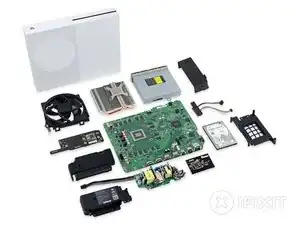
Para volver a montar tu dispositivo, vuelve a colocar el disco duro en la Xbox One S y vuelva a reensamblarlo.

KimJongIan

Miembro Desde 27/04/18

1271 Reputación

36 comentarios

It doesn’t work for me. Always “No USB/SATA drives found”. All drives are “online”.

Dennis Becker -

I have the same problem, I can’t decide what to do?

Диск ### Состояние Размер Свободно Дин GPT

-------- ------------- ------- ------- --- ---

Диск 0 В сети 1863 Gбайт 0 байт

Диск 1 В сети 3726 Gбайт 0 байт *

Диск 2 В сети 1863 Gбайт 0 байт

Диск 3 В сети 1863 Gбайт 1863 Gбайт

Диск 4 В сети 223 Gбайт 2048 Kбайт

Диск 5 Нет носителя 0 байт 0 байт

* No USB/SATA drives found *

* Script execution complete.

eshkinin.s -

Works perfect, back up and running… thanks!

dvmath50 -

Doesn't work with soild state drives? Isn't that what's in there to begin with?

Rob Hartwig -

This does work with solid state drives, it doesn’t work, occasionally, with seagate drives.

KimJongIan -

Any reason why we can’t just use Acronis True Image to make a 1:1 copy of the original drive?

Blair Skinner -

This guide is more for replacing a failed drive, so if you are upgrading the drive, then cloning it and resizing partitions is the way to go.

KimJongIan -

Which files go in “A” and which ones go in “B”

grady respess -

i purchased a replacement hard drive from you and it is a seagate !!!!! does not work

Jason Csencsits -

I have a black screen for 20 seconds when starting up. After that I land on the start screen. the quickstart is off. The black screen is also there.

Florian Hunger -

Все работает. Спасибо! Копировал на Crucial MX 500 2TB SSD.

Владимир Рудковский -

this method does not work! please remove this page. thanks.

capthook -

Does this also apply to the Xbox One X?

Ben -

Great guide. works perfect ! great job !

stavru doru-sorin -

Cant i start the xbox in safe mode then update it cause i have the OSU file on a USB

Brennan Beattie -

the master files can not be got there is no response from file trip

jason.redfern -

Guy, Thanks for this post, but you know if this procedure works for Xbox One X?

mritto -

i can not get this to work after running the script adn selecting the drive size i wait for 30 seconds and just get a message saying Missing drive X ‘System Update’ anyone seen this or know how to fix it?

Jonathan Murnion -

Were you able to figure this out? Getting the same issue.. :(

teejays -

it seems like the language of win 10 needs to be us English, did the trick for me

Darkaqua de -

Does this change MAC / Console Id / Xbox Live Device ID?

Shin Godzilla -

This work excelent! I was changed my damaged hard drive for one new, and that’s works and the first time.

Note: For windowos 7 must be use “create_xbox_drive_old”.

Thanks for this guide!

delgado_sntgo -

I’ve done everything like in the tutorial, but in the end I get Error E106. My Console is a Xbox One S, and I am trying to install a mechanical HDD. I’ve erased alleready the original HDD that came with the xbox.

Also I’ve tried installing the OSU 1 files on a flash drive, and selected the option from the troubleshooter to “install offline update” and it diden’t work. what should I do ?

festy22 -

Hey there! I’m turning xbox one on for update process and after 5% it shuts down. Can you help me with this problem?

NGA -

I'm getting the same thing

Erika -

i tried this tutorial in 2 consoles but always shows me the same problem.

I tried with 2 or 3 Hard disk and with 2 xbox One S but i can not.

In the morning 2 xbox have been working good but i need to change one motherboard in one of them. please help. greetings

gelodiaz -

If i replace the Internal SDD and follow the steps here will this fix my OS issue because mine is a insider OS and its poo and bricks the whole box ive tried offline update with osu1 wont recognize the usb and osu 2 is recognizes the osu2 but won’t finish the install. so i was wondering if i can just replace the internal sdd and reflash would that fix my issues or does it lie somewhere else?

Joseph -

Es mas fácil con J-Runner

1.- XBOX One > HDD Tool > Selecciona Disco > Start, espera a que termine el proceso

2.- Instala el Disco HDD / SDD en el Xbox One

3.- Descarga el OSU1 https://support.xbox.com/es-MX/help/hard... descomprime el ZIP

3.- En la PC Formatea una USB NTFS y copia todo el folder $SystemUpdate directo en raiz de la USB

4.- En el Xbox One Solución de problemas > Inserta la USB > Se habilitara la Actualización del sistema sin conexión, espera a que termine y se reiniciara la consola

5.- Sigue las instrucciones de configuración lenguaje, pais, cuenta, etc

Raymundo Pizano González -

A che serve scaricare lo script? Non posso scaricare OSU1 metterlo nella usb e fare tutto dalla xbox?

Corta Monitor -

Great stuff. only problem is… since microsoft has updated the os1. the size is tad bit bigger after you decompress the zip. so when you copy the update files into folder A and B. there is not enough space. the 12gb is not enough. and you cannot extend the hdd size. anyone find a work around?

sultan -

I have the same problem, You can extend the partition so it fits there, If you dont have a partition manager i recomand niubi partition editor

Pavel Matušů -

I’ve gone through the steps with no issues until copying the files into the “b” folder. It states that there is not enough room, I need like 5mb more space. Using a 1tb drive.

Mike Bergstrom -

Hi! You can skip step 11. Just make sure you got the newest Xbox update ready on your USB. Turn on your Xbox with your new Xbox formatted HDD or SSD, and continue with the update on your USB.

koppie007 -

System update partition is 12GB but the files that need to go into A and B folders will not fit in this partition. It is slightly too small. :(

Mark -

It works. But i couldnt use the OSU1 Data. Instead i had to use the Data from System Update (X:) from my old drive. But now it works :)

Jaime Justin Altenrath -

Hi Jaime! You can skip step 11. Just make sure you got the newest Xbox update ready on your USB. Turn on your Xbox with your new Xbox formatted HDD or SSD, and continue with the update on your USB. You can completely skip step 11. Due the newest update, there is not enough space anymore.

koppie007 -