Introducción
Solo requisito previo
Herramientas


-
-
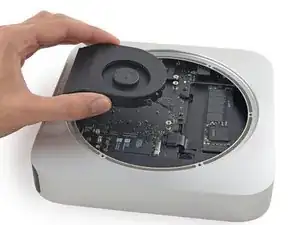
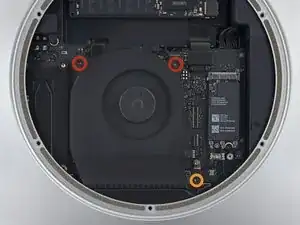
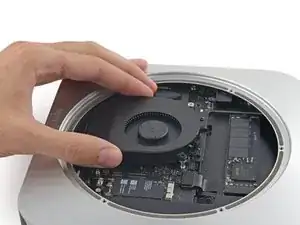
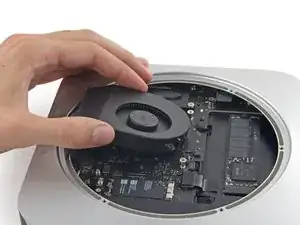
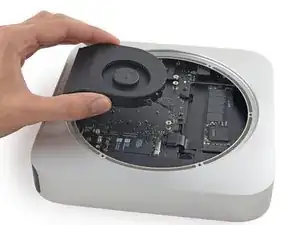
Levanta el ventilador hacia arriba para liberar el tornillo cautivo de su orificio en la placa lógica.
-
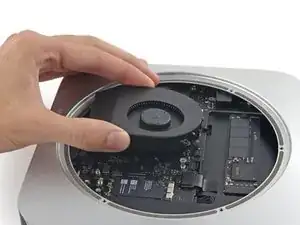
Aleja el ventilador del SSD hasta que pueda acceder fácilmente al conector del ventilador.
-
-
-
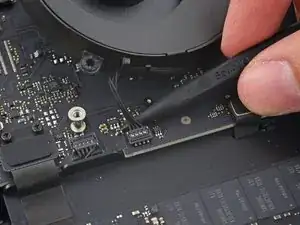
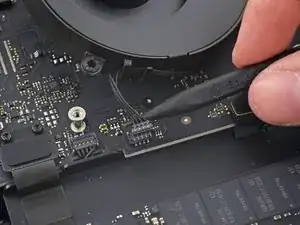
Usa la punta de un spudger para levantar el conector del ventilador y sacarlo de su zócalo en la placa lógica.
-
Conclusión
Para volver a ensamblar tu dispositivo, sigue estas instrucciones en orden inverso.

That 27mm screw should be very loose, since it attaches the motherboard to the case. When you’re trying to remove the motherboard, if the AC connection side of the board is not moving back easily, you need to make sure this screw is fully backed out from the case.
There’s no danger in removing it completely.
marklfarley -
I suggest removing the 27 mm tool, otherwise Step 23 will not work.
Arvin Bhatnagar -
Actually you don’t need to remove 27mm from the fan. I was able to tilt a little when I take the logic board out in Step 23. I also didn’t take the fan cable too. When you pull the logic board out, put the fan on the back of logic board as you pull it out.
Kenneth Z -