Introducción
Esta guía es privada e interna usada como pre-requisito.
Herramientas

-
-
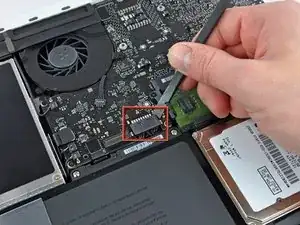
Usar la punta plana de una spudger para levantar el conector de la batería de su enchufe en la placa lógica.
-
Conclusión
Para volver a armar tu dispositivo, sigue estas instrucciones en orden contrario.

you do not need to remove the battery when replacing the hard drive or ram
brilldoctor -
beware not to lift the connector to close of the angle, as the picture suggest it. It might broke the angle. Attack by the middle.
naamol -
Not necessary?
hikkymemo -
Be careful of the corner of the battery cable connector when trying to pry it off with the spudge. I knocked the corner of mine. No operational impact but was not very pleasing!
jljordanweb -
Not necessary, but a good idea, so as to avoid any spurious charges going through the boards...
svenaustx -
@Svenaustx - What could happen if not removing this battery? Worst case? Not a geek on this but did change RAM on my Macbook Pro "15. Can't remember disconneting the battery back then. Shouldn't it be sufficient shutting the Mac off and ensure it has been used for an hour or so before replacing RAM?
Allan Clarke -
i used a metal pry and noticed some sparking when i disconnected the battery. replaced ram. now it wont turn on. did i fry it?
Ian Lynch -