Introducción
Utiliza esta guía para reemplazar el adhesivo del Apple Watch Serie 2 y vuelve a sellarlo. La resistencia al agua del Apple Watch no podría ser totalmente restaurada luego de este procedimiento.


-
-
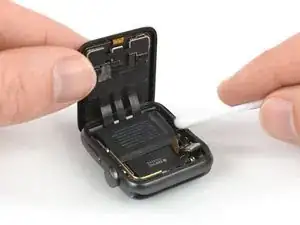
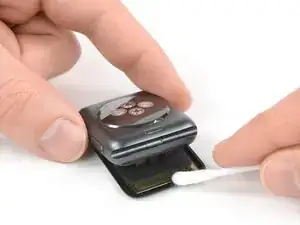
Aplica un poquito de alcohol isopropílico (>99%) en un bastoncillo de algodón o usa una almohadilla de limpieza para remover suavemente los residuos de adhesivo en la parte superior del junta del force touch.
-
-
-
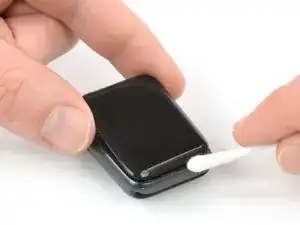
Gira el Apple Watch boca abajo para que la pantalla quede plana mientras levantas la caja.
-
Remueve los residuos en la parte posterior de la pantalla.
-
-
-
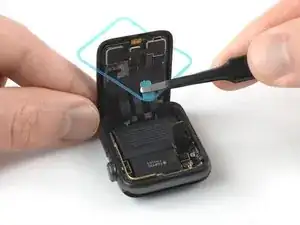
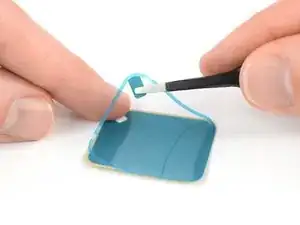
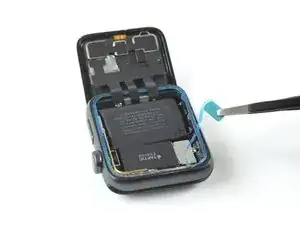
Usa un par de pinzas para remover con cuidado el adhesivo de reemplazo con el film protector azul del papel de respaldo.
-
-
-
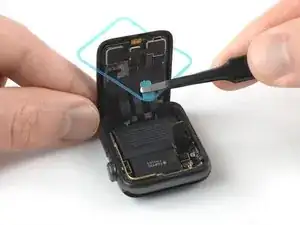
Sostén el adhesivo de reemplazo diagonalmente para pasarlo por la pantalla.
-
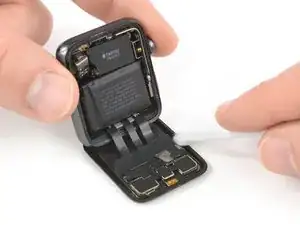
Inclina ligeramente la pantalla hacia adelante para poder alinear el adhesivo con el marco.
-
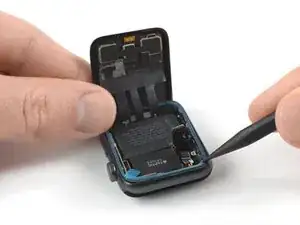
Coloca el adhesivo de reemplazo en la parte superior de la junta de force touch y usa el extremo puntiagudo de un spudger para moverlo y presionarlo en su lugar.
-
-
-
Reconecta la batería como se ve en la guía de reemplazo.
-
Remueve el film protector del adhesivo.
-
-
-
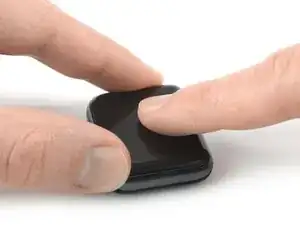
Alinea la pantalla y presiónala firmemente sobre el adhesivo.
-
Alternativamente, puedes usar abrazaderas de tornillo de banco alrededor del perímetro de su dispositivo para colocar el nuevo adhesivo.
-

6 comentarios
Will the new adhesive be water proof?
or will the watch after replacement no longer be water proof?
The Apple Watch isn’t waterproof, but water resistant. After opening and resealing it there is no guaranty that the resistance is the same as before. More on that topic can also be read on Apples website (“Apple Watch can't be rechecked or resealed for water resistance.“). But when resealed properly (using heat and pressure without damaging the force touch gasket in the opening process and cleaning off old residue) there shouldn’t be any concern for a normal daily use like washing hands or taking a shower. It might even work for a swim in a pool or an ocean, but I wouldn’t count on that 50M ISO rating ;)
This one was a bugger! Dang…getting this over the display w/o sticking to everything is an exercise puzzle. The first one also didn't release correctly and I ended up installing just the blue adhesive backing…then realized that the adhesive was still on the other backing, which I then had to very carefully remove with a tweezers, then navigate the puzzle of an exercise getting it over the display and in to position. I did it, but as other commenters noted, it is not sealed anything like it originally was. In fact, it came up in a few days and I had to use the iRemover to heat it back up and press it back into place. I also use an iWatch bumper guard all the time now to protect it from popping off. For this older series 2 iWatch I’m ok.
Thank you iFixIt for top notch parts, instructions and tutorials. I’ve been an IT tech/specialist for many years, but still approach new repairs with caution, especially on Apple products, until I’ve done it at least once.
Yes, resealing the Apple Watch is a tough one. It is either disconnecting the display and go without the "exercise puzzle" but risk damaging cables and having to reconnect the display vs. keeping a steady hand and feeding the adhesive around the display.
I edited the guide to apply pressure on the closed watch for a longer time now. A few hours under some heavy books might do a better job.
Oh, and congrats on the repair.
Adhesive gasket/strip did not fit. It was slightly undersized :( I ended up cutting tiny strips to fill the gaps. :(
I bought 6 adhesive strips expecting to foul up some. I tried following this procedure on three of the sets, but on each set I ended up with one corner not quite long enough to seat properly. On the fourth set I altered the procedure and it finally worked the first time.
1. Take off the screen. Yes I know, but do it anyway.
2. Take off only the blue adhesive around the periphery. Do not remove center area.
3. Place sticky side on force gasket. Seems small, but fit perfectly.
4. Remove entire inner rectangular portion of adhesive strip
5. Replace screen
6. Re-Attach battery
7. Follow rest of procedure
marilyntlinton -
The isopropyl alcohol can only remove so much of the old adhesive. After the first pass with the q-tip use an iFixit Opening Tool to carefully scrape off the old adhesive. There is always some left on the case.
Vangelis Angelakis -