Introducción

Para un impulso de energía fácil, reemplazar el RAM de la única actualización que no requiere cortar el adhesivo detrás de la pantalla . Reemplaza la memoria RAM para tener mayores prestaciones y velocidad. Es el único reemplazo que no requiere que cortes

  1. dNTgcKU3dVoLsw1C
    dNTgcKU3dVoLsw1C
    wLXGopDcKbTxLsIv
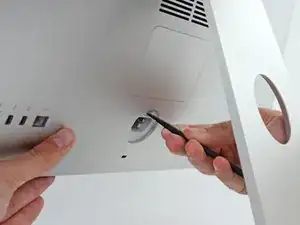
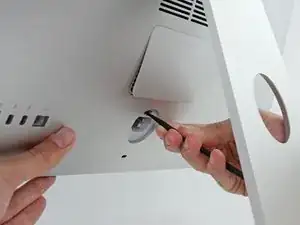
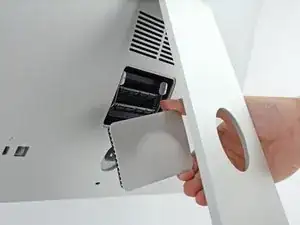
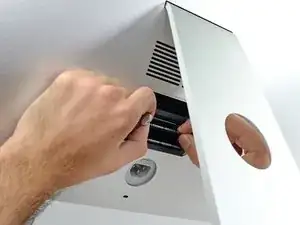
    • Manteniendo la pantalla firmemente, use una punta plana para hacer presión en el botón de apertura del compartimento de la memoria RAM. Este se encuentra localizado justo por encima del enchufe.

    • Quizás debas presionar bastante fuerte hasta que se habra la puerta del compartimento.

    Buenos días!!!

    Cómo le hago si mi iMac no tiene puertita!!! Se tiene que despegar la Pantalla???

    alterego69 -

    Hello! The procedure depends on the iMac's model. Find the exact iMac for the proper guide.

    ¡Hola! El procedimiento depende del modelo de iMac. Encuentra el iMac exacto para la guía adecuada.

    Arthur Shi -

    No hay que despegar la pantalla para este tipo de reparación. Si no encuentras el compartimento entonces puede que estes mirando al imac equivocado o quizas un monitor.

    overdas -

  2. W1B4OmN2sAshIdrE
    W1B4OmN2sAshIdrE
    hhI4LZHvC16YptTb
    Vfsy2ExaLAUvxYJx
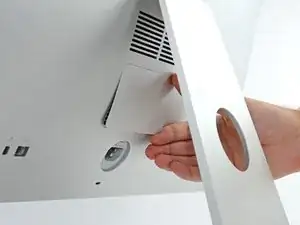
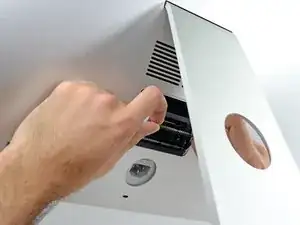
    • Remueve la puerta del compartimento de memoria RAM.

  3. X6DvlkFdCRZCBEtg
    X6DvlkFdCRZCBEtg
    pM1ACFnOTNB6NvOQ
    oiQjrJB1nmsRcIFS
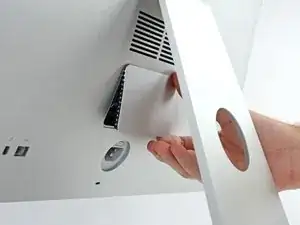
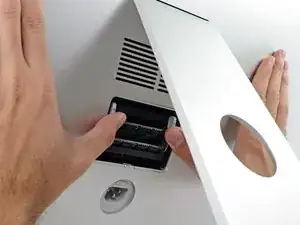
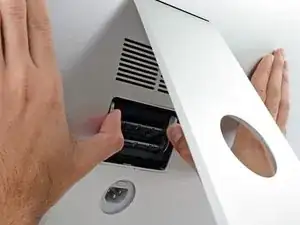
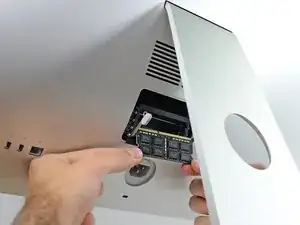
    • La bandeja de memoria esta trabada en posicion vertical con dos pestañas grises.

    • Usa los dedos pulgares o indices para empujar las pestañas hacia afuera y asi destrabar la bandeja

    • Tira de las pestañas de seguridad hacia afuera y abajo llevando la bandeja de la memoria hasta casi una posicion horizontal.

  4. 5aJc2QZciH2re2Vf
    5aJc2QZciH2re2Vf
    N6x3xIxmbjBcNsPw
    XMbiTspfMtHPnAcx
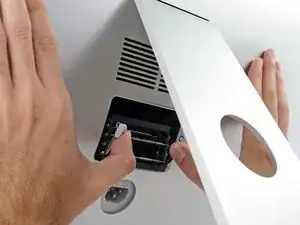
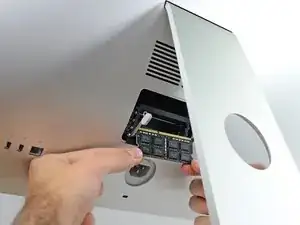
    • Retira la memoria RAM agarrandola con ambas manos para que salga derecha.

    • Los módulos RAM están diseñados para ser insertados de una sola manera. Observa con atención el diseño antes de colocarlo.

    • Inserta la memoria RAM en la ranura deseada y presiona firmemente hasta que quede asegurada en su lugar.

    • Reinserta la tapa de la memoria RAM

    "Note that the shorter section of contacts should be on the left when installing new modules."

    Mine is flipped so the shorter section of the RAM module is on the right.

    calebx -

    Mine is flipped too… not a mistake, is it?

    Kristi Mathias -

    To add:

    The RAM door is not symmetrical. When putting back the RAM door, it should flush with the back. In STEP 1 photo of the RAM door it seems the RAM door is not fully flushed and aligned.

    Chi -

    Does replacement RAM have to made in “matched pairs”? For example, if I add an additional 32G (2x16G) to the base 8G (2x4G) can the new 16G DIMMS go in any slots or do they need to be placed into specific “matched” slots - (slots 1 & 3 and slots 2 &4)?

    Can I “mix and match” different capacity and manufacturer RAM DIMMS or do they all need to be the same ?.

    richardkpallo -

    From the Apple website for replacing ram in an iMac: https://support.apple.com/en-us/HT201191...

    For iMac’s released 2012 onwards there is no note about the position of ram or matching pairs.

    For iMac’s released 2009-2011 there is this note:

    i5 and i7 Quad Core iMac computers come with both top memory slots populated. These computers will not start up if only a single DIMM is installed in any bottom slot; these computers should operate normally with a single DIMM installed in any top slot.

    Core Duo iMac computers should operate normally with a single DIMM installed in any slot, top or bottom. ("Top" and "bottom" slots refer to the orientation of the slots in the pictures below. "Top" refers to the slots closest to the display; "bottom" refers to the slots closest to the stand.)

    There is a number of comments to say you should stagger the ram and make sure i=identical ram modules share the same DIMM number, not the same BANK number. How to couple RAM Modules in iMac 27?

    Adam Dunn -

    Does ram from iMac 27 late 2013 suit these imac or do i need to buy others?

    Bertil Woltynski -

    Do you know what voltage the OEM ram that comes with the late 2014 iMac is? I just bought some Crucial RAM and was worried about not having the correct voltage and that messing up my iMac…..

    burdell1 -

    My computer is a iMac 27" 2017 RAM Retina 5k- I want to upgrade my Ram, put 1 -8gig in each free slot, talked with Apple service centre and they want $400.+ for this etc. There must be a comparable Ram on the market I could use that would be compatible to use at normal prices etc. Any recommendations. A computer tech from Apple centre recommended I try you folks.

    Thanks Len

    walser1 -

    Hi Len,

    It so happens that we sell the exact RAM you’re looking for at a much lower cost than Apple! Before you purchase the RAM, look over this guide to get an idea on how to replace the modules.

    Arthur Shi -

    Arthur I will contact you for purchase etc.

    walser1 -

    Arthur Shi- my ram is a 260 pin, not 204pin, it is a 27” iMac 2017 Retina 5k

    walser1 -

    Arthur this is what I require, 2X8gb

    Thanks Len

    iMac (Retina 5K, 27-inch, 2017)

    Get memory specifications for iMac (Retina 5K, 27-inch, 2017), then learn how to install memory in this model.

    Memory specifications

    This iMac model features Synchronous Dynamic Random-Access Memory (SDRAM) slots on the rear of the computer near the vents with these memory specifications:

    Number of memory slots4Base memory8GB (2 x 4GB DIMMs)Maximum memory64GB (4 x 16GB DIMMs)

    Use Small Outline Dual Inline Memory Modules (SO-DIMM) that meet all of these criteria:

    PC4-2400 (19200)

    Unbuffered

    Nonparity

    260-pin

    2400MHz DDR4 SDRAM

    walser1 -

    Sorry! This should be the right model. Unfortunately, it looks like we have low stock on the RAM.

    Arthur Shi -

    The good news is that the memory model is common and brand-agnostic, so you can find it online. Search for 8GB DDR4 2400 PC4-19244 260 pin SODIMM memory, and any results should work.

    Arthur Shi -

    What if the ran door isn't back there but everything else is

    Pamela Smalls -

    Is it missing or just no door cutout? If it's missing it's probably not a huge deal, maybe cover it with some packing tape to keep dust out. If it doesn't have the cutout at all, it's probably a 24" or 21" model, much more difficult to upgrade the RAM on those.

    maccentric -

Conclusión

Para reensamblar tu dispositivo, sigue estas instrucciones en orden inverso.

Andrew Optimus Goldheart

Miembro Desde 17/10/09

494141 Reputación

3 comentarios

If you have two original RAM sticks, they're installed in alternating slots, so there's no need to move anything around to install two more - just use the empty slots.

matt -

Ich habe diese Anleitung genutzt bei meinem 27“ late 2013 Mac. Zu den vorhandenen Speichern von 2x4GB habe ich in die leeren Slots je einen 8GB Speicher eingesetzt. Das ging problemlos so wie beschrieben. Habe kein Werkzeug gebraucht. Die Taste zum Öffnen konnte ich mit dem Daumennagel hineindrücken. Der gesamte Speicher wird mit 24GB angezeigt. Vielen Dank für diese Hilfe!

Nedra -

Hello. My Imac (27-inch, Late 2012) has the original memory (2x4GB Elpida) in slots 1 and 2. When trying to install in slots 1+3, 1+4, 2+3, 2+4 it beeps three times and the Mac does not start. Replacing the original memory in slots 1+2 with new memory (2x8GB) is successful. Can not add memory to slots 3 and 4 (old memory or new). Please advise where to look for the problem.

Олег Б. -