Introducción

Esta guía te enseña a retirar el panel frontal de la consola para acceder a la batería o sus otros componentes.

  1. wg4RTxdhgZNOVaab
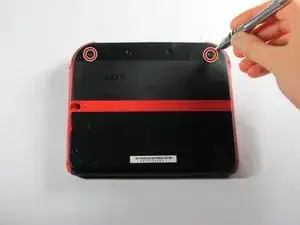
    • Retire los dos tornillos cautivos Phillips que aseguran el panel superior trasero.

    • Los tornillos cautivos no se separan del panel trasero completamente.

  2. cdb3AdyJTrNhIjrr
    cdb3AdyJTrNhIjrr
    okYxlIGDUBKBdGNP
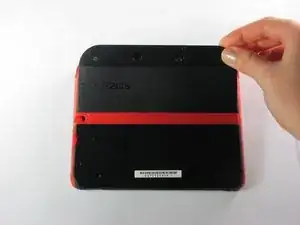
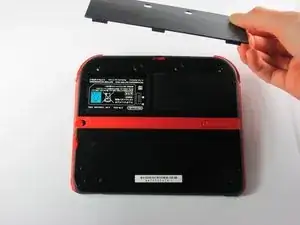
    • Gire el panel posterior superior hacia arriba y hacia afuera para quitarlo.

  3. YA2mNvc2fLpeZ4NZ
    YA2mNvc2fLpeZ4NZ
    yjKMPFAO1SC1LncE
    HRaiAoWcVXEMByll
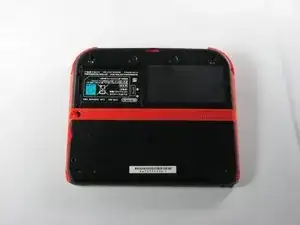
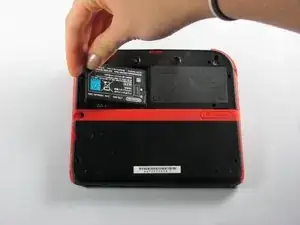
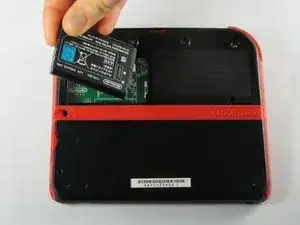
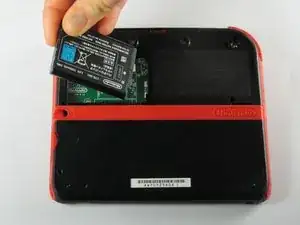
    • Retire la batería de su espacio levantándola del lado más cercano al borde exterior.

Conclusión

Para volver a ensamblar tu dispositivo, sigue estas instrucciones en orden inverso.
Fina Beauchamp

Miembro Desde 12/01/15

2864 Reputación

4 comentarios

The only thing I was trying to figure out is if the bezel came up with the panel, and it’s not clear from these photos. For the record, it does not.

francis deible -

This didnt help my problem

Artemy Matveev -

I don’t know but my 2ds won’t turn on i repetivly press the power button but i charge it and try again but it won’t work help me plz

MATTHEW WINGATE -

maybe its because you did not plug the battery correctly matthew

Ludovic Chartrain -