Introducción

Prerequisito Interno

  1. QNuiLQgFkQq4lHQX
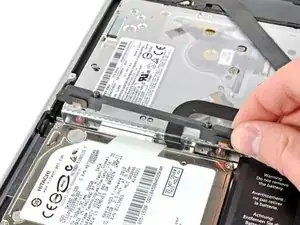
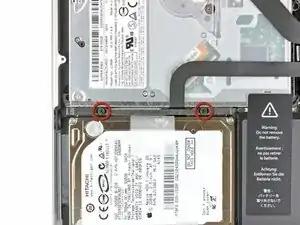
    • Remueve los dos tornillos Phillips que sujetan el soporte del disco duro a la tapa superior.

    • Estos tornillos se mantendrán unidos al soporte de disco duro.

    These were Philips #0 screws in my computer.

    Church Tucker -

    FYI my used Mac didn’t have the bracket or screws. 3D printed the bracket someone did (it’s on Thingiverse), M2x10mm screws were short but worked.

    sbierly -

  2. XoZgBtijMGxLjWhh
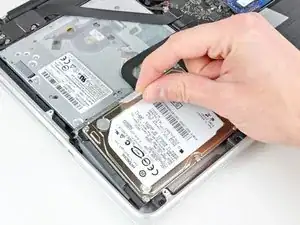
    • Remueve el soporte del disco duro.

    • El soporte de disco duro podría estar firmemente arraigado contra la tapa superior.

    Don't miss this step: I almost did and of course couldn't get the disk out until I looked at the video !

    francistasset -

  3. vsRJ1GZKgUr2LdGt
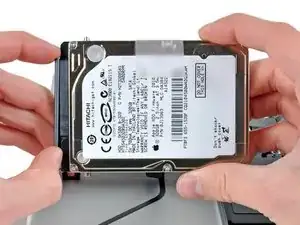
    • Utiliza la lengüeta adjunta para levantar el disco duro de la tapa superior.

    • No intentes aun de remover el disco duro completamente. Esta todavía unido al cable de disco duro.

  4. QIPPI6AGCpJFnMMH
    QIPPI6AGCpJFnMMH
    tgqxo1BVTnH6pBXk
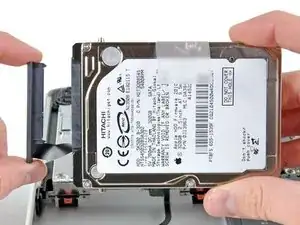
    • Tira el cable del disco duro para separarlo del cuerpo del disco duro

    • Remueve el disco duro.

    The hard drive cable is a recalled part on these machines. You may need to replace it before your drive will be read correctly. The Apple Store will replace your cable for free if it's problematic.

    Eric March -

    dont forget to save the torx T6 screws froom your old hard drive and install in your new one if you are replaceing the HDD at the same time

    Charlie -

Conclusión

Para volver a ensamblar tu dispositivo, sigue estas instrucciones en orden inverso.

Andrew Bookholt

578639 Reputación

0 comentarios