Introducción
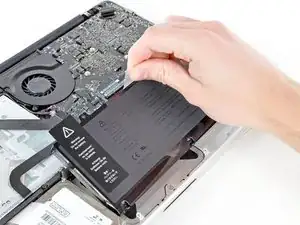
Utiliza esta guía para reemplazar una batería gastada. Si tu batería está hinchada, toma precauciones apropiadas.


-
-
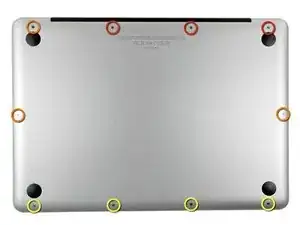
Extrae los siguientes diez tornillos:
-
Tres tornillos Phillips #00 de 14.4 mm
-
Tres tornillos Phillips #00 de 3.5 mm
-
Cuatro tornillos de resalto Phillips #00 de 3.5 mm
-
-
-
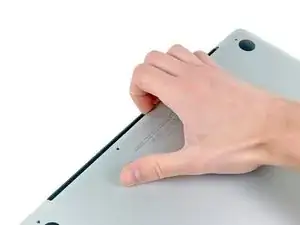
Usa tus dedos a modo de palanca para levantar la tapa inferior del cuerpo del MacBook por la zona del ventilador.
-
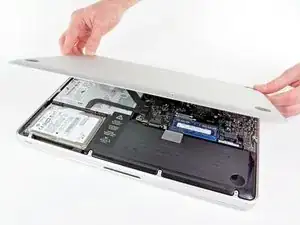
Extrae la tapa inferior.
-
-
-
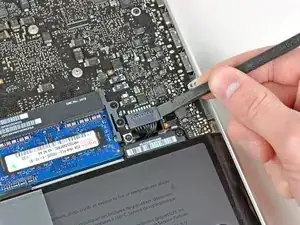
Usa el borde de un spudger para levantar el conector de la batería haciendo palanca para extraer su toma de corriente de la placa madre.
-
-
-
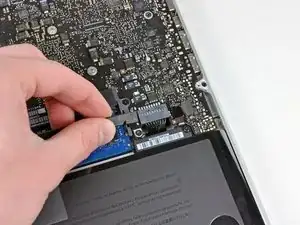
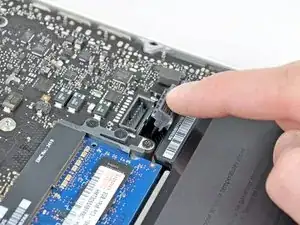
Dobla el cabre de la batería ligeramente para alejarlo de su conexión en la placa madre para evitar que se conecte accidentalmente mientras trabajas.
-
-
-
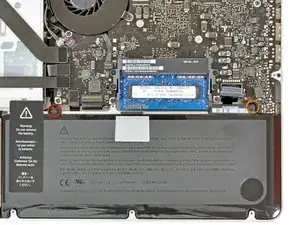
Remueve los siguientes dos tornillos:
-
Un tornillo Tri-punto de 5.6 mm.
-
Un tornillo Tri-punto de 13 mm.
-
-
-
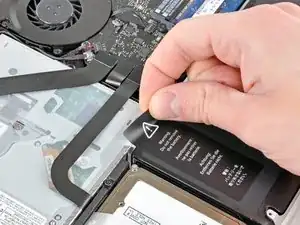
Con cuidado remueve la etiqueta de aviso de la batería de la caja superior entre la batería y la unidad óptica.
-
-
-
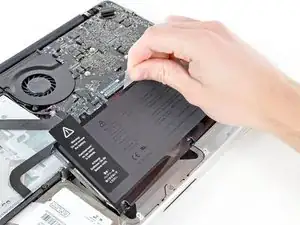
Utiliza la lengüeta de plástico adjunta para remover la batería de la caja superior.
-
Cárgala hasta el 100% y luego sigue cargándola durante al menos 2 horas más. Luego, desenchúfala y úsala normalmente para drenar la batería. Cuando veas la advertencia de batería baja, guarda tu trabajo y mantén tu laptop encendida hasta que se duerma. Espera al menos 5 horas, luego cárgala de forma ininterrumpida hasta 100%.
-
Si observas alguna conducta inusual o algún problema luego de instalar tu batería nueva, podrías tener que reiniciar la SMC de tu MacBook
-
Para volver a ensamblar tu dispositivo, sigue estas instrucciones en orden inverso.

8 comentarios
Many thanks to Phillip and the other contributors who put this guide together. My late 2011 MacBook Battery was headed downhill fast. Having used IFixit before, I headed back to the site and found the parts and help that I needed. My new battery arrived two days after placing the order and I went to work. Everything went smooth as silk(again thanks to some IFixit tools, etc.)and I was up and running in no time. Thanks for this great site and for encouraging do-it-yourself repairs with great guides. Hooray to all who like to fix things and boo to manufacturer who design products that make this difficult. Cheers and keep up the great work. Lowell Allen, May 26.
Thanks a lot, was great help and needed this greatly for one of my macbook.
Best regards from,
Replacing the original battery was easy, but the replacement battery loses a charge very fast.
20 minutes, I’ve lost 11% charge.
Alex -
How much weight can I save by removing the optical drive?
gunes314 -
You can save a lot of weight if lets say your installing a solid state drive or putting in a second hard drive but if you know that you use the CD/DVD disc drive a lot then you might just want to leave the drive alone.
Marshall WahlstromHelgren -
Tip: Use one of those weekday pill holders to have a cheep way to store screws you remove and each day of the week can be for different sizes or parts. It has been handy to have (much less expensive than the magnetic mat.
Robert Wacker -
Hello, where can I buy the screws I need in case I lose one of them?
taylornya -
iFixit sells a kit: MacBook Pro Unibody Lower Case Screw Set
Darrell Johnson -
I have one stripped screw... How opening without drill it?! Any suggestions please?
rodrigosady -
I also stripped a couple screws. I wasn’t able to open it up without drilling. After drilling the heads and removing the cover it was easy to hacksaw the tip and unscrew with a standard driver.
Michael Wilkens -
We have a guide for that!
Cómo quitar un tornillo barrido
Sam Omiotek -
My top tip - make sure you buy good quality Phillips screwdrivers and a magnetic holder. Cheap screwdrivers won’t get the screws undone safely. Without a magnetic holder you have no chance of getting the tiny crews in and out safely.
jeremyyoung -
A good Phillips 00 is your friend here. Also, when reinserting the screws, gently start anticlockwise and you wil feel a click at the start of the thread. This tells you you’re in the right place and less likely to cross-thread through force in the wrong place.
Iain Boyd -
I feel like these are 000 screws. Amazon sales describe them as such and my 000 screwdriver fits better
cam2000deluxe -
Before ordering a new Trackpad remove the existing battery and try clicking the Trackpad. If it clicks OK with the battery out the source of problem is likely a swollen battery, which should to be replaced even if it still works to some degree. From the side of the battery you will likely see the soft part of the battery bulging beyond the hard case.
Patrick Langvardt -
That’s absolutely correct as I can testify. With the battery removed I also adjusted the T6 set screw that adjusts the sensitivity of the trackpad click, evidently someone had cranked mine down tighter than the factory setting.
Gary Register -
Le quatrième paragraphe dans les instructions en français n’est pas correct : ce ne sont pas les 2 petites vis, mais les 7 petites vis qui sont inclinées. Et les 3 grandes sont bien verticales.
Degeorges -
Bonjour ! Merci de votre observation. J’ai corrigé la traduction. iFixit étant un wiki, n’hésitez pas à modifiez si vous remarquez une erreur :) Encore merci de votre attention et à bientôt !
Claire Miesch -
Tip: if you have a magnetic screw mat or similar, lay the macbook over the mat to make sure it catches any screws that may decide to fall of and hide under your table
Moritz -
Funny, it's not her hands that are doing the close ups. :)
Cinemated Man -
What's the difference between the shouldered and non shouldered screws? They look exactly the same to me.
MLNLRD -