Introducción

Esta guía de reparación fue creada por el personal de iFixit y no ha sido respaldada por Google. Obtén más información sobre nuestras guías de reparación aquí.

Usa esta guía para reemplazar la batería en tu Google Pixel 2 XL.

Antes de desmontar tu teléfono, descarga la batería por debajo de 25%. Una batería cargada de ión de litio puede prenderse fuego y/o explotar si se la perfora accidentalmente.

Si tu batería está hinchada, toma precauciones apropiadas. No calientes tu teléfono. Si es necesario, puedes usar un gotero o jeringa para inyectar alcohol isopropílico (90+%) alrededor de los bordes de la tapa trasera para ablandar el adhesivo. Las baterías hinchadas pueden ser muy peligrosas, así que usa protección para los ojos y ten mucha precaución o lleva tu dispositivo a un profesional si no estás seguro cómo proceder.

Para obtener un rendimiento óptimo, calibra la batería que acabas de instalar: cárgala al 100% y sigue cargándola durante al menos 2 horas más. Luego usa tu dispositivo hasta que se apague debido a la batería baja. Finalmente, cargarlo ininterrumpidamente al 100%.

  1. VfgvjYSToxIVyAtc
    VfgvjYSToxIVyAtc
    AGl4aMY5sr2pTh5y
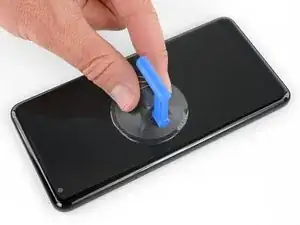
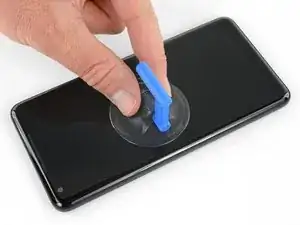
    • Si tu pantalla de cristal está rasgada, coloca cinta sobre el cristal para prevenir lastimarte y que se rompa más. Esto además hace que la superficie sea lisa lo que permite que la ventosa se adhiera.

    • Aplica una ventosa lo más cerca posible del borde del teléfono donde se encuentra la ranura de la tarjeta SIM evitando el borde curvado.

    • La ventosa no se sellará bien en la parte curvada del cristal.

    Shouldn’t this be “As close as possible to the volume rocker”?

    Mihai Turdean -

    Forget about the tiny toy suction cup they provide to battery replacement kits. I used a dent puller from an automotive shop. The smallest they had was just small enough for the Pixel's screen. I still needed to heat the edges with a heat gun.

    Tamás Polgár -

    I wish someone tell me in advance that if I doing this replacement after using phone for a few years it better to have spare "display adhesive" and be ready to follow Google Pixel 2 XL Display Adhesive Replacement

    Original adhesive become dirty with time and fat chances it will be damaged during opening phase. In my case I replaced battery but can't use the phone, as still waiting for adhesive to be delivered

    Maxim Vorontsov -

  2. fXcRgORRaOocDBAL
    fXcRgORRaOocDBAL
    MWjcaBPFxGGrnjoj
    BSwgDksYvoQ2ESAp
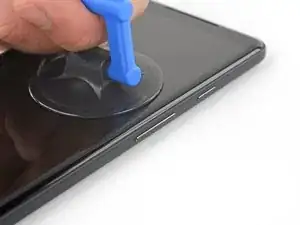
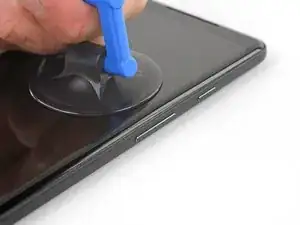
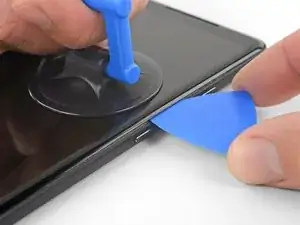
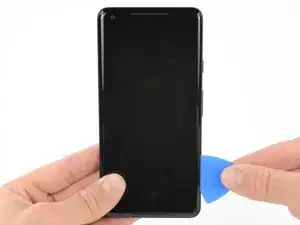
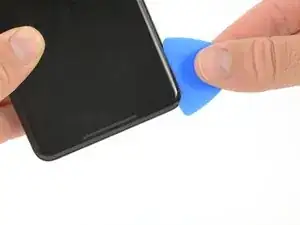
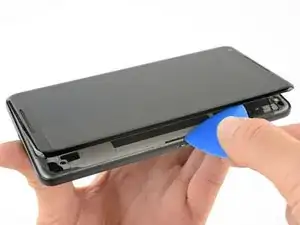
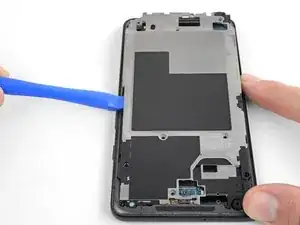
    • Tira de la ventosa con presión constante y firme e inserta una púa de apertura entre el panel frontal y caja trasera.

    • Esto requiere una gran cantidad de fuerza y paciencia. Si tienes problemas, mueve la ventosa y pantalla para ablandar el adhesivo o aplicar calor con una pistola de calor, iOpener o secador de pelo.

    Whatever happened to “Do not heat your phone. If needed, you can use a dropper or syringe to inject isopropyl alcohol (90+%) around the edges of the back cover to weaken the adhesive.”?

    Mike Trieu -

    It is in concern with swollen batteries.

    Fernando Granco -

    I spent an hour trying to get the glass screen apart from the body. I tried the hairdryer etc but made no progress. However, when I used a sucker to gently pull on the glass it was easy.

    Ronald Morrison -

    I used a heat gun, and the metal spatula in the iFixit kit. I broke the screen. Then, continuing with a blue plastic triangle, the screen continued to break. It seems to be quite brittle.

    Rolf Kirby -

    Never use metal tools on glass component

    p43j77 -

    Just broke the screen as well. I’d say heat gun is a must, otherwise it’s really hard to slide pick at the top and bottom without breaking the screen. It’s a very thin line of glass over there.

    Vitaliy Kurokhtin -

    I thought I did this perfectly. I used the iOpener to heat the glue, and the picks to slide around the screen to release the adhesive. I preformed the rest of the repair (charging assembly and the battery) with little issue. Just reassembled and the volume rocker side of the screen is white. I took less care on this side since the instructions said that you didn’t need to worry about how far the pick went in. NOT TRUE! There is a curvature to that edge that will push your pick up into the back of the unprotected display. It clearly doesn’t take much to damage it. I was so careful! F&CK!! I should have just created the e-waste and bought a new device. So mad!

    Eric Marcot -

  3. QTOPQyBykRiqjQAK
    QTOPQyBykRiqjQAK
    CDxGYMHrpLOOunaf
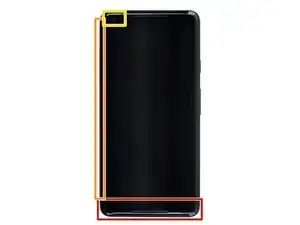
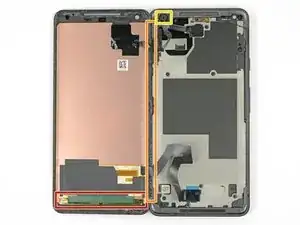
    • En los siguientes pasos, usa precaución adicional en ciertas áreas para evitar dañar el teléfono:

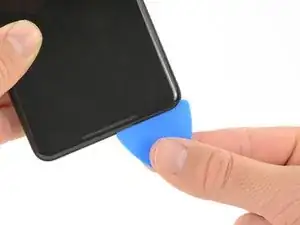
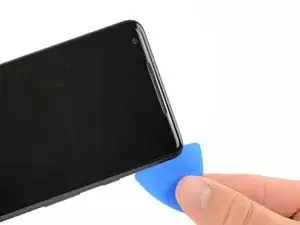
    • No insertes la púa más de 6 mm dentro del borde inferior del teléfono. Si la púa contacta la porción doblada del panel OLED, la pantalla puede resultar dañada.

    • No cortes a lo largo del borde izquierdo; hay cables de pantalla delicados que podrían dañarse.

    • Solo haz cortes muy poco profundos en la esquina izquierda superior. Hacer palanca muy profundamente puede dañar la cámara frontal.

  4. xLtUCqlMgMCHZFxe
    xLtUCqlMgMCHZFxe
    gCWc3YDluWvqMA3I
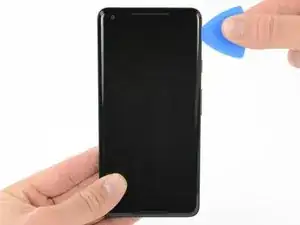
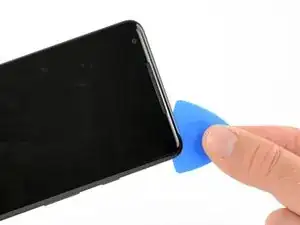
    • Desliza la púa de apertura a lo largo del lado derecho del teléfono para separar el adhesivo de pantalla.

  5. HJxBUHTGYCaUEMQS
    HJxBUHTGYCaUEMQS
    EpZELQbUOyLYSIpD
    hrtcDBTFMwJSwk22
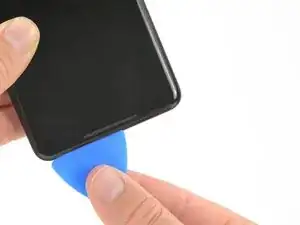
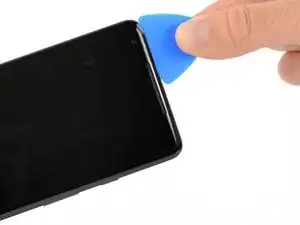
    • En los siguientes pasos, usa el borde plano de una púa de apertura en lugar de la esquina para cortar. Esto ayudará a que no insertes la púa demasiado profundo.

    • Desliza la púa de apertura alrededor de la esquina inferior derecha a lo largo del borde inferior del teléfono.

  6. FALPwgqqRNcJ2t6T
    FALPwgqqRNcJ2t6T
    FZpoOg1sPuaREOrf
    NEToBPfIR5hyYATX
    • Vuelve a insertar el borde plano de la púa en la esquina derecha superior del teléfono y deslízala alrededor de la esquina y el borde superior del teléfono.

  7. 4EUKqNVG5nvQcoIl
    4EUKqNVG5nvQcoIl
    RaxwCuAlKZjuOK5C
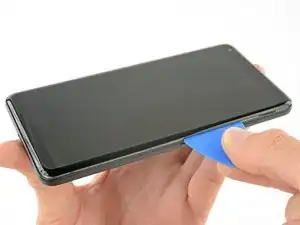
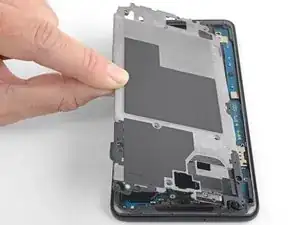
    • Levanta con cuidado desde el lado derecho del teléfono como si abrieras un libro.

    • Si la pantalla no se levanta fácilmente, haz un poco más de palanca para separar el resto del adhesivo.

    • No intentes separar completamente la pantalla aun, ya que los cables frágiles planos la conectan con la placa madre del teléfono.

    • Con cuidado coloca la pantalla de forma plana en la mesa al lado del resto del teléfono, manteniéndola cerca del teléfono para evitar tensar los cables de pantalla y del digitalizador.

  8. sdmUO2JTMAYLK3Oe
    sdmUO2JTMAYLK3Oe
    LPrN5vGxYbRvEwWO
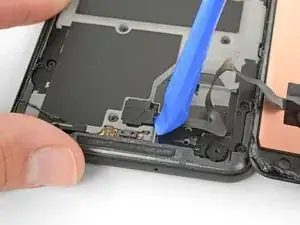
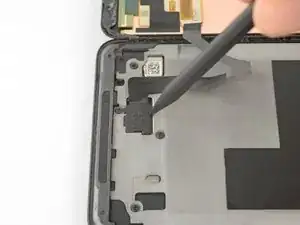
    • Usa la esquina de una herramienta de apertura para hacer palanca en la tapa del conector del cable del digitalizador.

    • Haz palanca con cuidado para evitar dañar el cable por debajo o perder la tapa misma.

    • Remueve la tapa del conector.

    • Asegúrate de conservar este componente para que puedas volver a instalarlo durante el montaje.

    when it comes out, it can pop with some force and go flying. Ensure you have a clear desk/floor so you can find it after it flies away

    hamiltont -

    Lol mine shot off and Ricocheted off the ceiling! Then landed on my shoulder haha

    john murfin -

    It literally popped me right in the middle of the forehead. My wife is still making fun of me.

    Jordan Toews -

    Mine flew off while I was laughing you guys, never too be seen again: (

    Shane Hadley -

    I decided to work outdoors, didn't read any comments first, so when mine flew off I found it five cursing minutes later in a crack on the driveway. Should have read the comments first! Thanks hamiltont. Will now read every comment BEFORE attempting step.

    Loose Drag -

    Confirmed, this $@$* can fly!

    Tamás Polgár -

  9. jOsasCmAgOEPh52W
    jOsasCmAgOEPh52W
    XIXoHbGDCVdLJvNO
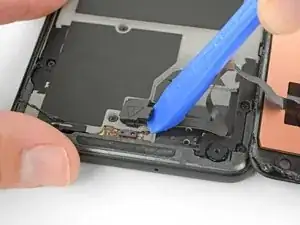
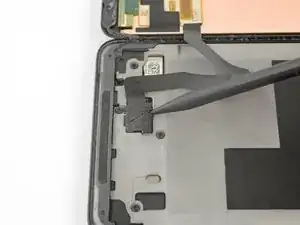
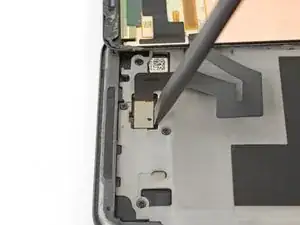
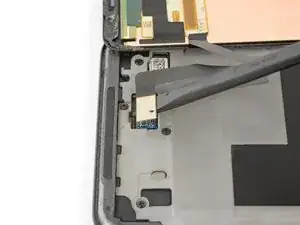
    • Usa la punta de un spudger para levantar el conector del cable digitalizador y sacarlo de su zócalo en la placa madre.

    • Para volver a conectar los conectores a presión como este, con cuidado alinea y presiona en un lado hasta que encaje en su lugar. No presiones en el medio. si es conector está mal alineado, las clavijas se pueden doblar y causar daño permanente.

    • Si alguna parte de tu pantalla no responde al tacto luego de la reparación, vuelve a asentar el conector, asegurándote de que se encaje completamente en su lugar y de que no haya polvo u otra obstrucción en el zócalo.

    This small connector gave me fits getting it located correctly, is there a trick to getting it aligned since it’s difficult to see around edge of the connector?

    Dennis Whitsitt -

  10. LnaLnoeCKPlhbwJM
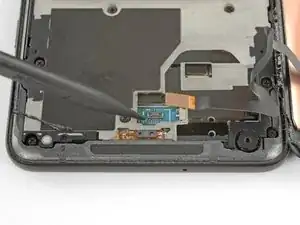
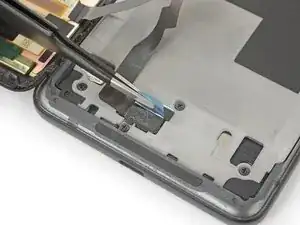
    • Usa pinzas para remover cualquier cinta de la tapa del conector de la pantalla.

  11. ekxkMu5XCABS52ZB
    ekxkMu5XCABS52ZB
    sDtVCGVtvSly6Z3A
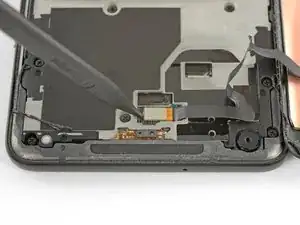
    • Inserta la punta de un spudger en el orificio pequeño en el borde de la tapa del conector de la pantalla.

    • Usa el spudger para levantar la tapa de su zócalo.

    • Retira la cubierta del conector.

    • Asegúrate de conservar este componente para que puedas volver a instalarlo durante el montaje.

  12. f61ekFXtUKT2XXh3
    f61ekFXtUKT2XXh3
    4uEsyCZq2HNlFsWP

    BE EXTRA CAREFUL HERE, and during reassembly! There are 2 itty bitty parts directly under this ribbon cable connector that, if damaged, will render your loudspeaker unusable. The only sure way to fix it if you break it is to replace the motherboard. There are some reports of people being able to solder the spots and shorting it to make it work, and that worked for me for a time, but they’re really tiny (about 0.5 mm) and if you don’t get a secure solder, or if you bleed over, it will also mess up your top speaker.

    Joshua Parnell -

    Saw this comment after I’ve done replacing and sure enough, the loud speaker was broken. The resistor was knocked over but still hanging in place so I just stuck it back and it works for now.

    They are 2 black resistors at the end of the cable’s connector. So follow the above photo exactly and pry the connector from the side, not from the end of the connector like I did

    Tri Nguyễn -

    What wasn't clear to me here (because I didn't put Step 13 together with Step 12, I suppose?) is that if your replacement part came with speaker grills and camera gasket, Step 12 is your final step. You are done, except for replacing the cables and covers, then placing the adhesive strips onto the replacement part and sticking the phone back together.


    I ordered my screen from iFixit and it came with new grills and camera gasket already installed. I was able to use the thinnest strips on the supplied Tesa patch to line the entire screen perimeter piecemeal, then stick it back together like new.

    Loose Drag -

  13. QFfiQcHT5APVG6MV
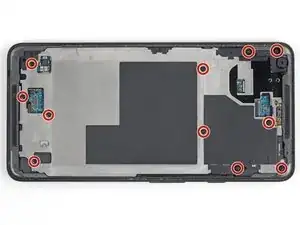
    • Remueve once tornillos Phillips de 3.8 mm que sujetan el marco medio.

    • A lo largo de esta reparación, realiza un seguimiento de cada tornillo y asegúrate de que vuelva exactamente al lugar de donde vino.

  14. kBZdIcRQClaTHxHK
    kBZdIcRQClaTHxHK
    dxX6vpNd51F6y5sm
    KndVwiYC4aGb2TdK
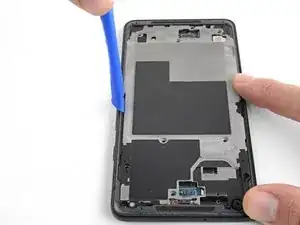
    • Inserta una herramienta de apertura en la muesca en el marco medio cerca de los botones de volumen y levanta el marco medio apartándolo del resto del teléfono

    • Remueve el marco medio.

    How do I reattach the midframe? it seems like there are a lot of tabs that need to be reinserted carefully

    Evan G -

    Slide in the bottom part at an angle in first since it has some tabs. Otherwise it will get stuck halfway on top

    Tri Nguyễn -

  15. QZ1owODRusLZiG1k
    QZ1owODRusLZiG1k
    6Dw5LJ4usfFc2ino
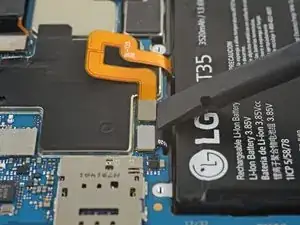
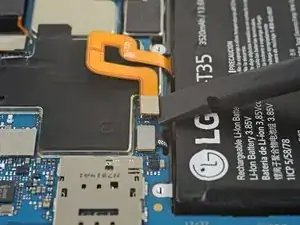
    • Usa el extremo plano de un spudger para desconectar el conector de la batería.

  16. epxPktIQcjAcGIXb
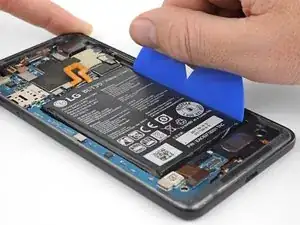
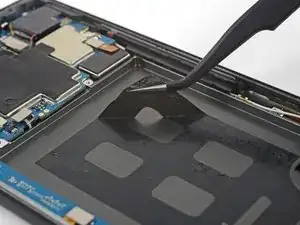
    • Si está disponible, aplica alcohol isopropílico debajo de cada esquina de la batería y deja que penetre durante varios minutos para ayudar a debilitar el adhesivo.

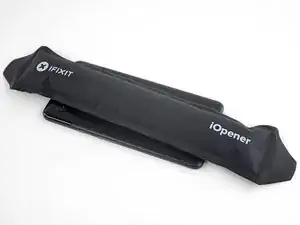
    • Alternativamente, aplica un iOpener calentado en la parte posterior del teléfono sobre la batería durante al menos dos minutos. Recalienta y vuelve a aplicar el iOpener según sea necesario hasta que el adhesivo de la batería esté lo suficientemente debilitado.

    NEVER use a pointed metal tool as shown in the picture in this guide. You can damage the battery, which can cause fire and further damage the device. It is also very easy to damage the mainboard.

    JaL -

  17. oYXaUodH6DZtVbKP
    oYXaUodH6DZtVbKP
    ci3s44FKnYilyDM2
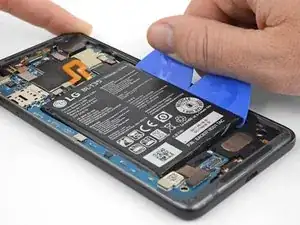
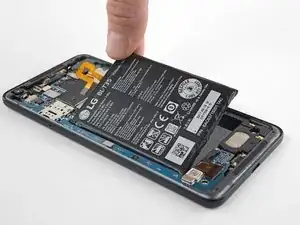
    • Inserta un par de púas de apertura o una tarjeta de plástico a lo largo del borde derecho de la batería.

    • Aplica una presión constante y uniforme para levantar lentamente la batería y sacarla del teléfono.

    • Trata de no deformar la batería durante este proceso. Las baterías de iones de litio de cubierta blanda pueden derramar sustancias químicas peligrosas, incendiarse o incluso explotar si están dañadas. No uses fuerza excesiva ni hagas palanca en la batería con herramientas metálicas.

  18. L2VtREgxSkJLn5EM
    L2VtREgxSkJLn5EM
    Y1AKZTavRAgyshh5
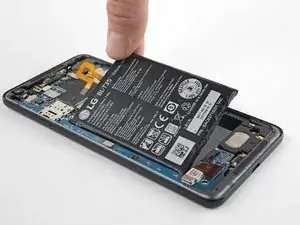
    • Remueve la batería.

    • No reutilices la batería después de haberla retirado, ya que hacerlo es un peligro potencial para la seguridad. Reemplázalo con una batería nueva.

    • Si queda algo de solución de alcohol en el teléfono, límpialo con cuidado con un paño sin pelusa o déjalo secar al aire antes de instalar la batería.

    • Para instalar una batería nueva:

    • Usa pinzas para despegar el adhesivo restante del teléfono y limpia las áreas pegadas con alcohol isopropílico y un paño anti-pelusa.

    • Sujeta la nueva batería conadhesivo precortado o cinta adhesiva de doble cara. Para colocarla correctamente, aplica el nuevo adhesivo al teléfono, no directamente sobre la batería. El adhesivo no debe tocar ninguno de los cables debajo de la batería.

    • Presiona la batería firmemente en su lugar durante 20-30 segundos.

    Wie versiegelt man das Gerät wider?

    aponteignacio -

    I ran into an issue when reapplying the double sided sticky tape and closing everything back up. I forgot that the 2XL has "active edges," where you can squeeze the sides of the phone to activate Google Assistant. I apparently put the glue strips too near the sensors, and they always thought I was squeezing the phone. I had to disable the active edges. I could have opened the phone again, removed the glue, and tried reapplying it, but I don't use the feature much so it was easier to turn it off. But if this is a feature you like, I'd recommend doing more research than I did!

    Jay Hutfles -

Conclusión

Para volver a montar tu dispositivo, sigue los pasos de arriba en orden inverso.

Para un rendimiento óptimo, después de completar esta guía, calibrar tu batería recién instalada.

Lleva tus desechos electrónicos a un centro de reciclaje certificado.

¿La reparación no salió como lo planificaste? Consulta nuestra comunidad de respuestas para obtener ayuda en la resolución de problemas.

Adam O'Camb

Miembro Desde 11/04/15

179525 Reputación

16 comentarios

Just completed this last night. They weren't kidding when they all say the battery is no fun.

I managed to get it, but doesn't mean the old one wasn't bent like crazy when I was done. I was planning on keeping it as a backup since it wasn't bad, but I don't think I would risk it at this rate. Getting a thin stiff plastic to push through the adhesive along with the spudger helped.

There are a lot of components and boards along the edge of the battery. It's hard to pry without touching them. I saw a guide recommend taking the guts out to remove the battery.

One thing I would recommend while you're in there is to replace the thermal paste. Mine wasn't too bad after a year, but I'm sure it won't make a solid and effective cover on the processor to the heat pipe.

Gage Cook -

Can I just use Artic silver MX4 for thermal paste? Or is there a paste specifically for it?

DheerajR -

Arctic Silver should be fine!

Arthur Shi -

Its pretty easy to do if you use the iPhone battery tool/pryer thing!

Warren Binder -

Never again, a nightmare to get it changed out.

Jamal Hussain -

What is the recommended adhesive when putting the screen back on?

Aleksey Khivrenko -

Batteries wear out, that’s a fact of life and should be as easy to replace in a phone like they are in a flashlight. The phone manufacturers just want to sell replacement phones not batteries. They all suck!

Neil Horowitz -

Thanks iFixit team. Can you please sell the battery replacement kit for this phone, as you do for the Pixel XL

Michael Porter -

Hi Michael, we do sell a Pixel 2 XL battery replacement kit! Good luck with the repair!

Adam O'Camb -

Hello

Completed this last night and after reassembly my screen presents horizontal lines all over the right part from top to bottom.

Do you think the screen get damaged during opening ? Or it could be the connector ?

Olivier Maréchal -

Looks like Google made sure that we break the screen if battery replacement is attempted.

Sanjay Babu -

Tip: Be super patient with the battery. Put ~5-10 drops of alcohol on each side of the battery, then wait 5 minutes. Put the opening picks on the right side of the battery and very gently pry up as shown. If the battery starts bending, wait some more. Once you have the picks underneath the right side of the battery, pour another 10 drops of alcohol where the picks and battery meet, and slightly tilt the phone in all directions to allow alcohol to flow under the battery. Wait another 5 minutes. Gradually work the picks underneath and around the sides of the battery, reapplying alcohol and waiting often.

To avoid applying too much alcohol, gently tilt the phone and check the sides of the battery tray. I was able to change the original battery with no damage to the adhesive or bending the battery this way

Patrick -

It went relatively easily, but with patience.

Tamás Polgár -

This repair went a lot easier than I expected. I was very patient when doing it, and honestly felt like I was being slow. My biggest suggestion would be to use lots of heat on the screen. I actually used a hot compress (instead of an iOpener or heat gun) before using the suction to pull up the screen, and it came up very easily. And the plastic picks made separating the screen a cinch. At no point in the process did I feel like the screen would break. But then again, I used a lot of heat and patience because I'd seed that several people had broken their screens.

The funny thing is that I've already replaced the phone with a Pixel 5a, so now, I have a refreshed phone that I don't really have a need for lol. I guess gaining the confidence that I can fix a modern smartphone is plenty

Niels Klassen -

Getting the screen off is scary, managed to do it without breaking the screen, but I recommend buy a screen with your battery replacement xP.

Nick Roy -

For me the hardest part was to remove the glass. If I can give one piece of advice, it is to use plenty of alcohol and heat, while the plastic pick must enter little so as not to damage the display. Following the instructions and with a lot of patience I was able to replace the battery.

Iacopo Mandatelli -