Introducción
Desconectar la batería. Prerrequisito interno.
Herramientas

-
-
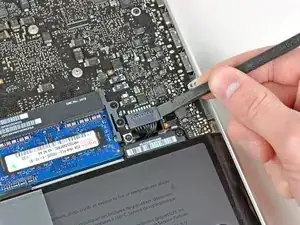
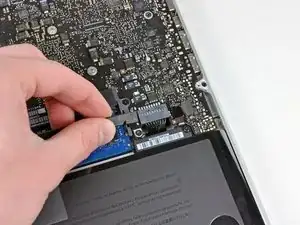
Usa el borde de un spudger para levantar el conector de la batería haciendo palanca para extraer su toma de corriente de la placa madre.
-
-
-
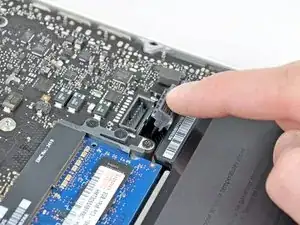
Dobla el cabre de la batería ligeramente para alejarlo de su conexión en la placa madre para evitar que se conecte accidentalmente mientras trabajas.
-
Conclusión
Para reensamblar tu aparato, sigue estas instrucciones en orden inverso.

Is this step of removing the battery connector required?
manodh -
yes - as with disassembly of any electronic component you have to remove any power source. You don't want to accidentally turn the Mac on
khull -
Prying the battery connector off does not take much force. I did exactly what the guide suggested (walked it off back and forth) with the spudger without any problems. Just be very gentle, much like with anything inside laptops, they are very fragile and need to be worked with carefully. A+ instructions, battery replacement was a success.
aekinaka -
Be patient on disconnecting this one. It worked for me step by step, little by little.
Phil Wagner -
I used the nails of thumb and pointer finger simultaneously - worked pretty fine
Reinhard Kaune -