Introducción

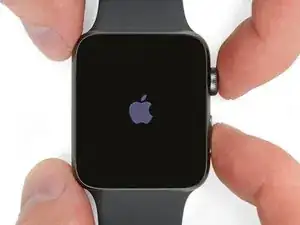
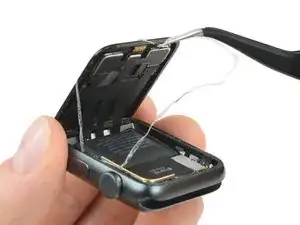
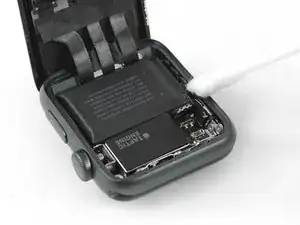
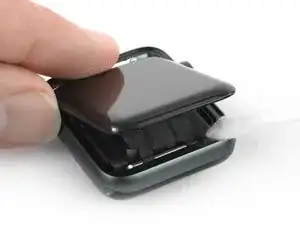
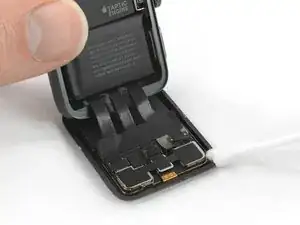
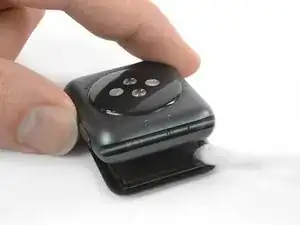
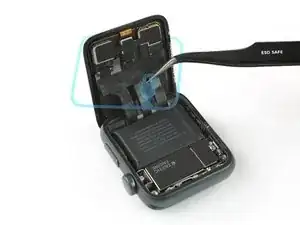
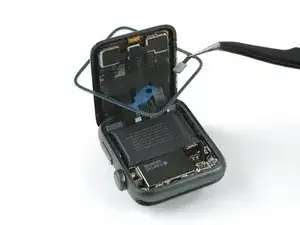
Usa esta guía para reemplazar la junta Force Touch en tu Apple Watch Series 3. Esta guía muestra el procedimiento mientras dejas la pantalla conectada. Si prefieres desconectarla la pantalla o estás reemplazando la pantalla , por favor dirígete a esta guía y reemplaza la junta Force Touch luego de remover la pantalla y antes de reconectar la pantalla nueva. Eso hará que la junta sea más fácil de posicionar.

Si la función Force Touch funciona correctamente y solo necesitas adhesivo nuevo para volver a sellar la pantalla, sigue la [guía|116656|guía de reemplazo de adhesivo].

El dispositivo que se muestra en las fotos de esta guía es la versión solo con GPS del Apple Watch Series 3. Existen algunas diferencias menores entre las versiones con GPS y celular del Apple Watch. Si tienes la versión celular, sigue atentamente todas las instrucciones escritas y presta especial atención a las advertencias sobre las discrepancias entre los dos dispositivos.

  1. 3jETuMAJGuYOyrM1
    3jETuMAJGuYOyrM1
    lENxZXOSlnxhjUKM

    Verify your model. The back of the Cellular model just says GPS, so be sure to check the groves where the watch band goes to determine you model. I made the mistake of just reading the back of the device and since I’d been gifted the device didn’t know it was cellular. Cellular has a different type of touch force gasket, different screen, and different battery connections.

    Ryan Holt -

    From what I just read on Apple, the only differences in watch series 3 is 38mm and 42mm.

    mcr4u2 -

    As a consumer all you need to know are 38mm and 42mm

    Michael Adoga -

    The back will say GPS LTE if it’s the cellular version. If it doesn’t say LTE it is only the GPS version. The displays are different whether or not it is LTE(cellular).

    themepark -

    This alternative method only reboots the watch.

    Gregg Stanley -

  2. dAlO5MlADoI4aHmQ
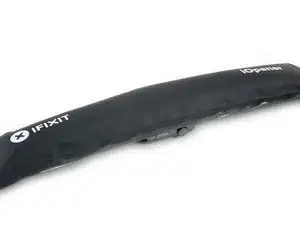
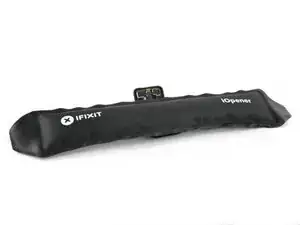
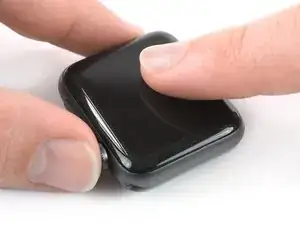
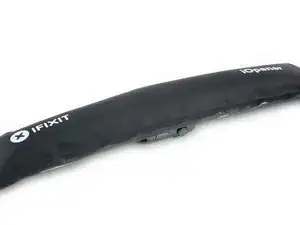
    • Prepara un iOpener (o usa un secador de pelo o una pistola de calor) y calienta la esfera del reloj hasta que esté ligeramente demasiado caliente para tocarla.

    • Deja el iOpener en el reloj durante al menos un minuto para calentar completamente la pantalla y suavizar el adhesivo que lo sujeta a la caja.

    • Es posible que tengas que recalentar el iOpener, o moverlo por la pantalla a medida que las secciones se enfríen, para calentar la pantalla lo suficiente como para levantarla.

    I have heated up the iOpener to 165 degrees and left it on for more than a minute. No way I can lift the screen off with the exact knife. Tried different angles in various places, but no go. I also used a hair dryer un til the watch screen was too hot to touch and even tried a very hard cutting tool blade and also no go. Could n ever get the blade under the face I applied enough force where I could see that the blade left small marks, not very big, but could never get anything to move or lift. What am I doing wrong? I spent 47 years at a global computer company and I am used to taking apart small things and applying force when required. I don’t know what I am doing wrong. Please help me.

    Rafael Blanco -

    Getting the initial gap is not easy. Maybe a playing card could work its way in the tiny gap and cut some adhesive. After that there might be some success with an exacto knife. Or you want to try a piece of aluminum foil (folded for more rigidity) for cutting the adhesive. Be aware of the force touch gasket and that it might get damaged during that procedure.

    Tobias Isakeit -

    I finally used a hot air gun set to 150 deg. C heating up the edges by slowly spinning the watch around before the technique worked. Difficult is the level noted and it’s correct. Finally worked and watch perfectly functioning.

    Chris Giavotto -

    I had to heat the iOpener 2 times and leave it on top of the watch for 10 minutes.

    Axel Trujillo -

  3. TiPIaVjFQZ6OJlTT
    TiPIaVjFQZ6OJlTT
    6hNke1uI3WvUQ3Im
    yys2M1eO4GHOURDx
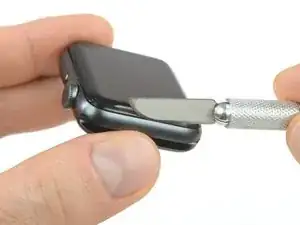
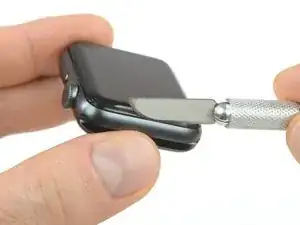
    • Debido a que el espacio entre la pantalla y el cuerpo del reloj es tan delgado, se necesita una cuchilla afilada para separar ambos. Lea las siguientes advertencias cuidadosamente antes de continuar.

    • Protege tus dedos manteniéndolos completamente alejados del cuchillo. En caso de duda, protege tu mano libre con un guante pesado, como un guante de cuero o un guante de jardinería.

    • Ten cuidado de no aplicar demasiada presión, ya que esto podría causar que el cuchillo se deslice y le corte, o dañar el reloj.

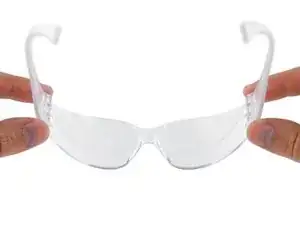
    • Usa protección para los ojos. El cuchillo o el cristal pueden romperse, haciendo que los pedazos salgan volando.

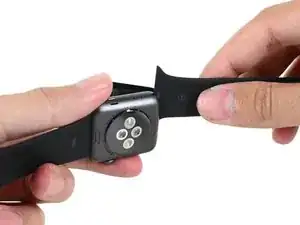
    • No dudes en colocar o quitar la correa del reloj según sea necesario para tener más control al hacer las reparaciones.

    Don’t cut your finger off!

    Mike -

    The Watch 3 stainless Steel has an additional Frame. Where do i have To Open it?

    asteffen@me.com -

    I wore thick gardening gloves just to be safe 😅 and it took a while but the screen did come off.

    Axel Trujillo -

  4. ZkWMSNMJYG6IZhkL
    ZkWMSNMJYG6IZhkL
    NQIDl3ZOwVEC44ZA
    oZFcsBuOlJ6JyOK3
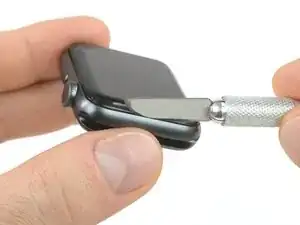
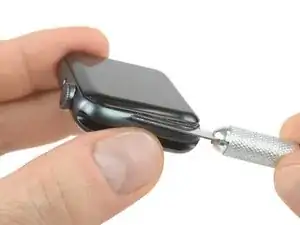
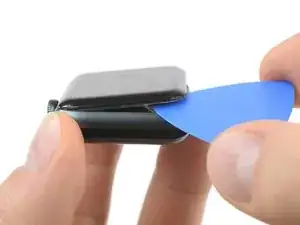
    • Coloca el borde de una hoja curvada en el espacio fino de la pantalla y la carcasa exterior. Comienza en el lado corto de la pantalla, más cercano a la corona digital.

    • Presiona firmemente hacia abajo en el hueco.

    • Una vez insertada, inclina la cuchilla para abrir ligeramente la pantalla.

    • No insertes la cuchilla más de 1/16 de pulgada (~2mm).

    It’s difficult to grip case in a way that keeps fingers safe from the blade but doesn’t hit the side buttons and turn the device on!

    If it’s a struggle to get the display to release, warm case for a few more minutes.

    Kyle Powderly -

    I have tried so may times to get the display to release but nothing works. Should have bought a new watch LOL. Kept the iOpener on 2 times for 10 minutes and it still won't open. There must be a better way.

    Susan E. White -

    Hi Susan,

    if you're struggling to get the adhesive loose enough a hair dryer, heat gun, or hot plate may also be used, but be careful not to overheat the device. The edge should feel slightly too hot to the touch.

    Dominik Schnabelrauch -

  5. AjRJCyCiMOCZ3rad
    AjRJCyCiMOCZ3rad
    ARGTNpwjNblelqda
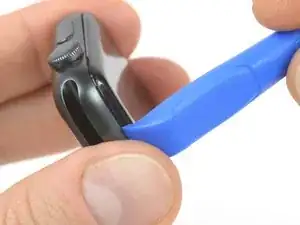
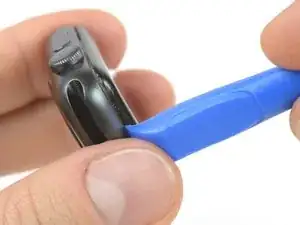
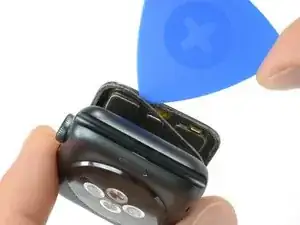
    • Una vez que has abierto un pequeño espacio con la hoja curvada, retira la hoja e inserta el borde mas delgado de una herramienta de apertura en el hueco.

    • Empuja la herramienta de apertura en el hueco. Usando tu pulgar como un pivote para levantar la pantalla abierta un poco más lejos.

    • No intentes abrir o separar la pantalla completamente.

  6. R4FIOpCBksWgGmXY
    R4FIOpCBksWgGmXY
    XUMQGYuCDf4DO6MI
    GWW1SH1I4KqcmfKr
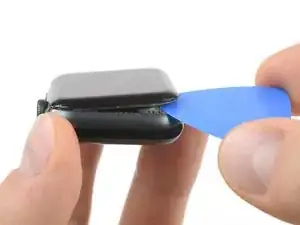
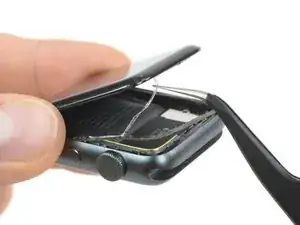
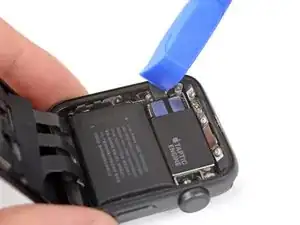
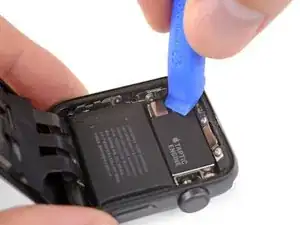
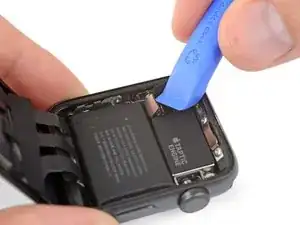
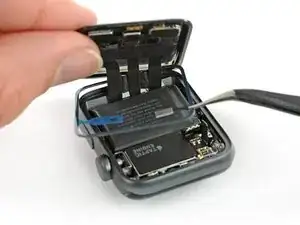
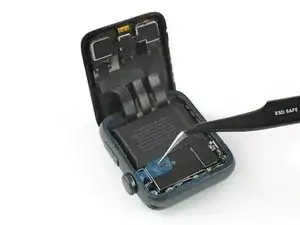
    • Inserta una púa de apertura debajo de la pantalla y separa cuidadosamente la junta de Force Touch de la pantalla.

    • La pantalla iFixit y los kits de reparación de la batería incluyen una junta de reemplazo Force Touch, así que no te preocupes demasiado si la tuya está dañada.

    • De lo contrario, para conservar la junta Force Touch, hurgue con cuidado bajo el borde de la pantalla. Si la junta Force Touch se rompe al levantar la pantalla, o si separa las capas de la junta, también deberá reemplazar la junta Force Touch en sí.

    • Desliza la púa alrededor de la pantalla para separar el adhesivo entre la junta de Force Touch y la pantalla.

    • No insertes la púa de apertura más de 1/16 de una pulgada (~2 mm).

  7. rPZ1tKy2Hq2hQToM
    rPZ1tKy2Hq2hQToM
    vdTqXtcOWsXKFMeh
    x5qVggWBkbWBMNls
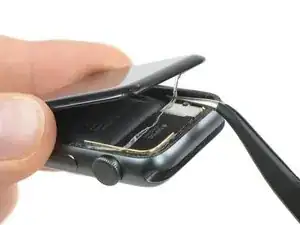
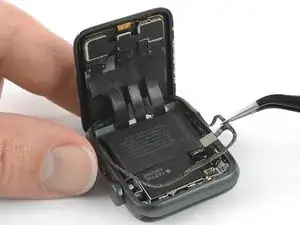
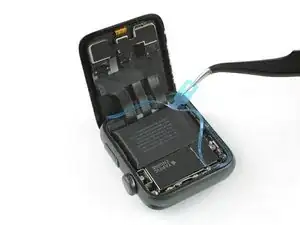
    • Para evitar tensionar los cables de pantalla, no la abras completamente todavía.

    • Abre la pantalla a un ángulo de 45° y usa pinzas para despegar el adhesivo entre la pantalla y la junta de Force Touch.

    • Enrosca el adhesivo alrededor y detrás de los cables de la pantalla para quitarlo completamente.

  8. cugMBWeDFADi12LD
    cugMBWeDFADi12LD
    djolewcDAeMkMcRP
    ul4DLxCvdBhMelEN
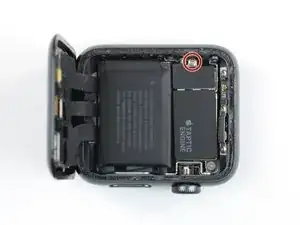
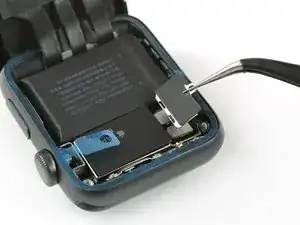
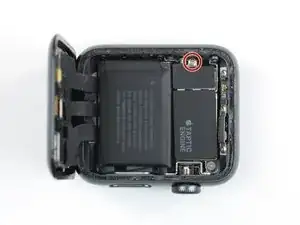
    • Utiliza un destornillador Y000 para quitar el tornillo de tres puntas que sujeta la placa de cubierta de metal.

    • Usa un par de pinzas para remover la tapa.

    • Primero abre la tapa para desenganchar las dos solapas.

    • Luego ciérrela a la mitad para retirarla completamente levantándola.

    Pictures are the GPS version. Cellular doesn’t have the gap and separate removable plate on the “taptic engine” section.

    Ryan Holt -

    What if I’m unable to unscrew the screw? I’m using the right tool, but it just won’t do it. It feels like it can’t “lock in” if you know what I mean in order to be able to get enough grip to turn the screw. Any suggestions?

    Cade Capper -

    Once you have the driver set properly in the screw you have to lean into it to get it to turn. The screw is coated with LockTight.

    mailghall -

  9. HRNgsYrYPAJcwlsc
    HRNgsYrYPAJcwlsc
    VKDLtTSRHNQJi1JT
    oUdPXZdjBXekHycY
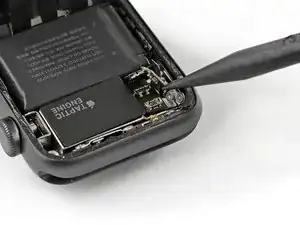
    • En la versión solo GPS es posible desconectar la batería inmediatamente. Para la versión celular/LTE, primero debes desconectar la junta Force Touch y apartarla para desconectar la batería.

    • Desconecta la batería haciendo palanca en su conector hacia arriba.

    • Dobla el conector ligeramente hacia arriba para asegurarse de que no haga contacto por accidente.

    whats does it happen if the connector make contact by accident????

    Daniel Sanchez -

  10. bbM2onmB2PHsKYfa
    bbM2onmB2PHsKYfa
    KDLAGuNfuCLvGwRZ
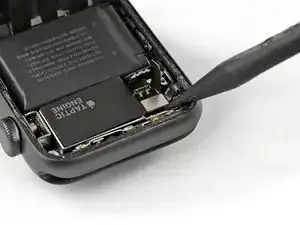
    • Usa la punta de una herramienta de palanca para desconectar la junta Force Touch haciendo palanca en su conector hacia arriba.

  11. hw2hQNsCGsF22CT6
    • Calienta tu iOpener durante otros 30 segundos y colócalo encima de la junta Force Touch para ablandar el adhesivo que se encuentra debajo. (Alternativamente, aplica calor con un secador de pelo o una pistola de calor).

    • Ten cuidado de que los cables de la pantalla no se estiren demasiado.

  12. UZg1DgtB15AHMNTm
    UZg1DgtB15AHMNTm
    EAWk2dCOSpuFbdsU
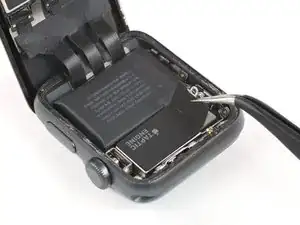
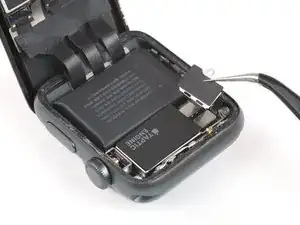
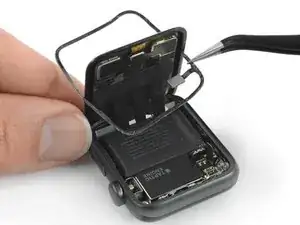
    • Usa un par de pinzas para despegar la junta de Force Touch.

    • Inclina ligeramente la pantalla hacia adelante y mantén la junta Force Touch en diagonal para enroscarla sobre la pantalla y extraerla.

    Does the metal connector for the gasket “clip” in place? Any tips on how to do that?

    Stephen Magladry Magladry -

  13. EV6clyvm4nnDRG2a
    EV6clyvm4nnDRG2a
    FooMhcMLnAdllYNh
    • Limpia bien todos los restos de adhesivo (y cristales rotos, si los hay) de la caja antes de volver a sellar el reloj.

    • Frota la caja con una almohadilla de limpieza, o usa la punta de una herramienta de apertura o un spudger envuelto en un paño sin pelusa o un filtro de café, junto con un poco de alcohol isopropílico (90 % de concentración o más). En un apuro, un Q-tip también puede funcionar.

    • Para quitar el adhesivo cerca de los cables de la pantalla, vuelve a doblar la pantalla sobre el reloj e inclínala con cuidado hacia afuera del marco para que haya espacio para trabajar.

    • No te apresures en este paso. Incluso una pequeña cantidad de residuos puede evitar que la pantalla se adhiera a la carcasa, lo que provocaría que se suelte con el tiempo.

    I recommend removing the screen, getting the new Display Connectors Sticker Set (IF334-009-1 for my 38mm version), and cleaning the housing. Made it much easier to clean and apply the touch force gasket.

    Ryan Holt -

    Which job has the sticker which connects the display flex with the housing? These stickers can‘t found on the series 2 but on the series 3? I damaged one of the two connections when I cleaned the old glue. I‘ve tested 3 force touch cable stickers and none worked…is there any connection? Help

    chrkraemer -

  14. PSYWv5DkUMMZbbHy
    PSYWv5DkUMMZbbHy
    yE3GFXdnO4MwTxWy
    • Si estás reutilizando su pantalla existente, limpia con cuidado cualquier residuo de adhesivo adherido a la parte posterior.

    • Es útil voltear el reloj boca abajo para que la pantalla quede plana. Solo asegúrate de sostener el resto del reloj y ten cuidado de no forzar los cables.

  15. yJt1yXdAHNfclhqc
    yJt1yXdAHNfclhqc
    tnCyOx5ixIvSAUJb
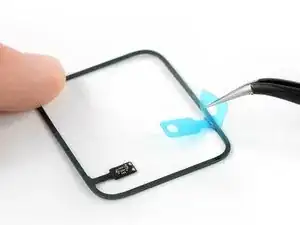
    • Usa un par de pinzas para quitar con cuidado el revestimiento protector azul de la parte inferior de la junta Force Touch de reemplazo, exponiendo el adhesivo debajo.

    • Asegúrate de que las clavijas del conector miren hacia ti o quitarás el forro del lado equivocado.

    My force touch sensor looks different than this one. It says it’s a 38/2/3Cell on the package but it has a different connection than the one in the pictures.

    Jonathan McGahey -

  16. uVdDwcNaN1V3ENGx
    uVdDwcNaN1V3ENGx
    ukOOabAnStkWHTlG
    PUJgUwJigilZ6Rcq
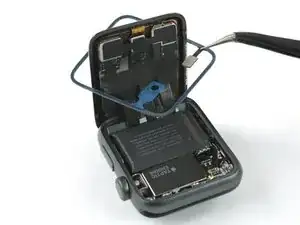
    • Con el adhesivo expuesto hacia abajo, pasa la junta Force Touch sobre la pantalla (si está conectada) y colócala en su posición en la carcasa.

    • Inclina ligeramente la pantalla hacia adelante para que puedas alinear la junta Force Touch con el marco.

    • Asegúrate de que el conector se alinee con su enchufe.

    • Puedes usar el extremo de una herramienta de palanca para presionar la nueva junta Force Touch en su lugar en todo el perímetro del reloj.

  17. rKCLekw3TXuQoZrx
    rKCLekw3TXuQoZrx
    ylXBeUGjQo461hEE
    • Asegúrate de que su pantalla esté conectada antes de volver a conectar la batería.

    • Vuelve a conectar la junta Force Touch y el cable flexible de la batería presionando sus conectores hacia abajo hasta que encajen en su lugar.

    Any tips to seating these connectors? How positive (tight) are the connections.

    Stephen Magladry Magladry -

    You might want to start pushing down the side of the connector that is closest to the cable instead of flat down.

    Tobias Isakeit -

  18. VQQXCAC6Z4cOV3MJ
    VQQXCAC6Z4cOV3MJ
    BlQVWamOkuGE4Upu
    • Utiliza un par de pinzas para colocar la placa de metal que cubre el conector de la batería en su posición original.

    • Instala el tornillo de tres puntos Y000.

    • En este punto, es posible que desees encender el reloj y comprobar si todo está funcionando, antes de sellarlo.

  19. AUN4npMjDHqTwaKx
    AUN4npMjDHqTwaKx
    AUT4UosSOQNNdGCj
    tyywu3rsJ6IDBNJW
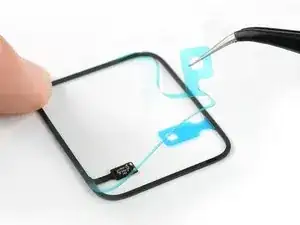
    • Usa un par de pinzas para quitar suavemente el revestimiento protector azul en la parte superior de la junta Force Touch, exponiendo lo último del adhesivo.

  20. Z4wvxjG1Z6JFYFpI
    Z4wvxjG1Z6JFYFpI
    5sqs6H2bbuB53NpW
    uJDQIPawSMJIAFKQ
    • Alinea la pantalla y presiónala firmemente sobre el adhesivo.

    • Para obtener los mejores resultados, aplica calor con tu iOpener, pistola de aire caliente o secador de pelo para ayudar a fijar el adhesivo.

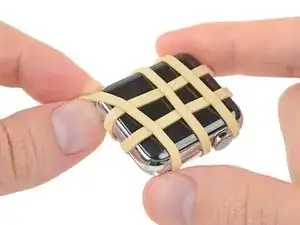
    • Luego, aplica un poco de presión durante unas horas, envolviendo el reloj con un par de bandas elásticas o colocándolo debajo de uno o dos libros pesados.

    • Como verificación final, enciende tu reloj y asegúrate de que Force Touch funciona correctamente: una presión fuerte en la pantalla debería hacer que el reloj vibre y la presión debería registrarse en la pantalla.

Conclusión

Lleva tus desechos electrónicos a un Reciclador certificado R2 o e-Stewards.

¿La reparación no salió según lo planeado? Prueba algunos solución de problemas básica, o busca ayuda en nuestro Foro de respuestas.

Dominik Schnabelrauch

Miembro Desde 23/11/16

169012 Reputación

14 comentarios

very detailed teardown. however seems like the force touch sensor is a bit different on the LTE version.

The LTE parts actually looks similar to the Series 2 ones. Does anyone know if S2 and S3 force touch sensor is compatible to each other?

George -

After replacing the screen and the force touch sensor everything except the force touch works.

I have tested 4 force touch sensor flex…what can it be?

chrkraemer -

Hello I’ve got the same problem. Have you resolved it ?

Perhaps it’s necessary to reinstall watchOS ?

In my case applewatch is locked, to many error code access. And I don’t have iphone brother with me….so I can’t reset applewatch.

Frederic Berger -

Reinstalling watchOS is impossible. Only Apple can do it…

my only problem is still the non-working force touch.

chrkraemer -

Same problem, replaced battery while broke the force touch gasket. After replaced a new gasket, the force touch still not working.

Patrick -

Warning! Inserting the screw to the plate that holds down the battery connector and the GPS antenna was very difficult. I actually lost the screw and thought it was down inside the watch. I removed the battery to see if it shake out. I realized that it was not inside the watch. My last hope was looking on the area rug with a big magnifying glass. Low and behold I found it. Tip! Do not try this repair on a bare wooden tabletop. That tiny little screw will bounce a long way if you drop it. You need to work on a soft rubber mat or on the top of the magnetic parts mat that Fixit sells. After several attempts trying to get that screw started, I still failed. Eventually, I had to use the tweezers from Fixit to hold the screw then dab a tiny bit of Gorilla glue on the Y0000 bit and hold the screw with the pliers and push onto the bit until it dries. Once the screw was glued to the bit I had no problem.

Albert Holler -

Same here, repaired the display and used a new touch sensor, force touch is still not working… any suggestions?

Frank H. -
Did everything but now my touch sensor isn’t working at all …. Heellllppp me?

Junior Tulloch -
Do not buy the repair kit for the apple watch. I bought the repair kit for a broken screen, an new battery and an extra force touch sensor just to play it safe. The adhesive on the force touch sensor does not work. Even after following the instructions of placing a weight (book) on it for several hours the adhesive doesn’t hold. Save your money and buy a new watch.

Robert Gammariello -
Same issue here. My screen separated from the case on its own, guessing I wore it too much! Anyways, I ordered the force touch gasket and when it didn’t work the first time ifixit did send me a new one as it didn’t seem to have adhesive on one side…new one seems to also have this issue. Just save yourself time and a small headache and get a new one.

Andrew Horvath -

For all those with the force touch problem- This may have been caused by damaging the internal force touch ring, located in-between the digitizer/glass layer and the OLED display. Impossible to fix. However, in watchOS 7, Apple removed the force touch feature and replaced it with Haptic Touch, which is basically de-glorified force touch. Just tap and hold gently on the display and it will be triggered, with no need for the force touch ring.

Braden Lambiase -

En el series 3 LTE + GPS, si no se pone eso que le pasa al Apple Watch?

elchidote_chubby -

After replacing the Force Touch gasket will the watch be waterproof enough to swim with/ have the same water resistance as when it was new?

Gibson White -

After a new force touch ribbon and gasket and screen replacement, the screen works, but not force touch or the ability to use the touch screen. It is a display only.

After the first result, I took the new screen off again, disconnected, disconnected the force touch, checked connections, reconnected, put on a new adhesive, and it's still the same result a second time.

Is the problem the force touch ribbon or the new screen? It's possible I suppose it is a bad screen.

Mark Charest -