Introducción
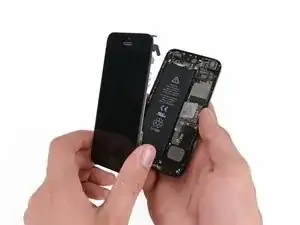
Aprende cómo reemplazar la pantalla de tu iPhone 5 con la cámara frontal, altavoz y la placa LCD ya instalados para una reparación más fácil.
Todo lo que tienes que hacer es quitar la pantalla antigua y cambiar el botón de inicio a la nueva pantalla.
Luego de reemplazar la pantalla, protégela de los raspones instalando un protector de pantalla.


-
-
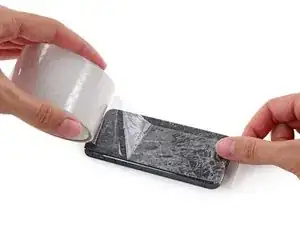
Si el vidrio de tu pantalla está quebrado, contén el vidrio utilizando cinta adhesiva para evitar daños corporales.
-
Superpone tiras de adhesivo transparente sobre la pantalla del iPhone hasta que esta esté completamente cubierta.
-
-
-
Apaga tu iPhone antes de comenzar el desmontaje.
-
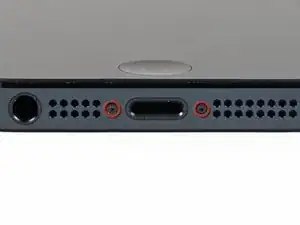
Retira los dos tornillos Pentalobe de 3.6 mm situados junto al conector Lightning.
-
-
-
Independientemente de la herramienta que utilices, asegúrate de que levantes toda la pantalla.
-
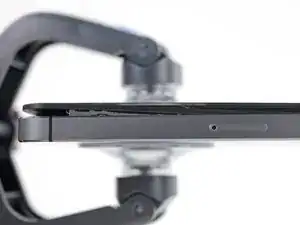
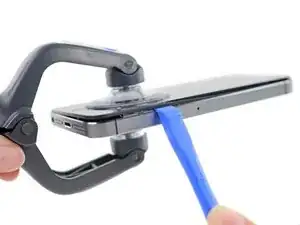
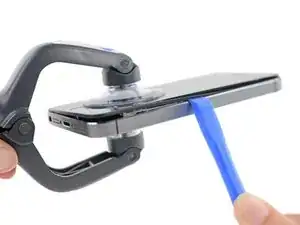
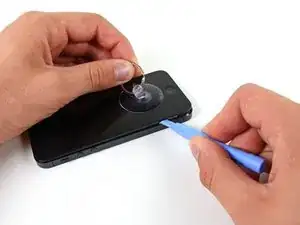
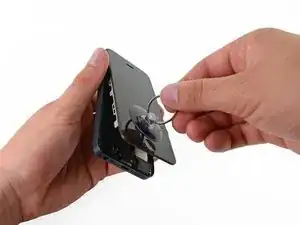
Si el vidrio empieza a separarse del plástico, como mostrado en la primera imagen, utiliza una herramienta de apertura de plástico entre la carcasa de metal del dispositivo y el borde de plástico para separar los clips metálicos de la carcasa.
-
-
-
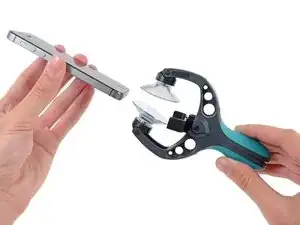
Cierra el mango del iSclack para abrir las ventosas.
-
Coloca la parte inferior de tu iPhone entre las ventosas y contra el calibre de plástico de la herramienta.
-
La ventosa superior debe estar por encima del botón de inicio.
-
Suelta el mango para cerrar los brazos del iSclack. Centra las ventosas y haz presión sobre ellas para sujetarlas al iPhone.
-
-
-
Sujeta firmemente tu iPhone y cierra el mango del iSclack para separar las ventosas, levantando el panel frontal del interior de la caja trasera.
-
El iSlack esta diseñado para abrir tu iPhone cuidadosamente, lo suficiente para separar las piezas, pero no demasiado como para dañar los cables.
-
Despega las dos ventosas de tu iPhone.
-
Salta los siguientes tres pasos y continua en el Paso 9.
-
-
-
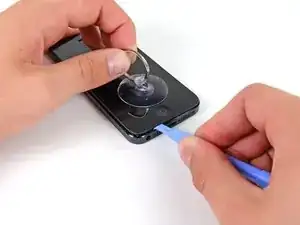
Mientras sostienes el iPhone con una mano, jala la ventosa hacia arriba para separar el ensamblaje del panel frontal un poco de la caja trasera.
-
Utilizando una herramienta de apertura de plastico, empieza a cuidadosamente separar la caja trasera de la pantalla, mientras continuando jalando hacia arriba con la ventosa.
-
-
-
Continúa haciendo palanca alrededor del ensamblaje de pantalla, separando los clips alrededor del lado izquierdo y derecho.
-
-
-
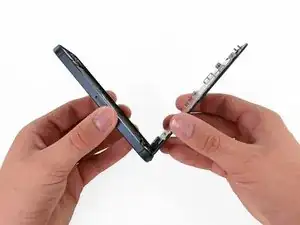
Una vez que los clips han sido liberados en la parte inferior y a los lados del ensamblaje del panel frontal, tira de la parte inferior del ensamblaje hacia afuera de la caja.
-
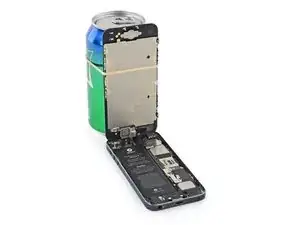
Abre la pantalla hasta formar un ángulo de 90º y apóyala contra algo para mantenerla sostenida mientras trabajas en el teléfono.
-
Agrega una banda elástica para sostener la pantalla firmemente en su lugar mientras trabajas. Esto evitará que ocurra cualquier tipo de esfuerzo en los cables de pantalla.
-
-
-
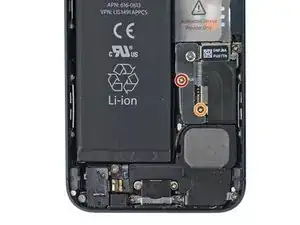
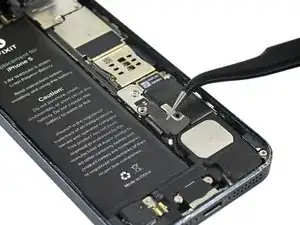
Quita los siguente tornillos asegurando el soporte del conector de batería a la placa lógica:
-
Un tornillo Phillips de 1.8 mm
-
Un tornillo Phillips de 1.6 mm
-
-
-
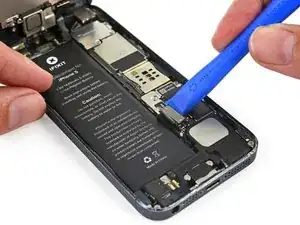
Utiliza una herramienta de apertura para cuidadosamente desconectar el conector de batería de su enchufe en la placa lógica.
-
-
-
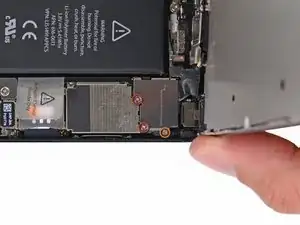
Quita los siguiente tornillos asegurando el soporte de cable del ensamblaje del panel frontal a la placa logica:
-
Dos tornillos Phillips de 1.2 mm
-
Un tornillo Phillips de 1.6 mm
-
-
-
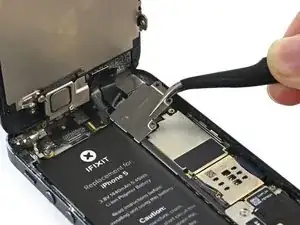
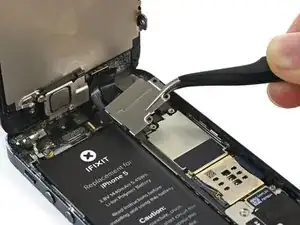
Levanta el soporte de cable de pantalla hacia la batería para desabrocharlo y sacalo del iPhone.
-
-
-
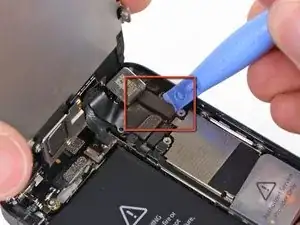
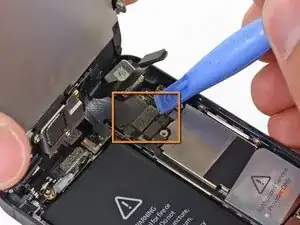
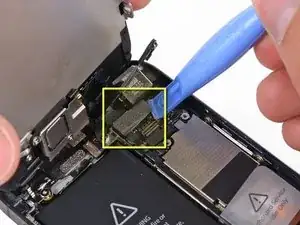
Utiliza una herramienta de apertura de plastico para desconectar las tres cables del ensamblaje del panel frontal:
-
Usa una herramienta de apertura de plástico o una uña para desconectar los tres cables de ensamblaje del panel frontal.
-
Cable del sensor y cámara frontal
-
Cable LCD
-
Cable de digitalizador
-







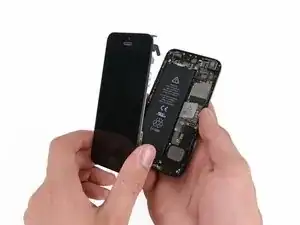


Para reensamblar tu dispositivo, sigue estas instrucciones en orden inverso.

38 comentarios
My brother in-law had water damage to his screen and the carrier was going to charge him and arm and a leg for a new phone so I ordered the complete display assembly from right here on iFixit that came with all the necessary tools. Took me a little over 5 minutes between repairing and chit chat to finish. It was a really easy repair and my brother in-law was never happier to have his phone back at a fraction of the cost the carrier was quoting.
Thanks for your guide for replace new touch screen
i had save one tiny screw from inside assembally :) :) :)
My display didn't shut down when i have a call and i put the phone near my ear! I plug my broken display and it work well but not the new one...please someone help! btw thanks for the guide and for the fast delivery
I know you posted this awhile ago, but if anyone else is wondering, how to fix the issue where the display won't turn off while on a phone call, You MUST transfer over the small plastic retaining brackets from the old display, and put them in the correct position! By correct position, I mean the two small transparent points need to line up with the receptors on your iPhone's front panel assembly (Camera, light sensor, mic).
This one is for Max:
Max, can you explain better what you mean by plastic retaining brackets? I'm about to swap my screen out and I wanna be able to do this
U need to scratch the paint in ur display where the proximity sensors are covered by it. After that use a black marker.

Having completed this repair using the rear camera part from Ifixit I have to comment that the camera is noticeably lower quality. Its not huge - You don't notice it looking at the photos scaled down to fit but viewing one for one there is significant detail lost. My staff member has an Iphone 5 bough at exactly the same time as mine so I was able to take a photo side by side on his and mine after my repair and when you view 1 for 1 pixel in product boxes on mine the text was just a colored blur where on his although you couldn't read the text it was more obviously text. Overall though its still better than having a camera that wouldn't focus at all and being that Apple seem to refuse to supply genuine spare parts (Which there has to be a low against??? - Imagine if a car manufacturer did that) its still good buying one from someone who gives good support. At the end of the day its a phone camera not an SLR and its still better than the older Iphone 4 camera.
matt -
The majority of product manufacturers are not required to provide parts, and apple will fix items under the various warranties it offers. Car manufacturers on the other hand are required to make parts available by law. It is part of the regulation of their industry. They get a lot of protection for their business model, but have some obligations too. It's why the EV1 was pulled, they didn't want to have to make the parts, and why there are so many Delorian parts.
William Leeper -
This is a great guide. However, I'm having a hard time popping the screen back into place. Everything works but I'm afraid of putting too much pressure least I crack it again. Any advice?
amciotola -
To avoid broken screens during reassembling:
Put the hooks of the screen in the right place in the housing, then close it loose, don't press it. Turn your phone upside down with the screen on a very flat surface (e.g. table). Now press the housing on the screen -> no more risk for braking the screen because of inhomogeneous force applied on the glass!
mondbewohner -
I hope folks read this comment before proceeding to attempt a Sleep/Wake button repair on the iPhone 5! Apple has an iPhone 5 Sleep/Wake button replacement program, free, for iPhone 5 devices manufactured through March 2013. See program details at https://www.apple.com/support/iphone5-sl.... Don't do this yourself if you don't need to. It's a difficult repair.
Mark Luscher -
I was willing to add the following important remark on top of this guide but, strangely, it has been refused! Here it is:
---
*Check if your Iphone 5 is eligible to the Apple special program for a free battery replacement (devices sold between September 2012 and January 2013, within a limited serial number range).
* If not, watch the video and use this guide [video|https://www.youtube.com/watch?v=6ogE8USs...]
---
And thus, as my Iphone 5 was eligible, I went to the Apple store of Le Louvre in Paris and the battery has been changed for free instead of 65 euros. Thanks to Mark!
revher -
Hi every one i drop my iphone5s 16gb
I replace 10!new screen but cant back to live i see on the "logic board" where u conect the screen i se damage HOW CANT FIX THAT WHITOUT LOST MA DATA ??? Thaks for anny hellp!!!!!
aliroberto01 -
Steps 12-15 seem to be not necessary for battery replacement. They are not required to remove and replace the battery and they at least DOUBLE the amount of work. Most of the time spent on this process involved working with those tiny screws and maneuvering them in place and screwing them down. Steps 12-15 are three of the five screws that you work with inside.
Also, there should be a note at the beginning of Step 2 that if you bought the iFixit kit that you should go directly to Step 6.
Bob Hatcher -
please wear safety helmet too, integral helmet and cover mouth with an N95 facemask underneath, just in case the battery punctures, explodes, you knock your head back to the wall and slam it back forward hitting the screw in your eye and and inhaling toxic fumes! can never be too careful ;-)
ibisiki -