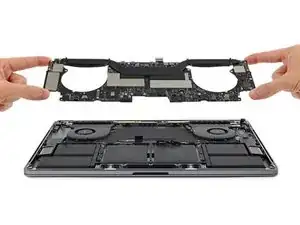
Partes
Conclusión
Para volver a montar tu dispositivo, sigue estas instrucciones en sentido contrario.
Para volver a montar tu dispositivo, sigue estas instrucciones en sentido contrario.
The video is very good although there are a few things that in my mind could be a lot better, first is the availability to view the removal of the Mainboard in Full-screen mode to make it easier to see what is being used and the detail of the board as well. The other is that I use a Fix-it organisation tray for all the screws and bits that come out of the device I’m stripping down, os that I can put the bits back into the device in the reverse order they came out, but in this video that doesn’t happen and the screws start to go back in totally differently, so please if you're going to do this then put the items back in the order they were taken out, and point things like different size screws etc, otherwise, this was helpful, if a little confusing.
Roberto Enrieu -
Thank you, I’ll use your recommendations in future instructions.
Arty -
What happened to the very concise step by step produced by iFixit for the 2016, 15” MBP touch Bar.? Why was it taken down?? This new video. while informative doesn’t compare to the multi step picture guide that was removed. Can someone answer this?
Macrepair SF -
Not ifixit guide but this guys videos are great https://www.youtube.com/watch?v=_mwHGidM...
Peter Newman -
what is max temp used for removing efi chip
jay -