Introducción
La rueda de clic recibe la respuesta de tus dedos y la transmite a la placa lógica.
Herramientas


Partes
-
-
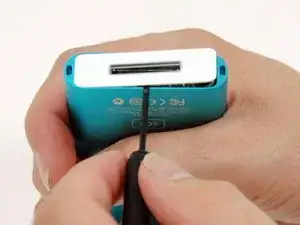
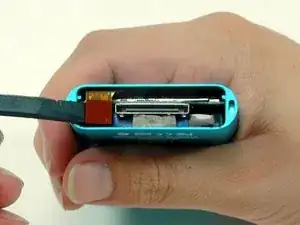
Un pequeño par de pinzas para anillos de presión es la herramienta más fácil para extraer el soporte de retención metálico.
-
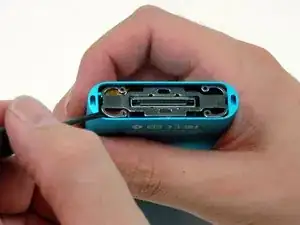
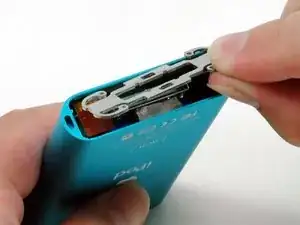
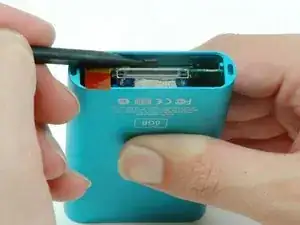
También puedes usar un destornillador de punta plana para extraer el soporte de retención metálico debajo del bisel inferior, como se muestra. Puedes liberar el soporte empujando primero los brazos de metal en las esquinas y luego levantando el soporte.
-
-
-
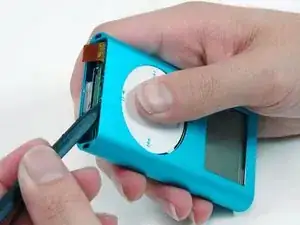
Usa un spudger o la punta de tu dedo para desconectar cuidadosamente la cinta naranja de la rueda de clic de la placa lógica.
-
-
-
Usa un spudger para tirar hacia atrás de la pequeña pestaña de plástico negro que sujeta la rueda de clic en su lugar.
-
-
-
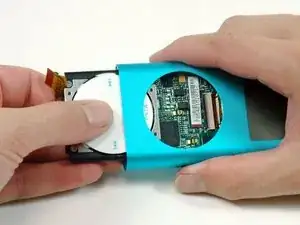
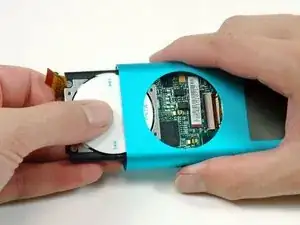
Continúa tirando hacia atrás de la pestaña de plástico negro, usa la otra mano para presionar la rueda de clic y comienza a deslizarla fuera del iPod.
-
Para volver a armar tu dispositivo, sigue estas instrucciones en orden inverso.

8 comentarios
Hi guys. I have problem with ipod mini click wheel. I allreadu order it new one, once i replace it its still problem with them. Once i press menu button or home button.My ipod reset.
See movie below:
http://www.youtube.com/watch?v=2tJurNl5q...
Is this are problem with Click Wheel, or iPod mother board ?
info -
I wonder if you ever got this resolved? I am trying to restore an old ipod mini and have the same issue.
So, as soon as you press the menu or center button, it resets? Sounds more like a logic board problem. (Have you tried restoring it in iTunes?)
yeah, tried that a number of times. also have swapped out the hard drive for a cf card with sd card in it and still get the same issue.
I guess it must be the logic board as I can power it on by holding the menu button. With the original hard drive in, it just does nothing when I press buttons and with the cf card in, it resets as soon as I press anything.
It’s a real shame as its such a nice piece of hardware and I love to restore faulty gear back to working order.
Interestingly enough, it does work fine if I dock it on my stereo or ipod dock and I can move around the menus using that remote. Maybe it will just live in my basement docked on an old speaker I have down there.
If you test the iPod and the click wheel is not working, try putting in the metal bracket, after putting mine in the click wheel started working again, I think that added pressure from the metal bracket is required to get the click wheel to work.
Hi, I just replaced the battery and the sd card of my ipod mini. So fine so good, when I connected it to my laptop I could transfer some music on my ipod. However, after unplugging and starting the ipod my click wheel doesn’t work anymore. No reaction at all. Is there somethibg important I missed when reassembling? I tried to unplug and plug the click wheel back in several times, but with no success.
Again, be mindful and careful of the little white teeth on the underside of the plastic especially the two on the ends of the long sides.
DITOSP -
I used Stanley knife blade to gently prise both top and bottom plastic covers
jimbo20039 -
Like I do for the top, I use a thin plastic guitar pick to wedge between the plastic cap and metal case. Once it’s in, turn the pick horizontal (same as the cap) and work it around until you can get your fingernails under it. Also, I believe this cap is made to go on only one way, so maybe mark which edge is front or back
Ken Mastri -