Introducción

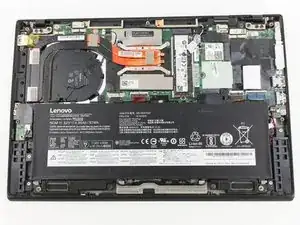
Esta guía ofrece instrucciones para retirar la tapa trasera del Lenovo ThinkPad X1 Carbon 6ª Gen. Esto puede ser necesario si la tapa está rota y necesita ser reemplazada o si se necesita acceder a algún componente interno.

Antes de empezar, asegúrate de que el portátil esté apagado y que la batería este por debajo del 25% de carga.


  1. NFtYMIq2pIVe1NLS
    NFtYMIq2pIVe1NLS
    f3HPZLtAIooGCgUh
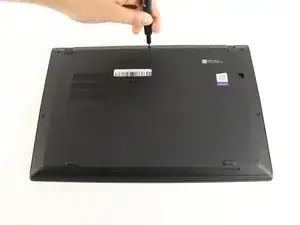
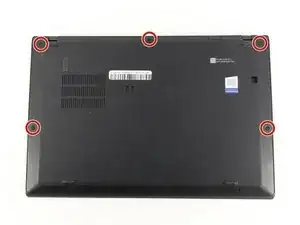
    • Utiliza un destornillador Phillips #0 para desatornillar los cinco tornillos que fijan la tapa trasera al portátil.

    • Los tornillos no se desprenden completamente de la tapa trasera. Afloja hasta que los tornillos estén completamente sueltos.

  2. HKMFZVKrjam3PWWH
    HKMFZVKrjam3PWWH
    6ZP1DMLSvgYbwIhX
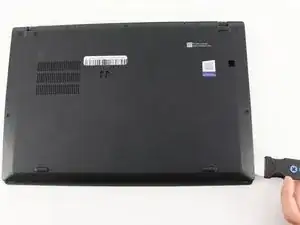
    • Utiliza un Jimmy para levantar la cubierta directamente de los pernos de localización.

    • Aunque en la imagen se muestra una herramienta de apertura de metal, recomendamos utilizar herramientas de apertura de plástico para minimizar cualquier daño cosmético.

    • Remueve la tapa trasera.

    • Si encuentras resistencia al levantar la cubierta, vuelve a revisar los tornillos para ver si alguno de ellos sigue enroscado en el dispositivo.

    I thank you for these instructions. They were quite helpful and I successfully replaced the fan. There is one thing however. Your instructions stated the following: "Be sure to pull on all of the cables at the same time."

    I disagree. One should never pull the wires. I was able to nudge the one part of the connector loose from the other part that it fit into." I then put the new fan in and gently and carefully pushed the connecting parts together.

    Otherwise, your instructions were clear and to the point. Thank you very much

    ALAN L SILBERLIGHT -

Conclusión

Para volver a ensamblar tu dispositivo, sigue estas instrucciones en orden inverso.

Michael Megna

Miembro Desde 23/01/20

1177 Reputación

0 comentarios