Introducción

Usa esta guía para reemplazar la tapa trasera de tu Huawei P9 Lite.

  1. TEq5nM4U4sDEDHNx
    TEq5nM4U4sDEDHNx
    l2sFSkJVVUauFbPP
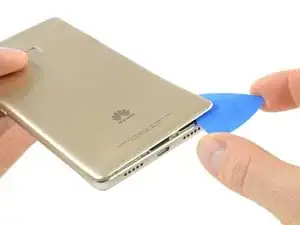
    • Usa una púa de apertura para desenganchar la tapa trasera comenzando en la esquina inferior.

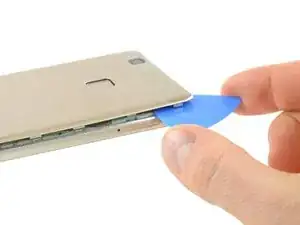
    • Sigue pasando la púa en dirección contraria a la agujas del reloj y con cuidado haz palanca en las lengüetas plásticas para abrirlas una a la vez.

    What could you use instead of an opening pick??

    Alfredo -

    Like, could a guitar pick wor? Or anything else?

    Alfredo -

    A guitar pick will also do.

    Tobias Isakeit -

    what can still be used besides guitar pick

    Tarshia Thompson -

    I had a hard time to open the back cover by opening pick. Then I used little, really little knife at first, and I continue to opening back cover using opening pick.

    Andy B -

    Heating up aroud the finger sensor to loosen the square adhesive tape ..

    Hishamchohan -

    If you do not have any picks, You can also adapt an old credit or utility card by cutting it in to thirds. Then with some fine emery or sand paper, rub a sharp point on the one edge of the card. This will help you get access to the clips that hold the rear cover on. The one i did yesterday had quite a lot of adhesive around the edge & around the finger print sensor. Another tip with an old credit card is to cut it in to narrow strips to insert in to where you have separated the cover from the frame to stop it getting stuck to the adhesive again.

    gazza667 -

  2. HHkVVuLiGxGZQ3JZ
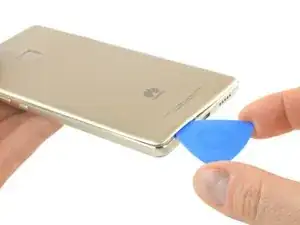
    • Hay un adhesivo por debajo de la tapa trasera que sujeta la batería y la placa de metal en la parte superior.

    • Ten cuidado con el cable flex del lado derecho.

    • Tuerce la púa de apertura para hacer palanca en la tapa trasera y soltarla del adhesivo.

    Most of the adhesive is around the fingerprint cell and on the battery itself. You can slowly pull the back cover from its side but make sure not to break it. Push the mediator or a longer piece of plastic under the back cover to slowly destroy the adhesive.

    Nicolas Combaret -

    Slowly, slowly wins the day. Nicolas is right and comes off a charm. The most nerve wracking part of this longish repair.

    John Nordstrom -

  3. IWjHQtQ5StgPJEIy
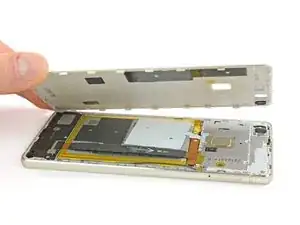
    • Cuando la tapa trasera se libera del adhesivo puedas sacar con la mano completamente.

    Hi! Im so sad! At the begginig of the operation i ve broken the white seal/connector that in one side is connected to the board and the other side is "glued" to the battery. Can someone help me? how can i solve this?? There is no image displayed on the screen. but there is vibration, sound, notifications... can someone help me please???

    Diogo -

    What you broke is handling the NFC, and doesn’t have anything to do with the display. You probably damaged the ribbon right below the battery, since that’s what links the display to the motherboard.

    Polaris -

    Oups ! L’antenne NFC était solidement collée à l’intérieur de la coque et j’ai donc déchiré sa nappe en ouvrant la coque. Heureusement, je n’utilise pas les fonctions NFC et, à part cela, tout a l’air de fonctionner normalement.

    Michel Orban -

Conclusión

Para volver a ensamblar tu dispositivo, sigue estas instrucciones en orden inverso.

Dominik Schnabelrauch

Miembro Desde 23/11/16

168982 Reputación

0 comentarios