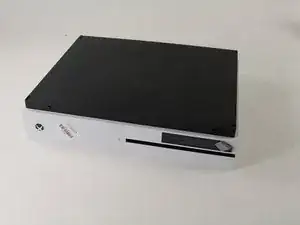
Introducción

Así que confirmaste que tu Xbox One S no puede conectarse a ninguna fuente WiFi, pero otros dispositivos sí. Sigue estas instrucciones para reemplazar la tarjeta de Red WiFi

  1. AQtIBB1ZGqHTvNg4
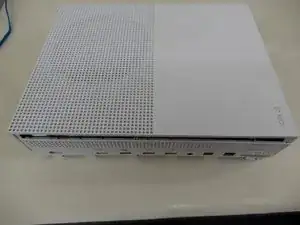
    • Voltea la Xbox One S de manera que el fondo de la cubierta mire hacia arriba

  2. cI432T5plYCpwsEg
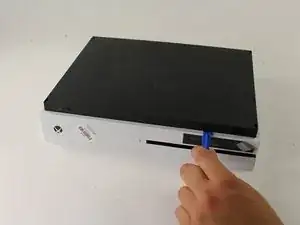
    • Empieza a trabajar en la carcasa en la parte trasera (donde se ubica el sticker de garantía). Inserta el abridor de plástico en el espacio entre el fondo de la carcasa y el lado superior rallado. Luego busca en medio los clips que sostienen la carcasa.

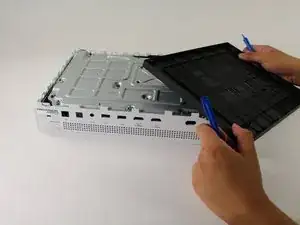
    • Usa el abridor para abrir los clips (valga la redundancia). El mejor método es hacer palanca para separar la cubierta negra del fondo.

    • Escucharás clics cuando estés abriendo la carcasa. Podría ser bastante difícil quitar la cubierta del fondo.

    • Es posible que los clips se rompan cuando quites la cubierta del fondo

    • Recomendamos empezar en una esquina y deslizar el abridor a lo largo de los ejes de la Xbox One S. Una vez que los clips se abran puedes levantar la cubierta para buscar los clips que faltan.

    Be careful not to damage the pairing button on this part

    David -

    Important!!

    You've to start from the back corner where is the information label, because there is a main clip behind a warranty sticker

    Cristian Ramirez -

    They should add this to the guide! I didnt know that, and did some minor damage to the bottom piece where that main clip is.

    I dont mind because it's my own Xbox, but what if it belonged to a customer?

    Charles Jackson -

    They should add this to the guide! I didnt know that, and did some minor damage to the bottom piece where that main clip is.

    I dont mind because it's my own Xbox, but what if it belonged to a customer?

    💯% same opinion!

    profnussecke42o -

    This was hard! I tried using plastic pry tools, but they did not work. A metal tool did, but make sure to watch a video or two, to see what you actually are dealing with. After the videos it went quite smoothly.

    Peterdk -

    I legitimately cannot open the case where the warranty sticker is, ive tried everything, im resorting to a fork to try and open this

    Sohail ツShah -

  3. DGFtVxEdoZKRdLMd
    • Una vez que todos los clips estén abiertos, retira el fondo de la carcasa

  4. GeIOPswgPOYsuGeJ
    GeIOPswgPOYsuGeJ
    uITOYPJDbxUgf4Lc
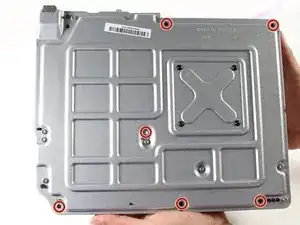
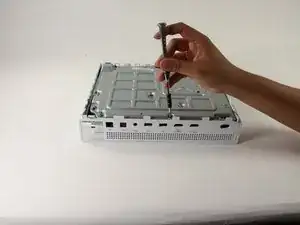
    • Usa un destornillador Torx T10 de seguridad para retirar los seis tornillos de 50 mm de largo etiquetados de F1 a F6 de la carcasa metálica

    My F3 isn't coming out. The screwdriver isn't sitting tight like it is for the other ones. Any idea on how to fix that?

    ben mccord -

  5. 3AbSAfsoTxUrMeTi
    3AbSAfsoTxUrMeTi
    wudY36aHJeyT6WjV
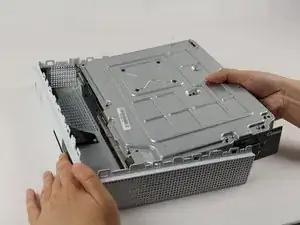
    • Usa el método adecuado para separar suavemente la carcasa interior de la cubierta exterior blanca

    • Haz palanca en los lados de plástico blanco hacia afuera en la parte trasera para separarlos del protector de E/S de plástico

    Essential tip: be sure to slide the metal housing backward, away from the from of the case as pictured above, rather than upward. If not, you can easily break off the teeny momentary switches on the IR blaster board!

    Mark Ross -

    “appropriate method is not descriptive like Mr. Ross’s comment. The original poster should edit the description to ensure people do in fact remove the box from the case appropriately. I would also add arrows to the picture.

    Ryan A -

    ____________⬆️

    ↖️Yes! I see it the same way!↗️

    ⬅️Arrows are always a good thing!➡️

    ↙️Can't do anything wrong with them! ↘️

    ____________⬇️

    😅😅

    profnussecke42o -

  6. SKvHlGkJOM6DRRZu
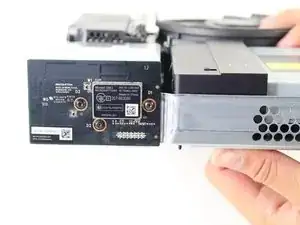
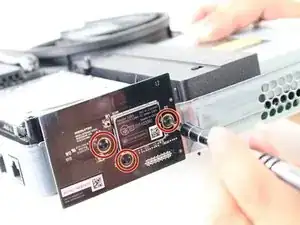
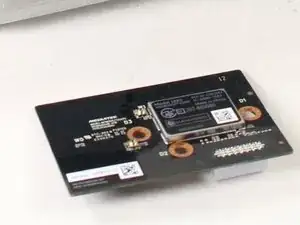
    • Busca la tarjeta de red WiFi en los lados de la carcasa interior. Debería estar al otro lado del disco duro.

  7. lfKmfqHhRWbCpaZb
    • Retira los tornillos Torx T8 con círculos naranjas alrededor (debería de haber 3).

    • Después de retirar los tornillos, desconecta gentilmente la tarjeta de red WiFi .

    These are T8 screws. If you’re surprised by that, having only seen a T10 in the parts list for this fix, that makes two of us :(

    Bill Weiss -

Conclusión

Para reensamblar tu dispositivo sigue estas instrucciones en sentido inverso

Victoria Law

Miembro Desde 26/04/17

895 Reputación

5 comentarios

The T10 is too small for the WiFi card what should I use

Joe Smith -

T8 Torx Bit Screwdriver

Sebastian Rosso -

How long are the 15 mm screws supposed to be?

Natalie G -

15 mm long hense the name

?

Ethan Jones -

So I have replaced the Wi-Fi card from the Wi-Fi I bought from ifixit and my console cannot still connect to the Wi-Fi but my other devices can any help?

Noel Sappor -