Introducción

Requisito interno.

  1. W2HnnXkZIR6pR4XO
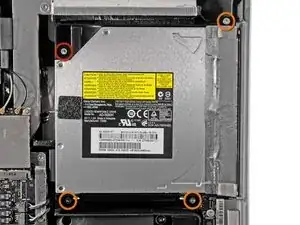
    • Retira los siguientes cuatro tornillos:

    • Un tornillo Torx T10 de 9,3 mm con cabeza grande

    • Tres tornillos Torx T10 de 9,3 mm con cabeza de tamaño normal

    The 4 srews are equal

    hybanibienen -

  2. HAGGY2uvcgBFnouq
    HAGGY2uvcgBFnouq
    ksARRyrLEb23C1yO
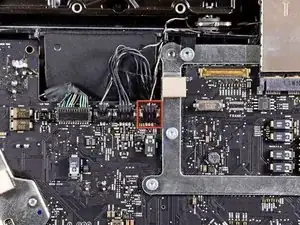
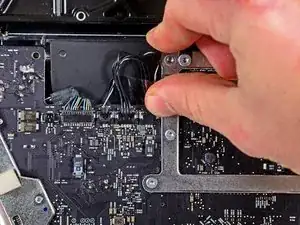
    • Tira del conector del sensor térmico de la unidad óptica hacia el borde superior del iMac para desconectarlo de su zócalo en la placa lógica.

    No need to do this! Just gently pull up the felt-pad sticky on top of the thermal sensor (looks like a tiny circuit board), then (again gently) peel the thermal sensor off the ODD. Leave it hanging while you remove the ODD and replace it with the SSD, then just put the thermal sensor covered by the protective felt-pad back onto the SSD enclosure.

    cdansmith1 -

    I agree with cdansmith1, above.

    I had removed the sensor completely. Booted up and the fan was like a jet engine - 4200rpm! I opened up the mac again to check the LCD thermal sensor cable was connected properly (as warned in Step 8). It was.

    So, I simply used the spudger to peel off the felt sticky pad from and then the optical drive sensor too from the drive I'd taken out. Stuck the sensor onto the SSD using the same sticky pad, plugged it back into the original socket. Bingo. Booted up and everything was back to normal.

    Monkeyrebirth -

  3. SLLZA2rOC2L1QekO
    SLLZA2rOC2L1QekO
    hgqZm4hp1yuxvlvV
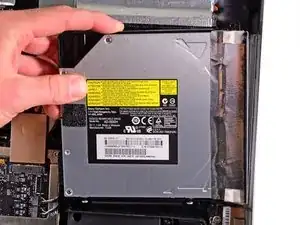
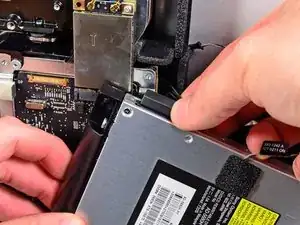
    • Levanta el borde interior de la unidad óptica y maniobra tu conector más allá del marco de la GPU conectado a la placa lógica.

    • Retira con cuidado la unidad óptica de sus clavijas de montaje en el lado derecho de la carcasa exterior para tener espacio para desconectar el cable de la unidad óptica.

    • Deja que la unidad óptica cuelgue mientras desvías el conector del sensor térmico de la unidad óptica de detrás del disipador de calor de la GPU.

    this part is complicated because the wire is very delicate. when you try to extract it passing through the others elements this wire trap it very easily on the other elements of the logic board

    Cristian Pizarro -

  4. B1o1YbuPD3G5QU4d
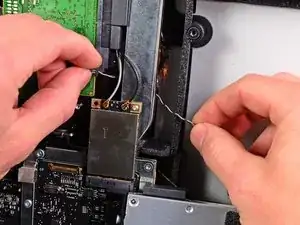
    • Desconecta el cable de la unidad óptica tirando de su conector para sacarlo de la unidad óptica.

    • Retira la unidad óptica del iMac.

    • No olvides mover también el sensor térmico de la unidad óptica a la carcasa cuando instales la segunda unidad de disco duro.

Conclusión

Para reensamblar tu dispositivo, sigue las siguientes instrucciones en orden inverso.

Andrew Bookholt

578639 Reputación

0 comentarios