Introducción

Esta guía se usa como prerequisito interno.

  1. MZPUUJVPxxANUeoT
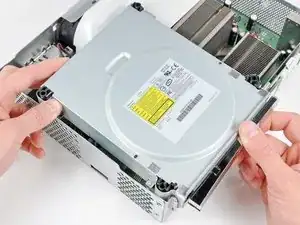
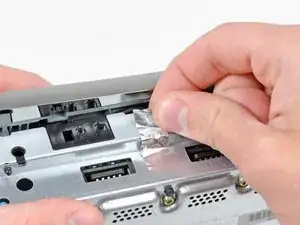
    • Quita la cinta de metal que sujeta la unidad óptica a la carcasa de metal.

    Does anyone know if the Silver Tape is Lead Tape?

    Sean -

  2. ZtSZCTiWnI1mFySC
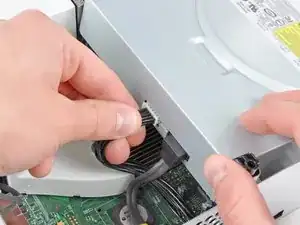
    • Levanta ligeramente la unidad óptica para poder acceder a desconectar los conectores SATA y de alimentación localizados en la parte trasera de la unidad óptica.

    • No intentes quitar la unidad óptica completamente aún. Dos cables aún la conectan con la placa base.

  3. aP5BgixloKHsaQOB
    aP5BgixloKHsaQOB
    bFYsJNjL6UUJtumE
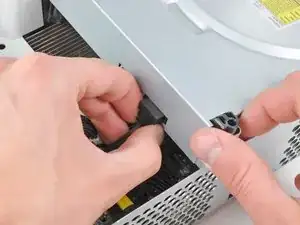
    • Agarra el conector de alimentación por sus cables y tira recto hacia afuera de su zócalo en la unidad óptica.

    • Desconecta el conector de datos SATA de su zócalo en la unidad óptica tirando de manera recta.

    I found the power cable to be very tough to get out, at least it is the first time doing this.

    Nick Flacco -

  4. NlR5YgLZKUOY6y2G
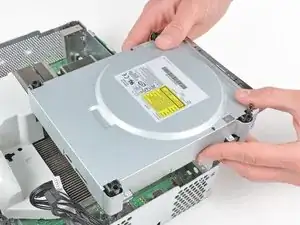
    • Saca el conjunto de la unidad óptica de la carcasa de metal.

    Be careful not to lose or break the two teeny metal clips securing the optical drive assembly snugly to the metal casing on either side of the drive's front face. I used a spudger to press in the topmost tines on these clips because they were catching on the drive and bending up. The clips should stay on the metal housing, not come off with the drive.

    Vaughn Baker -

Conclusión

Para volver a ensamblar tu dispositivo, sigue estas instrucciones en orden inverso.

Walter Galan

685928 Reputación

0 comentarios