Introducción
Use esta guia para reemplazar la tapa inferior.


-
-
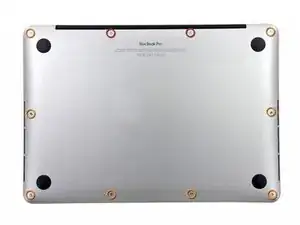
Quitar los siguientes diez tornillos que unen la tapa inferior con el cuerpo:
-
Dos tornillos Pentalobe P5 de 2.3mm
-
Ocho tornillos Pentalobe P5 de 3.0mm
-
-
-
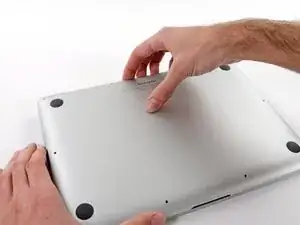
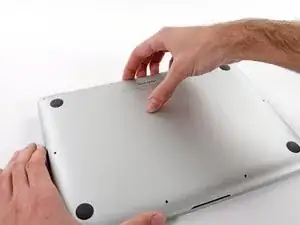
Introduce los dedos entre el cuerpo y la tapa inferior.
-
Tire suavemente de la tapa inferior.
-
Retire la tapa inferior y déjela a un lado.
-
-
-
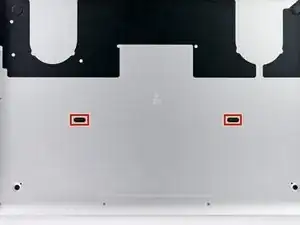
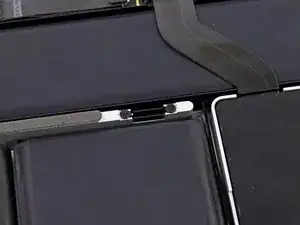
La carcasa inferior está conectada a la carcasa superior en el centro, con dos clips de plástico.
-
Conclusión
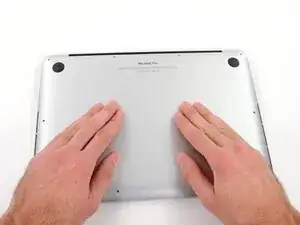
Para volver a ensamblar tu dispositivo, sigue las siguientes instrucciones en orden reverso.

If don’t have one of those neat project mats, then you can use small pieces of flattened blu-tack to hold the screws. If you arrange them in the shape of your mac book cover, and put the screws down methodically, you can get a one-to-one mapping of the screws to the correct screw holes.
Toby Thurston -
Or you can use an ice tray where you put the screws and the parts in separate bays in the same order as they come in the instructions.
timofej.se -
This is great! I used a small magnetic white board, and wrote on it to identify the parts as I went. This whole process, from the fast shipment to the great instructions to the complete, high quality, tool kit has been great. I’m typing this comment on my resurrected laptop. Thank you! Sue
Susan Greer -