Introducción
Esta guía te muestra cómo reemplazar la tapa trasera de tu Huawei P10
Herramientas


-
-
Apaga el teléfono.
-
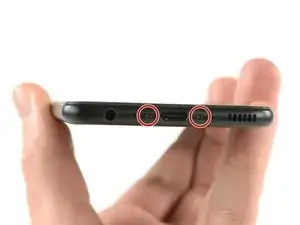
Quita los dos tornillos Pentalobe P2 en la parte inferior.
-
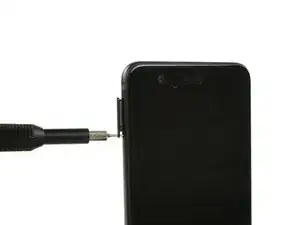
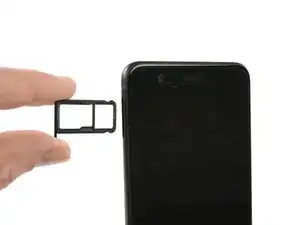
Quita la bandeja de tarjeta SIM.
-
-
-
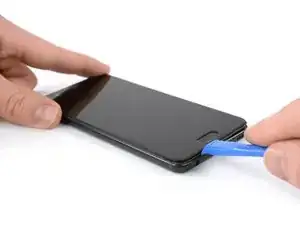
Introduce una herramienta de apertura de plástico entre la pantalla y la carcasa comenzando en la parte inferior de tu teléfono.
-
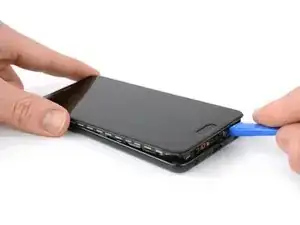
Levanta con cuidado la pantalla con sus partes fuera de la carcasa.
-
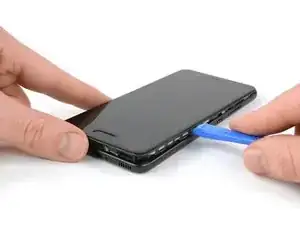
Después de hacer palanca en el extremo inferior, usa la herramienta de apertura para abrir las abrazaderas en ambos lados.
-
-
-
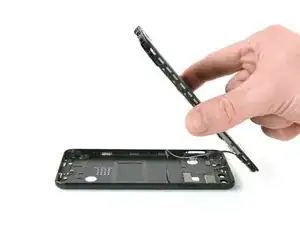
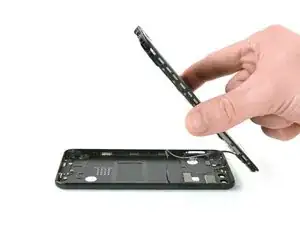
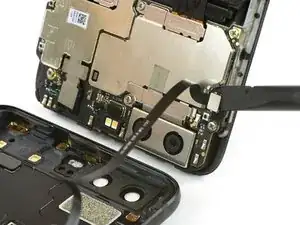
Abre el teléfono hacia atrás.
-
Usa un spudger para desconectar el cable flexible del botón de volumen y encendido.
-
Conclusión
Para volver a ensamblar tu dispositivo, sigue estas instrucciones en orden inverso.

Das Honor 9 hat an der Unterkante keine Schrauben.
Wie ist das Honor 9 zu öffnen?
Michael Tuschek -
Vielleicht beantwortet diese Anleitung deine Frage ;)
Tobias Isakeit -
Hi, my P10 does not have screws, just two tiny holes. Do I push in here to unfasten? Einar, Norway
Einar Ryvarden -
Hi Einar Ryvarden,
in case you bought a used or refurbished phone, someone might have forgotten to put them back in. Since you have holes at the bottom edge next to the charging port this is likely. You can try to start with step 2 and see if you can lift the phone assembly (don’t forget to remove the SIM tray first). As far as I know there is no version of the regular Huawei P10 with no screws. However you there are none in the P10 lite and in the P10 plus, maybe one of the opening procedures for those phones might help you.
Dominik Schnabelrauch -