Introducción

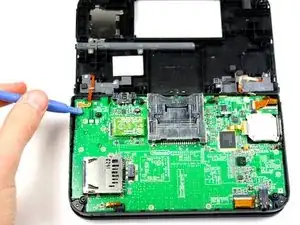
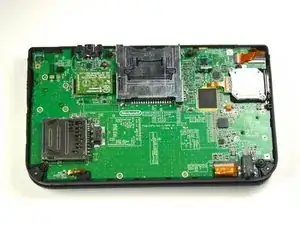
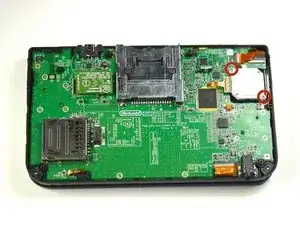
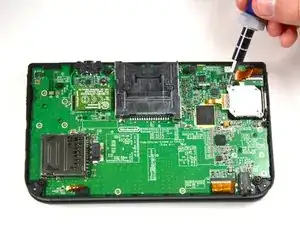
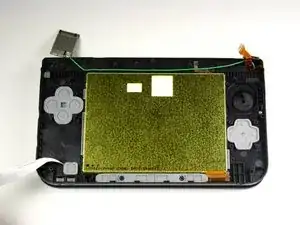
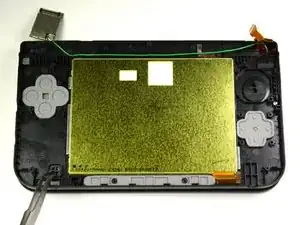
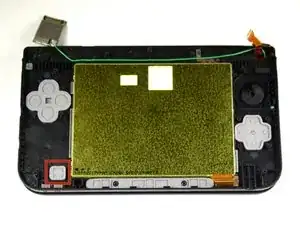
Esta guía para reemplazar el botón de encendido te guiará a través de los pasos para desarmar la Nintendo 3DS más allá de la placa base para acceder al botón de encendido.

  1. uiGfsMWIvvMi1Gxg
    uiGfsMWIvvMi1Gxg
    BrgDdSH43ysqpUC2
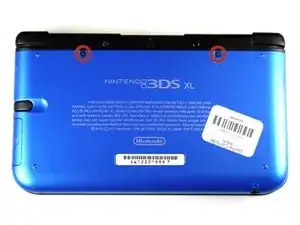
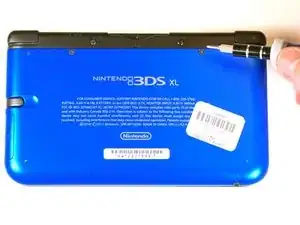
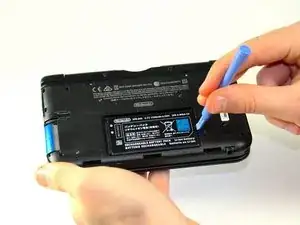
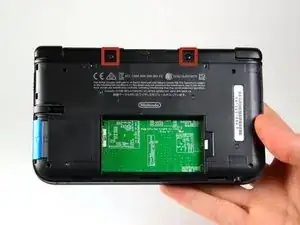
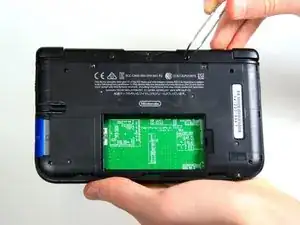
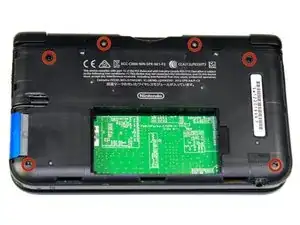
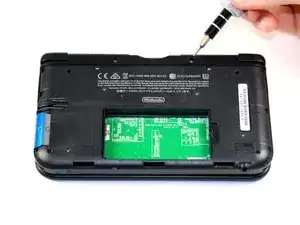
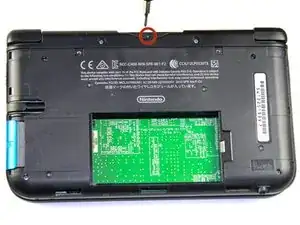
    • Desatornilla los dos tornillos de 4.2 mm que están localizados arriba de la cubierta.

    • Los tornillos tienen arandelas (rondanas) de seguridad que evitan que los tornillos se desprendan de la cubierta . Deja las arandelas en los tornillos; no es necesario removerlas para esta guía de reparación.

    Note: If your top or bottom screen was working before disassembly and doesn't work after reassembly, then it's likely that the connector is loose or dirty or damaged or not clipped or PLACED UPSIDE-DOWN. I had this issue with my Super3DS XL(2015) and it turns out that the reason why my top screen wasn't working after put together, was because I had the top LCD connector upside-down. After I correctly put the connector in, It worked again!

    justjustintuber -

    what type screwdriver do i use?!? its so small!!!!

    Matthew -

    I had success using a #00 Phillips head

    Jake S -

    Can't clip the front of the back cover back in

    Macro Man -

  2. GUqhWChaLM3ZkYDT
    GUqhWChaLM3ZkYDT
    w2fpAWwgAJcqSHZQ
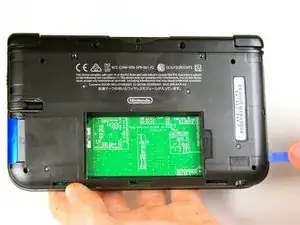
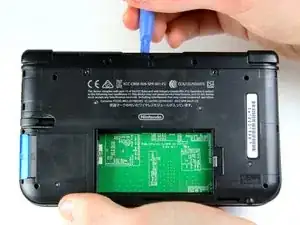
    • Coloca el dispositivo de manera que la cubierta quede hacia arriba.

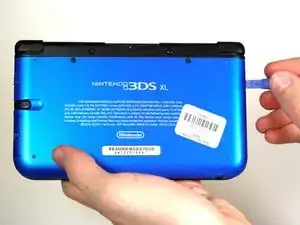
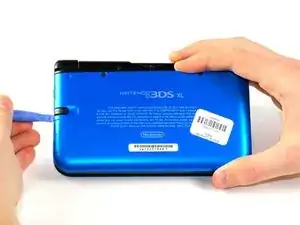
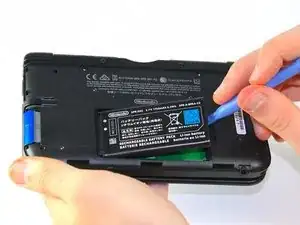
    • Usa una herramienta para abrir de plástico para desprender la cubierta empezando desde la esquina derecha.

    • Sostén la orilla de la cubierta para asegurarte de que no se cierre de nuevo.

    • Revisa la pequeña sección debajo del compartimiento del stylus. Manipula la cubierta en ese punto si aún no se ha desprendido.

    • Quita la cubierta del dispositivo y deja la batería a un lado.

    Note that on the lower side (opposite to the hinges), there are small hooking tabs. These require you to lift the top (screw side) off towards you, then the lower area.

    Jordan Kelly -

  3. C6DIOSrlv4hCvQlN
    C6DIOSrlv4hCvQlN
    gKdhLpsCKBQbRC2P
    pL42eowreW5MQMTY
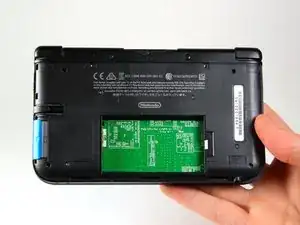
    • Inserta la herramienta para abrir de plástico en la apertura localizada en el lado derecho de la batería.

    • Empuja la bateria fuera de la carcasa.

    • Levanta y retira la bateria fuera de la carcasa.

    My 👴 grandpa was helping me 🔧 repair my 3ds xl and ⚡️electrocuted himself with the 🔋battery while we was taking it out with a 🔪 knife. 💀 Rip grandpa 😔

    Corban Bennett -

  4. NDaL1FwfgpipXktP
    NDaL1FwfgpipXktP
    ED2niUPcvZGc6RIq
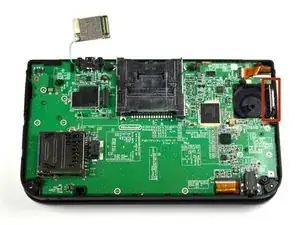
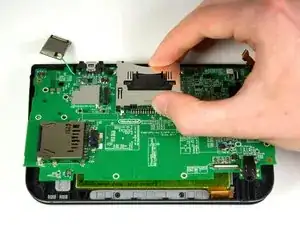
    • Usando pinzas remueve las gomas localizadas arriba del dispositivo a cada lado del slot de cartuchos

    I found that the rubber bumps don't move easily, you'll likely have to use a lot of upward force to move them.

    jconnell85 -

    I torn one of the bumpers because I used a needle instead.

    luxusmirajane -

    You do have a pry a bit. I tore one a little but not that big of a deal.

    Christopher -

    I think the ease of this step would be subject to the age and condition of the 3DS. Mine came out with minimal leverage using my nails.

    infmz -

    try twisting upward

    Kmi Nguyen -

    I used a super tiny metal screwdriver to push the bumper against one side and then used the screwdriver to push it up and out

    S Maduras -

    I tried tweezers but they were scraping against the plastic and I didn't want to leave any marks. Ended up using a tiny flat screwdriver to get them out like S Maduras said. Once I got them out I noticed there was a tiny bit of glue on the bottom holding them in place.

    Anth Rodi -

    My 3DS XL is so old that the rubber bumpers were very hard to remove.

    So I tried to heat the rubber bumpers a little bit with a hair dryer for 15-20 seconds, with some pauses every 5 seconds in order to avoid overheating or damaging something as a precaution.

    It worked well to remove them but the only drawback is that as my rubber bumpers already got damaged and scratched because of my previous attempts without heating first, heating it up after aggravated the scratch damages when I used tweezers.

    So I would recommend heating the rubber bumpers moderately first and be gentle when using something that could scratch or damage them.

    (Do not take my words for it, it may not work for you)

    S. Tony Ly -

  5. TCb3gX1x3AIQipCO
    TCb3gX1x3AIQipCO
    ZUBt6MsBLfRC1bRg
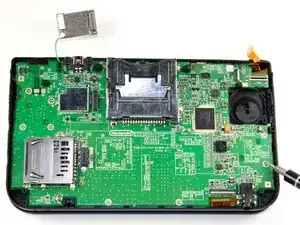
    • Quite los 6 tornillos de 6.2 mm usando un desarmador Phillips #00

    #000 ifixit philips screwdriver does not fit the 6.2mm screws. Whats the deal?

    sevenethshinobi -

    I have a 000 Phillips from tekton and it worked just fine.

    Megan -

    I stripped a good #000 screwdriver, and found that EVERY screw actually fit perfect and snug with a #00 screwdriver. Zero damage to the screws or the screwdriver with the #00.

    Vannicke Trabeitt -

    Don't buy the #000 screwdriver from this site! It's poorly made and strips the screws. I had to drill the screws out and replace them, it was very tricky and nearly broke my DS. Get a screwdriver from an electronics store.

    sharga -

    I bought and used the #00 screwdriver, and it worked perfectly for this.

    I had also bought the #000, but I never needed it during the entire operation.

    jconnell85 -

    All 6 screws are exactly the same so you don't have to worry about mixing them up.

    Christopher -

    One of the screws in my 3ds XL seems to have its '+' engraving worn off, i can't seem to unscrew it, though the other 5 unscrewed properly. What should I do?

    Potato Man -

    J000 works better here.

    Dom -

    I stripped a screw in my 3ds xl and don’t know how to get it out. Do I have to use a drill or is there another way?

    Troy Czaban -

  6. lwAJqibixLXNUTvp
    • Retira el tornillo de 2,3 mm ubicado sobre la ranura del cartucho de juego con un destornillador Phillips #00.

    between these two steps, the bottom two screws are not mentioned. make sure to take those out too ;)

    anthony pullano -

  7. MZdsuNoC12SfAQg2
    MZdsuNoC12SfAQg2
    j4KlaO4YjMZXQMr1
    egELWOpQy2ZM2GaK
    • Asegúrate de que se haya retirado la tarjeta SD. Con una herramienta de apertura de plástico, haz palanca en la carcasa inferior comenzando por el borde inferior y trabajando alrededor del perímetro.

    • Dos cables planos conectan la carcasa a la placa de circuito. Ten cuidado de no tirar demasiado fuerte de la carcasa y rasgar los cables planos.

    Make sure that you have removed your SD card, otherwise that'll keep you from completing this step.

    jconnell85 -

  8. ML2lLyhIAkqvwZ6M
    ML2lLyhIAkqvwZ6M
    vUOOFyrWcTD5U3Uc
    QHCGlYtRbFsLEEwm
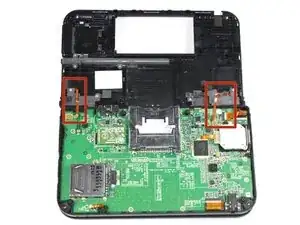
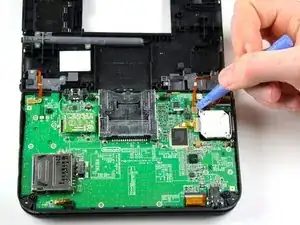
    • Retira los cables de cinta ubicados debajo de los topes izquierdo y derecho haciendo palanca en la base de los cables con una herramienta de apertura de plástico.

    • Retira completamente la carcasa inferior del resto del dispositivo y déjela a un lado.

    The IR board is facing the wrong way.

    Jordan -

    Thank you so much for pointing that out, it was keeping my system from starting up and I thought I blew it!

    Ryan Hescock -

    Yup, that is definitely an upside-down IR board, and will result in a silent post error. It was driving me crazy trying to figure out why the system wouldn't start up.

    alexmouravskiy -

    That's it!! Thanks so much!! I've tinkered around about one month and couldn't get this thing to work...all because I've followed the guide here and looked the picture up twice so I don't put the IR-Board in the wrong way...

    chfreydank -

    Hehe. That would explain why it was not working ;-)

    boma40 -

    Thank you guys so much! I followed everything faithfully and it was DOA on startup. (Black screens, blue light). The IR board was backwards. These pictures need to be fixed. As-is, it shows a broken 3DS.

    jtmuehlbauer -

  9. nLUoPQfoGUNaBU3D
    nLUoPQfoGUNaBU3D
    gALvDvwpnAVUwYfJ
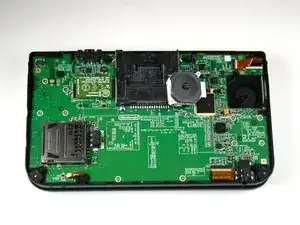
    • Coloca el dispositivo de modo que la ranura del cartucho de juego quede en la parte superior.

    • Localiza el joystick circular en el lado derecho del dispositivo.

    • Retira los dos tornillos de 7,5 mm de las esquinas superior izquierda e inferior derecha.

    This IR is bad side, diode IR must be UP

    patholog -

    Careful you don’t lose the little washer on the circle pad stem. It’s not held down by anything.

    edwardsgreg -

  10. CI62DGXtCSkNx26o
    CI62DGXtCSkNx26o
    W66IMNEFjpu6mMYa
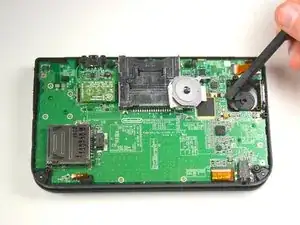
    • Con una herramienta de apertura de plástico, saca el joystick circular de la almohadilla.

    • No utilices una fuerza excesiva con la herramienta de apertura de plástico. Hay una cinta que une el joystick a la placa base y que permanecerá unida.

    • Hay una arandela suelta ubicada entre la almohadilla y el joystick circular. Ten cuidado y no pierdas esta pieza.

    I found it easy to put my finger ontop of the board and apply a little pressure. When i popped off the board, my finger stopped it flying off.

    Chris Ramsay -

    I made a small mistake by popping the circle pad joystick and it went flying off and now im stuck trying to put it back in

    magnus munoz -

  11. CdVVBuCTeyDO5mZT
    CdVVBuCTeyDO5mZT
    QynH2EYVTOOVVjMR
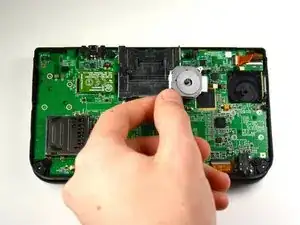
    • Con el lado de la cabeza plana del spudger, levanta con cuidado la solapa de retención que une la cinta de la almohadilla circular a la placa base.

    • Retira la cinta y el joystick de la almohadilla circular.

    The 'flat head' holds it in place when down, and you can reattach your ribbon cable when it's up, it only needs to be partway in so when you close the flat head, if your joystick board can't move easily in place then you've done it right, it it's too loose, try again to work the ribbon cable under.

    jconnell85 -

    The ribbon goes into the left side of the "flat head" right? Not the end that clamps down on the right? I'm having a !&&* of a time sliding the end of the ribbon into the little space between the flat head when it's up and the side of the terminal.

    Sedroc Djeddi -

    For those of you like me, who got stuck after the last step.

    To understand how to actually remove the circle pad, continue with these steps at 21.

    Reemplazo del "Circle Pad" de la Nintendo 3DS

    Hope it helps those after me. I almost ripped some cabling inside thinking I had to take out the motherboard.. luckily I didn't.

    monk333y -

    Just as what monk333y said, follow the Original 3DS steps. They are identical and you don't have to remove anymore big parts. The only annoying part is taking out the circle pad.

    luxusmirajane -

    I broke the retaining clip. It is not very strong and I used a bit too much force i think in opening the clip or pushing it back down. Thinking of using hot glue or something else to keep the circle pad ribbon in place.

    Lawrence -

    Did the hot glue work? I did the exact same thing now im not sure what to do…

    Matthew Johnson -

    How do you re attach the ribbons? do the just snap right into the motherboard?

    petraogan -

    thank you monk333y, the author of this guide needs to correct a couple of things and how hard would it be for her to add steps 21 onward from the other guide?

    S Maduras -

    step 11, if you're just replacing the button, you don't need to disconnect the circle pad ribbon from the motherboard.

    S Maduras -

    During re-assemblhy, note that the peg between the joystick mechanism and the circle pad is rectangular, and must fit into the matching rectangular socket on the circle pad.

    Dan -

    When testing the touchscreen, make sure you install the analog. Otherwise, the screen will act erratic. Thought I broke a brand new part. Just a heads up!

    Hassan Sinanan -

    The entire top part of my circle pad had broken off, so I had no problem getting the old one out. I actually had more trouble getting the ribbon cable back into the clip, and the new circle pad attached to the stick, than any other part.

    That said, this was way, way easier than I expected it to be.

    Emtu -

  12. BDMRAdlBqGdfRmSi
    BDMRAdlBqGdfRmSi
    gP1TmEMjWKfNUq42
    • Coloca el dispositivo de modo que la ranura del cartucho de juego quede en la parte superior.

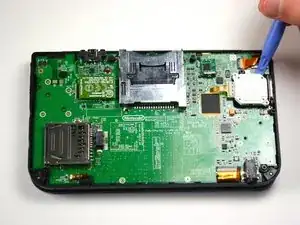
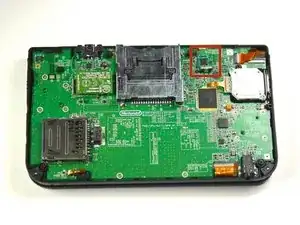
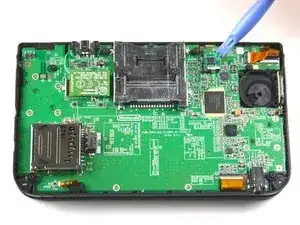
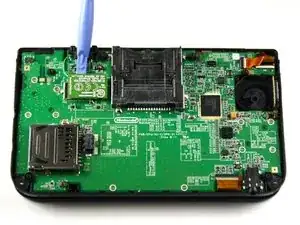
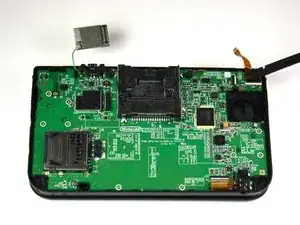
    • Localiza la placa IR ubicada en el lado superior derecho de la placa base.

    • La placa IR está instalada al revés en estas fotos por error. Si lo instalas de esta manera, tu DS no podrá iniciarse. Ten en cuenta la orientación de su placa IR antes de quitarla y vuelve a instalarla de la misma manera.

    • Retira la placa IR con una herramienta de apertura de plástico insertando la herramienta debajo de la placa IR y haciendo palanca suavemente hacia arriba.

    The IR board appears to be upside down in this photo.

    Eric -

    One assumes they forgot to take the photo before removal and quickly put it back on upside down (accidentally) for the purposes of taking the photo.

    Retro Gaming Repair -

    Removing the IR board is actually a completely unnecessary step. It's absolutely fine to leave the IR board attached to the motherboard, it's then one less loose piece to go missing ;)

    Retro Gaming Repair -

    The reason they remove these "easily loosable" pieces is because there's an order to put the board back together or the 3DS won't turn on. This is for replacing the motherboard, which most of the time you will buy and it won't come with the microphone, volume or IR board. Use your head kiddo. If it's so easy to loose these pieces, you should keep better track of them. We might as well just not take out any screws as well because those are very easy to loose

    Miles Holiman -

    You should add this note to the other uses of this picture; I accidentally knocked that chip off and reinstalled it upside down. I was referencing the photos for replacing the joystick.

    Infernal Dalek -

    You skipped removing the microphopne.

    Mykaila Brown -

    In my 3DXL, there was no IR board: the parts were installed directly on the motherboard.

    Dan -

    I agree my 3dxl the IR board is also part of the motherboard and doesnt come off.

    Anthony siracuse -

  13. xP3Frwuq2PTp5wRx
    xP3Frwuq2PTp5wRx
    2v61m3TXOsfMpSbP
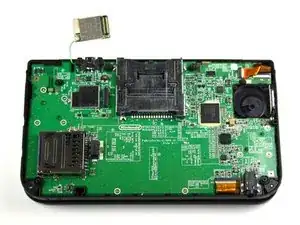
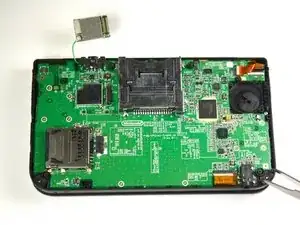
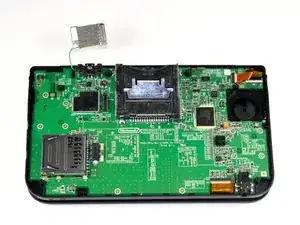
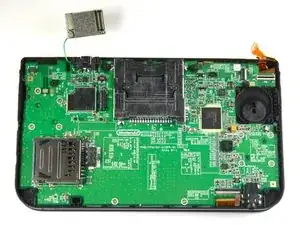
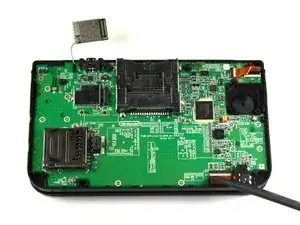
    • Con una herramienta de apertura de plástico, saca la placa Wi-Fi.

    • La placa Wi-Fi aún estará conectada por un cable y no es necesario quitarla por completo para este paso. Simplemente colócala fuera de su lugar en este paso.

    Component on bottom left was taken off, but not mentioned. Not sure what it does it does, and I'm assuming it's unimportant, but I just wanted to note.

    Jordan -

    The thing on the bottom left in the little black rubber cover is the mic!

    Maxwell Alexander -

    Why not just seperate the wifi board from the antenna now while in your hands? You're going to do it later anyway...

    Retro Gaming Repair -

  14. Xt6bUvL1BA1NnAiN
    Xt6bUvL1BA1NnAiN
    ddNYA6sonMaQHTNe
    • Ubica el interruptor de volumen en el lado derecho de la placa base al lado de la almohadilla circular del joystick .

    • Usando pinzas, retira con cuidado la placa de volumen de la carcasa. Todavía estará conectada a la placa base mediante un cable plano.

    As previously commented, in this step the microphone (lower left corner) was removed.

    This is done by opening the grey flap, removing the ribbon from the motherboard and then either remove it or just let it sit in it’s place.

    In my experience the motherboard will go around it easily.

    Stefan Nicodem -

  15. BValKuUrBfFbiQQt
    • Con el lado de la cabeza plana del spudger, levanta con cuidado la solapa que une la cinta de la placa de volumen a la placa base.

    • Retira la placa de volumen y déjela a un lado.

    This step proved to be unnecessary. It's perfectly fine to leave it attached, and again it's one less small fiddly piece to go missing.

    Retro Gaming Repair -

    What if I pushed flap too hard and detached and cant find. Now I unable to secure in. Is there a part for this?

    Crystal Ramirez -

    Its is the small grey flap that holds in the ribbon.

    Crystal Ramirez -

  16. irvTZyIgiQtDH1NO
    irvTZyIgiQtDH1NO
    5Jubj1CXnZBFdLKv
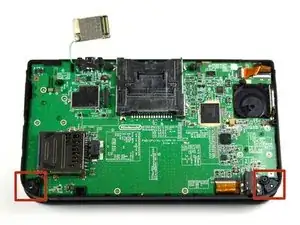
    • Retira las piezas de plástico negro de las esquinas inferiores izquierda y derecha con los dedos o con pinzas.

    • También puedes quitar estas piezas fácilmente levantando con cuidado la 3DS y sosteniéndola boca abajo. Normalmente se caen, ¡pero no las pierdas!

    Does anything happen if you lose them or not, that last part made me a little worried?

    Ptheassassina - -

  17. j1GUpZaOyHZRnEhS
    j1GUpZaOyHZRnEhS
    NCIeEy2msJnFnAQW
    ItHGRNw4cKo43fDN
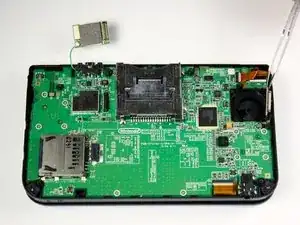
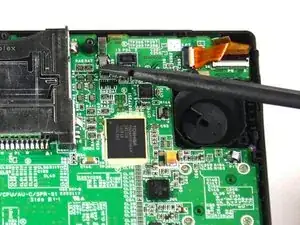
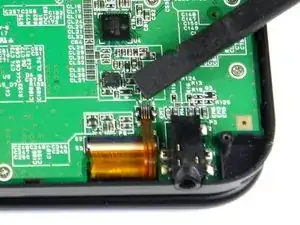
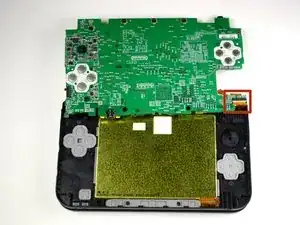
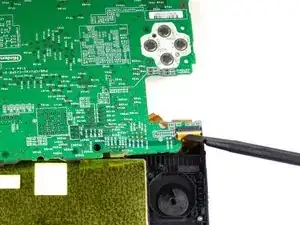
    • Con el lado de la cabeza plana del spudger, levanta con cuidado la solapa que une las dos cintas más pequeñas a la placa base.

    • Estas aletas se encuentran en la parte superior derecha e inferior derecha de la placa base.

    • Retira las cintas de la solapa.

    For the first picture on step 17, (the one at the top of the board) what does that cable connect to? My clip broke.

    Bradly -

    MMM as far as I can tell it looks like it's for the touch screen as it plugs into p13 and is the same plug type as p10, p12 and p17 and a couple others. Could be wrong though :)

    Connor -

  18. M4c6UfHxnTs3bVAr
    M4c6UfHxnTs3bVAr
    6WgPNNYxUIkMdmMm
    WnMKUYypretWDHqM
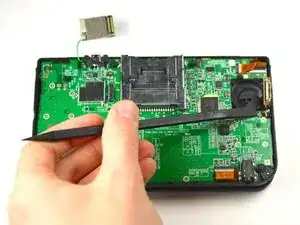
    • Usando el lado de la cabeza plana del spudger, levanta con cuidado las aletas que unen las cintas más anchas a la placa base.

    • Para las cintas más anchas, asegúrate de levantar las solapas del lado blanco.

    • Retira las cintas de las solapas abiertas.

    Note: the top right wider ribbon is for the camera, the thinner ribbon in the top right is for the speakers and the bottom ribbon is to the upper lcd. You will want to ensure you stack the ribbons appropriately when putting the system back together.

    Elaine -

    Had some trouble with this: Not exactly sure why, but when after successfully replacing the screen and beginning to resemble, while reinserting the wide ribbon for the lower LCD (p8) it seems that the white locking clip unhinged itself from the connector, and bent some of the pins. The ribbon now won't fully insert.. Can't figure out if I've somehow completely ruined my 3ds. Mostly concerned about my save data that's not on my sdcard.

    kbbauer -

  19. rZsyV2jtRZkcfCYX
    rZsyV2jtRZkcfCYX
    IMqddENmKPdYXAet
    • Usando el lado de la cabeza plana del spudger, levanta con cuidado la solapa que une la cinta a la placa base.

    • Para esta solapa, levántala desde el lado negro.

    • Retira la cinta de la solapa.

    • Reensamblaje: Esta cinta ancha es la que tiene la RAYA NEGRA y va en el lado superior (visible) de la placa base durante el reensamblaje.

  20. UTYrVki6LRFQFGqd
    UTYrVki6LRFQFGqd
    uNKUJjJjEKcpNER2
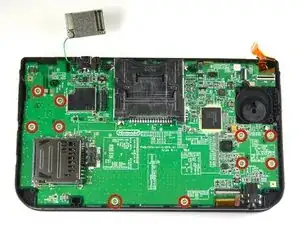
    • Retira diez tornillos de 3.0 mm que se encuentran alrededor de la parte frontal de la placa base.

    It’s not a *!&*^#% 5.5mm, it’s 0.05mm probably. I ended up using wrong screws and punctured the housing. So wrong!

    장한솔 -

    I think those 5,5 mm mean the length (!) of the screws. The heads are normal little Philipps, perhaps #00 or #000.

    VauWeh -

    I took a micrometer to these screws, they are not 5.5 mm long.

    Evan J Garner -

    These screws are 3.0mm long.

    Marques Jones -

  21. aP1UoNPQKHaJGWcE
    aP1UoNPQKHaJGWcE
    hqEs55CWo1wCwVZu
    • La placa base aún estará unida en la esquina superior derecha, así que no la separes por completo en este punto.

    • Levanta con cuidado la placa hacia arriba lo suficiente para liberar los dos soportes de plástico ubicados cerca de las esquinas superiores de la ranura del cartucho.

    • Voltea suavemente la placa base sobre el lado superior.

    Laying it down like this puts too much stress on the ribbon cable. I find it better to release the connector while the board is tilted at a 90 degree angle to the body of the 3DS. Less chance of damage to the top screen cable that way.

    Retro Gaming Repair -

  22. FdDT3fPIMrMTRYmy
    FdDT3fPIMrMTRYmy
    HnN2g6EUumwDCpxm
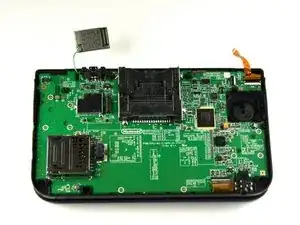
    • Usando el lado de la cabeza plana del spudger, levanta con cuidado la solapa que une la cinta más ancha en el lado superior derecho a la placa base.

    • Asegúrate de levantar la solapa desde el lado blanco.

    • Retira la cinta de la solapa abierta.

    • Deja la placa base a un lado.

    So I tore this wire is this the visual or something?? Please help

    linkon king -

    I tore this wire too. Am I able to buy it individually?

    dobe mon -

    How do you get this cable back in? It is way too short...

    Luke Miller -

    Tweezers, steady hand, and a little luck.

    Marcus DeCamp -

    So, before step 23 do you put the bottom half of the 3ds xl back together?

    Poké Pi. -
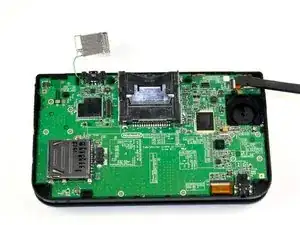
    When fixing, I can't put the 2 wires in the connector. HELP!

    Owen Burch -
    are there issues with compatibility between motherboards? one works perfectly and the other powers on then off

    xdboost -
    Don't unplug this cable. Just leave the motherboard flat and don't move it while replacing the face button(s). This thing is way too hard to get back in.

    Engiturtle -

    It's hard to put it back but it's doable if you spend a lot of time, it took me around an hour and a half, also make sure you put it well because the first time, it was not fully inserted and the screen was flickering with gray lines so after I reinserted it worked fine.

    Levan Kakashvili -

  23. aVXXYFayijOYjZVN
    aVXXYFayijOYjZVN
    6ljgt5aKaBW2gBTi
    o3nYnoAABnWnMkmW
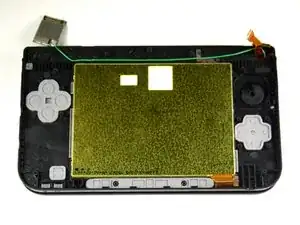
    • Con unas pinzas, retira la tapa de goma ubicada en la esquina inferior izquierda.

    • Usa las pinzas para sacar el botón de encendido.

Conclusión

Para volver a armar tu dispositivo, sigue estas instrucciones en orden inverso.

Charlene Donlon

Miembro Desde 08/04/14

9809 Reputación

2 comentarios

Does anyone have any idea where I can get a spare power button (black plastic part) and the rubber bit?

I've found the rubber bit on ebay but for the life of me I cannot find the plastic part (In the UK at least)

Thanks.

hudster1991 -

Did you find it by any chance? Kind of looking for the same thing

yaboi -