Introducción

Prerrequisito para desconectar la batería.

  1. aZYLqaFDDqiGABps
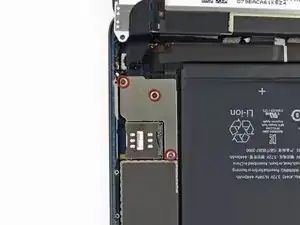
    • Remueve los tres tornillos Phillips #00 de 1.3 mm que aseguran la protección del conector a la tarjeta lógica.

    • Asegúrate de no sustituir estos tres tornillos con otros tornillos, específicamente con los tornillos que aseguran la placa de protección del LCD a la carcasa trasera del iPad. Cualquier tornillo por ligeramente mas largo puede remover los agujeros de los tornillos y resultar en daño irreparable dañando la tarjeta lógica.

    Note: These three screws are smaller than the rest of the screws holding the larger LCD shield although they look similar. If you substitute the larger screws, you will pop a screw bracket which can damage the board on both the mini original and mini 2 retina. I just wrote a blog post about how this happens: http://mendonipadrehab.com/entries/gener...

    jessabethany -

    Hi jessabethany. Thank you for the warning. I read your blog post and found it to be very informative. Thanks for adding the warning to the step. It will most definitely help others avoid any damage to the logic board. Thanks!

    Walter Galan -

    Be careful: At iPad mini retina Wi-Fi there are thw short and one longer screw! Don't mix them!

    sandro -

  2. ypOjwrdfQGQcfVFS
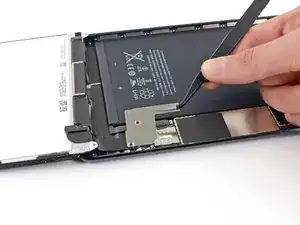
    • Usa un par de pinzas para agarrar y remover la protección del conector del iPad.

  3. qUkH4blu5CaSPSvP
    qUkH4blu5CaSPSvP
    KvwMvvxHyg3r4JRl
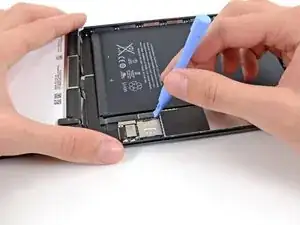
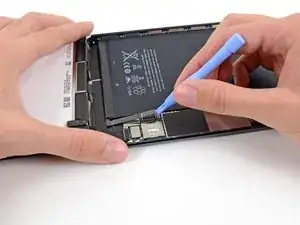
    • Usa una herramienta de apertura de plástico para gentilmente hacer palanca a el conector de la batería de su socket en la tarjeta lógica.

    • Ten cuidado de solo hacer palanca en el conector de la batería y no del mismo socket. Si haces palanca en el socket de la tarjeta lógica, puedes romper el conector por completo.

    Make sure you disconnect the battery. If not and ipad is still on you can have problems with the LCD backlight. To fix that problem you have to solder

    Mattis -

    I may be experiencing the backlight problem you mentioned. What connection needs to be soldered?

    Grillwrecka -

    Have an issue - heard that if you don't disconnect the battery a fuse is blown. I need help to fix the blown fuse.

    Andrew Kivell -

    There is an extensive thread in Answers about iPad mini backlight problems.Th screen stays black after a digitizer replacement.

    jessabethany -

    After unplugging the battery place a guitar pick in-between the two connections.

    While continuing to work on the iPad you may inadvertently cause the two connections to touch.

    Michael Vovaris -

    Yeah, you need to put the pick in between the connections so the battery doesn't touch the logic board connector and blow a fuse and make your backlight not turn on. You really don't want to have to solder the 2 connections together, especially if you don't know how, like me! I will use your comment's advice when working.

    WolfyHD -

    I put a piece of cellotape on the contact side of the connector and could happily forget about it while getting on with the rest of the repair.

    Rory Filer -

Conclusión

Para reensamblar tu dispositivo, sigue estas instrucciones en orden inverso.

Andrew Optimus Goldheart

Miembro Desde 17/10/09

494141 Reputación

0 comentarios