Introducción

Guía de prerequisito para remover todo el conjunto de pantalla.

  1. faYLZCcUqNgfLImh
    faYLZCcUqNgfLImh
    fTsCL5NUphoD5vbV
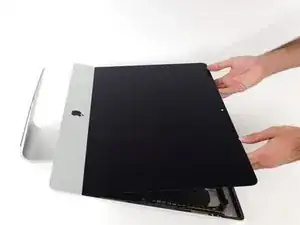
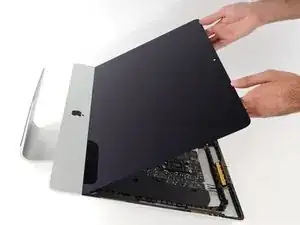
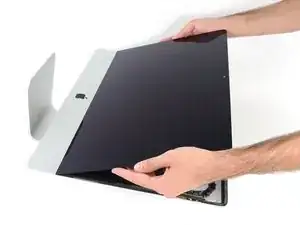
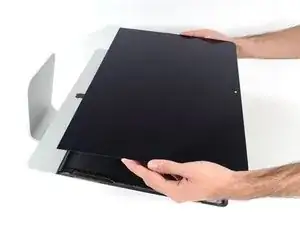
    • Levanta la pantalla en una posición casi vertical.

    • En este punto todavía hay una tira adhesiva en la parte inferior de la pantalla que mantendrá la pantalla al marco como una bisagra. Puedes deshacerte de él subiendo y bajando la pantalla varias veces.

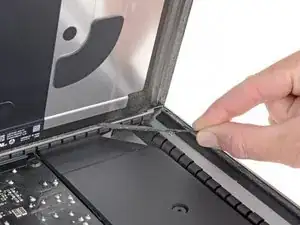
    The best way to remove the chin adhesive is to use the tabs at either end (there are two strips that run from each outside corner to near the centre). Carefully pull the tabs up and the strips should peel off.

    Advance Technical Service -

  2. EyrkeRmWKhVr6PQL
    EyrkeRmWKhVr6PQL
    V3KWORppGRpxkZl5
    EEJDoH3W6oKg6nHd
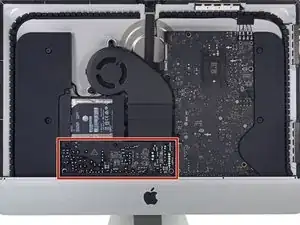
    • Tenga cuidado y no toque ningun capacitor o alguna soldadura expuesta en la parte trasera de la fuente de energía (caja roja)

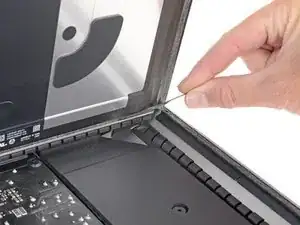
    • Agarre la pequeña pestaña en el final de uno de las tiras adhesivas de la pantalla del abajo y tire el adhesivo hacia el tope de la iMac para quitarlo

    • Repita este paso con la otra tira adhesiva y retirelo.

    • Si tanto la tira adhesiva se rompe antes de se quite, use una tarjeta plástica para cortar el adhesivo restante.

    At step 21-22, releasing the adhesive strips from the bottom of the display, I noticed a tab on the outer end of each strip. Pull the tab to remove the whole strip, no need to mess around with the plastic cards!

    roberttrevellyan -

    Instead of the plastic cards, use the flat end of a spudger. Use it as scraper. Be careful as there are antennas mounted on the inside edge of the frame on the right side (facing you), and the top right (facing you). The original adhesive strips are on those as well. - ECJ

    ECJohansen -

    A little bit of hot air (eg. hair dryer) will help soften the adhesive. Use a piece of cardboard or equivalent if you want to avoid blowing hot air towards the electronics.

    Be careful to remove absolutely everything - any remainder will create a bump and prevent your screen from sticking back to the frame when reassembling.

    Froggy Manny -

    A little bit of hot air (eg. hair dryer) will help soften the adhesive. Use a piece of cardboard or equivalent if you want to avoid blowing hot air towards the electronics.

    Be careful to remove absolutely everything - any remainder will create a bump and prevent your screen from sticking back to the frame when reassembling.

    Froggy Manny -

  3. W11PURO2LYnqVMEL
    W11PURO2LYnqVMEL
    4x45fNhvlBjfqU3f
    WstuEbNDdOlFKIns
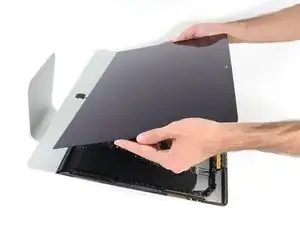
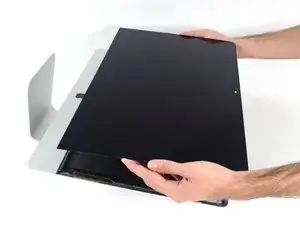
    • Levanta la pantalla hacia arriba del marco y quítala del iMac.

    • Podría ser necesario levantarla lentamente de un lado para pelar el adhesivo restante.

    • Ten cuidado manejando la pantalla; es grande, pesada, y está hecha de vidrio.

    • Después de que el pegamento es cortado, no se puede volver a usar para colocar la pantalla en su lugar. Sigue esta guía para reemplazar las tiras adhesivas que aseguran la pantalla al marco.

Conclusión

Para reensamblar tu dispositivo, sigue las instrucciones en orden inverso.

Adam O'Camb

Miembro Desde 11/04/15

179519 Reputación

0 comentarios