Introducción

  1. fJxXaVwrD5fhPicg
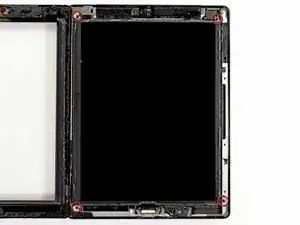
    • Retire los cuatro tornillos Phillips # 00 de 2 mm que sujetan la pantalla LCD al marco de aluminio.

    End of teardown. Start of disassembling.

    Dorothy Simler -

    The top left screw may be covered by black adhesive tape.

    Chat Pat -

    The ribbon cable on my unit was too short to lay it all the way down. I had to let it sit sideways.

    Petabyte Studios -

  2. bsb2BBUpsOYsIQAs
    bsb2BBUpsOYsIQAs
    jernUONBTLXtdMJB
    QXXfYvKLHQEn5gKL
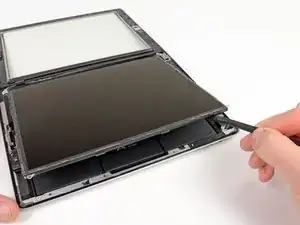
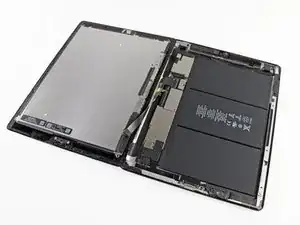
    • Con una herramienta de apertura de plástico o un spudger, levante el borde derecho de la pantalla LCD del iPad.

    • Gire la pantalla LCD a lo largo de su borde izquierdo y colóquela sobre el panel frontal.

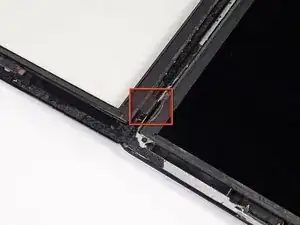
    • Tenga cuidado al mover la pantalla LCD. El cable de cinta es frágil y se puede romper si se flexiona demasiado.

    I skipped everything beyond this point and proceeded with the detachment of the battery starting from the right side, one section at a time, with a credit card and a glue remover. I then removed the three screws around the battery connector (on both logic boards) and the one of the battery connector itself. I then lifted the boards up jointly just enough to free the battery connector from the screw hole cylinder that keeps it in place. I then cleaned up and removed all the adhesive from the base, inserted the new battery and glued it to the base. I then put the screws back, mounted the LCD, closed the glass with new adhesive, and powered on. The iPad booted normally and I proceeded with the calibration. I am aware that removing the boards is safer, but if you are careful you save a lot of time disconnecting and reconnecting fragile connectors from the boards.

    Ermanno Bellini -

Conclusión

Para volver a armar su dispositivo, siga estas instrucciones en orden inverso.

Brett Hartt

Miembro Desde 13/04/10

125887 Reputación

0 comentarios