Introducción

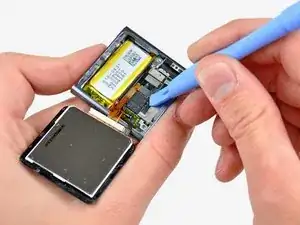
Utiliza esta guía para reemplazar el conjunto del panel frontal de su Nano. Un nuevo conjunto de panel frontal proporcionará un nuevo panel de vidrio frontal, digitalizador y LCD. La pantalla LCD no se puede separar del digitalizador.

  1. lqKlCtMsQpYnmwqN
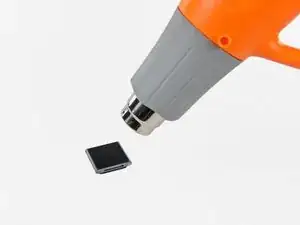
    • Utiliza una pistola de aire caliente o un secador de pelo para ablandar el adhesivo que sujeta el perímetro del conjunto del panel frontal a la carcasa exterior.

    • Ten cuidado de no sobrecalentar el conjunto del panel frontal, ya que podrías dañar la pantalla LCD.

    Do I need new adhesive to reassemble?

    David Wallin -

    Make sure to not break this cable even if your backlight is out, there can be internal corrosion that prevents the backlight from working. It may still work with the old display.

    Matthew Borgholthaus -

  2. QwRPFKaTUfY5wvVe
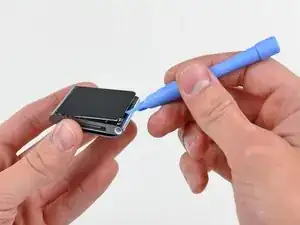
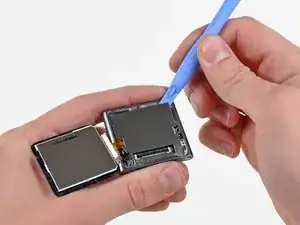
    • Mientras el panel frontal todavía está caliente, usa el borde de una herramienta de apertura de iPod para sacarlo del lado del conector de auriculares del ensamblaje del panel frontal del Nano.

    • No intentes sacar el ensamblaje del panel frontal ni insertar la herramienta de apertura en el lado izquierdo de la pantalla, ya que el cable de datos de la pantalla está justo debajo y puede dañarse en el proceso.

    • Continúa sacando el perímetro del ensamblaje del panel frontal de la carcasa exterior, teniendo cuidado de no dañar el cable de datos de la pantalla que se encuentra debajo del borde izquierdo.

    • Si te resulta excesivamente difícil levantar el panel frontal de la carcasa exterior, vuelve a calentar el área y vuelve a intentarlo.

    I strongly recommend using a Small Suction Cup (IF145-019-1) instead of a plastic opening tool.

    After half an hour of various heating times, trying to use a plastic opening tool, I overheated the LCD, which caused it to discolour. Now I need to buy a new screen. I wish I'd thought to use a suction cup earlier; it seems so obvious in retrospect.

    Peter Burkimsher -

    I used a hot water bottle with towelling cover, resting on it for about 5 minutes. glue softened at 45 degrees. enough to easily lift panel.. Ipod’s working temperate is 55 deg C max according to apple. I used IR heat gun for temperature check.

    Hay rack -

    We have a temperature controlled testing oven at work. I set the oven for 50 degrees C, let it absorb heat for half an hour, then took it out. I had zero luck with either the plastic pry tool or the suction cup, so I carefully pried up the indicated side with the sharp pointed tip of a dental pick until I could get the plastic tool into the crack opening.

    Klieb -

  3. igxGIWdBGjufPoAM
    igxGIWdBGjufPoAM
    Sq3MKLVxjFZfTLsb
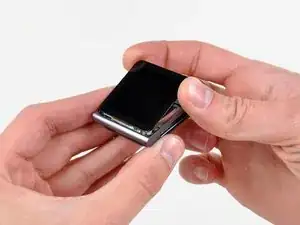
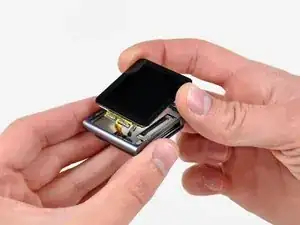
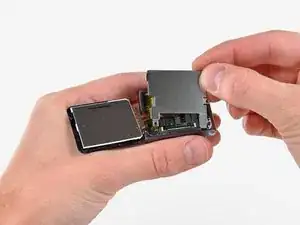
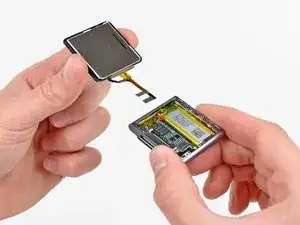
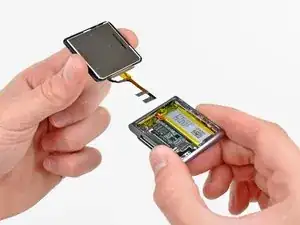
    • Levanta el conjunto del panel frontal del lado del conector para auriculares del Nano.

    • Tira del ensamblaje del panel frontal ligeramente hacia afuera del lado izquierdo del Nano para despejar el cable de datos de la pantalla.

    • El ensamblaje del panel frontal todavía está conectado al Nano por medio de dos cables.

  4. DlZM3DGDlh2Wflu1
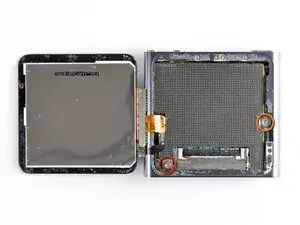
    • Coloca el ensamblaje del panel frontal al lado del Nano.

    • Retira los dos tornillos siguientes:

    • Un tornillo Phillips de 2,3 mm

    • Un tornillo Phillips con reborde de 2,6 mm

  5. dSU3vipUBQDOB2YU
    dSU3vipUBQDOB2YU
    Z462On2RXtRxUblK
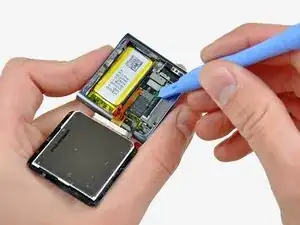
    • Usa una herramienta de apertura de iPod para sacar el protector de acero del Nano por la esquina superior derecha.

    • Retira el escudo de acero del Nano.

  6. GT1KwHmNxpJRZpBE
    GT1KwHmNxpJRZpBE
    C6QZWqLdQth2rQhD
    • Utiliza una herramienta de apertura de iPod para desconectar los datos de la pantalla y los conectores del cable del digitalizador de sus enchufes en la placa lógica.

  7. KKVtRDIuPGSClKGX
    • Retira el conjunto del panel frontal, teniendo cuidado con sus dos cables que pueden quedar atrapados. Para volver a montar, puedes utilizar la cinta adhesiva de doble cara que se encuentra aquí.

    How come you did not put back the metal plate that goes between the iPod and the display?

    Adam Meyerson -

    You do put the steel shield back in to place and screw it down, but only after you connect the digitizer and display data cable connectors to their sockets on the logic board.

    Lance J -

Conclusión

Para volver a armar tu dispositivo, sigue estas instrucciones en orden inverso.

Andrew Bookholt

578639 Reputación

10 comentarios

Don't forget to include in your repair the adhesive to hold the new screen on. It does not come with the new display. I as unable to find it at iFixit's site but was able to get it here for $10 incl p&p: http://www.badgizmorepair.com/product/ip...

By the time I paid for the screen, opening tool and glue it turned out to be more economical and less hassle to take it to the Apple store (albeit less satisfying than doing it yourself). I suggest you forego the opening tool if you have a good flat blade jewelers screwdriver. A fine temporary fix for not having the correct screen glue is a piece of packing tape. It leaves the iPod open to the elements though, so I highly recommend the correct glue in order to avoid water leaking in around the edge of the screen.

You will also need a very small jewellers or electronics screwdriver for the two screws. I just managed it with an oversized flathead driver.

dmcgleenan -

Hi, i already unmount the display, but i need the adhesive strips for paste the ne one. The link you suggested it's down, is it possible to have a new one where i can find this adhesive?

Thanks

quentin23 -

Its diffucult to place the display data cable when reverse step 3. Any tips?

Akela66 -

i had bought these part and succeeded in repair my drown ipod using these guides (luckily only the lcd that didnt work). and it work nicely. thanks

bubba12250 -

Thanks for the guide. Very useful and easy to follow.

Had some issues with getting the screen off initially, but that was due to the glass along the headphone jack side being cracked into several small little shards (hence the reason for following the guide ;)

Used a replacement screen (incl. toolkit and replacement precut adhesive) that I purchased from ebay for around US$10 (free shipping).

Jared Yates -

Simple as that? You know what sucks about an incomplete repair description - is the incomplete thinker that posted it. There is nothing on here about what insulators remain, nothing about sequencing the reassembly, nothing about adhesive, etc...

Get your $@$* together and compete your how-to you half ass.

John Publique -

i need a new screen any suggestions my little sister busted it HELP!!!!!!

alexis -

This guide is useless. I removed the screen but cant get the flex / IC cable from the LCD back in place with these adhesive.

Eric Rauchfuß -

Yeah, took about ten minutes, really easy

2009Impala -

Followed directions, used iFixit tools I had previously purchased, worked flawlessly. One bit of struggle while reattaching the larger of the two ribbon cables (the orange/brown one): took a bit of work to get it aligned properly to the tiny socket. Old eyes and fat fingers most likely. I used thin black tape I had purchased for another screen replacement (I believe it is referenced and may be sold on this site). Did a great job of reattaching the screen without using glue. Glad I could salvage this iPod Nano 6th gen. Apple doesn’t repair them anymore and it is a terrific form factor for music and FM radio on the go. Now let’s see how long the battery will hold out. That replacement might be beyond my skillset.

Steve Leighton -