Introducción

Esta guía es una guía interna usada como prerrequisito.

  1. sMEoM3vUMfDX1WrE
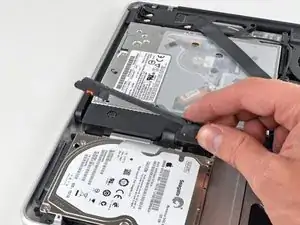
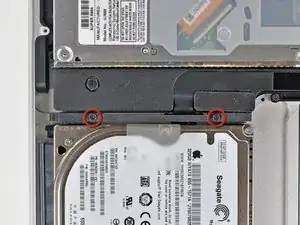
    • Remueve los dos tornillos Phillips que sujetan el soporte de disco duro a la caja superior.

    • Estos tornillos están fijados al soporte del disco duro

  2. BaLsEQXwHYTUyHVN
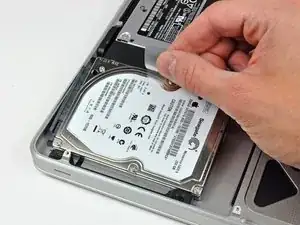
    • Levanta el soporte de retención y sácalo de la caja superior.

  3. fL4dQxFDdTmYgUSM
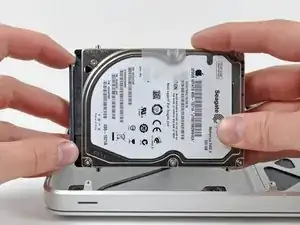
    • Levanta el disco duro por su lengüeta y sácalo del chasis, teniendo cuidado con el cable que lo une a la computadora.

    Be VERY careful when you are lifting up the drive. Otherwise, you'll need to buy a new hard drive/IR sensory cable! Learn from my fail!

    goodski -

    After having changed the drive my disk works some times only, other times not. Some times it will boot other times not. I see that the sleep indicator is not working. Might have damaged the cable? Thought I was really careful when changing the drive.

    Eivind Johansen -

  4. SvDxteKHMETOFuQs
    SvDxteKHMETOFuQs
    Qv2kAYMOLXWgBdDk
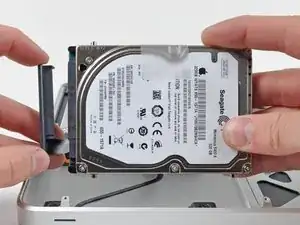
    • Retira el cable del disco duro tirando de su conector directamente del disco duro.

Conclusión

Para volver a ensamblar tu dispositivo, sigue estas instrucciones en orden inverso.

Walter Galan

685928 Reputación

0 comentarios