Introducción

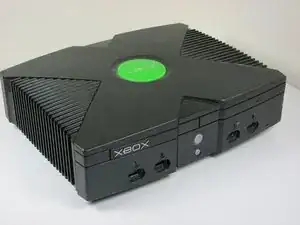
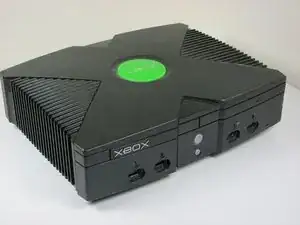
Esta guía le mostrará cómo reemplazar el disco duro de su Xbox.

  1. DAWYeQTbJIyRE44H
    • Asegúrese de que su Xbox está desenchufado de forma segura y está sobre una superficie plana y estable.

  2. jG2uJZqNF5OSgIoi
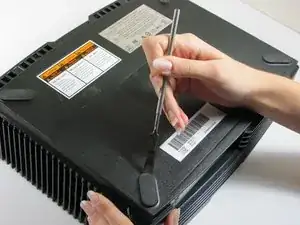
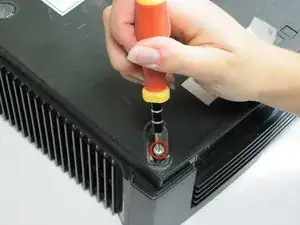
    • Gira la Xbox para revelar los cuatro pies de goma

    • Utiliza un spudger de metal para quitar los cuatro pies de goma.

    The screw is in the outside corner. If you pry up only the half of the foot on that side, you can easily remove the (very long) screw, and the foot will stay attached.

    Ian Butler -

    Ah I always used to damage the feet.

    Andrew Veiga -

  3. CNc1f5HgbfeLyU6V
    CNc1f5HgbfeLyU6V
    Fkv25vcmRjCqx11G
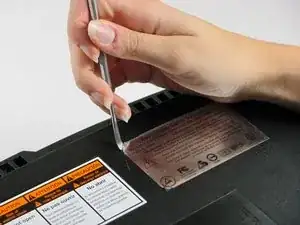
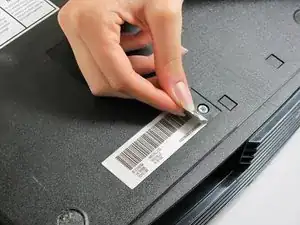
    • Hay dos tornillos más escondidos debajo de las dos etiquetas en la parte inferior de la caja.

    • Puede quitar las etiquetas o simplemente sentir los agujeros de los tornillos a través de las etiquetas y luego cortar o perforar un agujero a través de ellos.

    It is also easy to feel for the screw hole with your finger and then cut a hole, or punch it out with the tip of the Torx driver to reveal the screw.

    Ian Butler -

  4. yrHWicQWhkLfIroI
    • Retire los seis tornillos Torx T20 que sujetan la cubierta superior a la cubierta inferior.

  5. HWBO3akf3JrTpItt
    HWBO3akf3JrTpItt
    QSGAQlPuDMAd4lyt
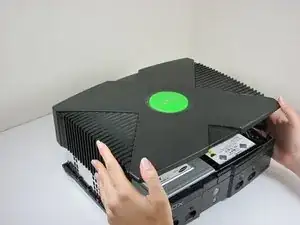
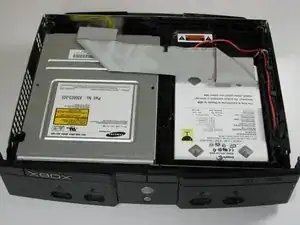
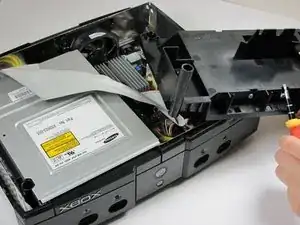
    • Una vez que las carcasa inferior y superior ya no están conectadas, gira cuidadosamente la Xbox hacia arriba, levanta y retira la cubierta superior.

  6. tPN4vdeeZKl1I1rZ
    tPN4vdeeZKl1I1rZ
    g4NJhsK3pDOWGQkB
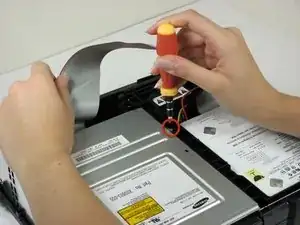
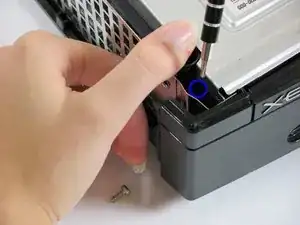
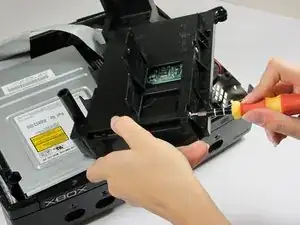
    • Retire los tres tornillos T10 de 3 mm que sujetan el disco duro a la Xbox.

    • Hay un tornillo en el lado izquierdo trasero del disco duro que sólo es visible cuando se eleva el cable plano IDE. Los otros dos están en los lados delantero derecho e izquierdo del disco duro.

    • El tornillo en la esquina inferior izquierda de la unidad de disco no está en el agujero en el que parece estar, sino más bien cerca de la esquina.

  7. 1fXjrAGgWWybWvHI
    1fXjrAGgWWybWvHI
    A2OccKgygJyyMSuP
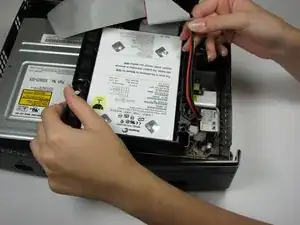
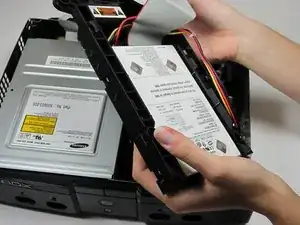
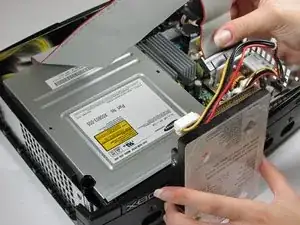
    • Libere el cable de alimentación de la unidad de disco duro de la portadora para obtener suficiente holgura para levantar la unidad de disco duro.

    • Levante el soporte de disco duro de plástico de la caja de Xbox.

  8. 2DKHk4nEpggCoB3R
    2DKHk4nEpggCoB3R
    k1Kyg6JejwYtJREe
    PJVDyrRyKbsR22CB
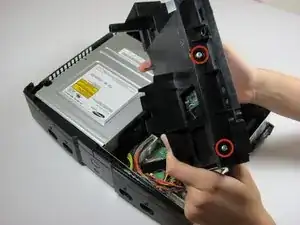
    • Retire los cuatro tornillos T15 Torx de 3,4 mm del soporte de plástico duro (dos tornillos por lado).

    • Retire con cuidado el disco duro del soporte de plástico. Sontengalo suave verá el disco duro salir absolutamente fácilmente.

  9. hIptJJoxao2CLYaT
    hIptJJoxao2CLYaT
    huhJSci5P4rvoDnU
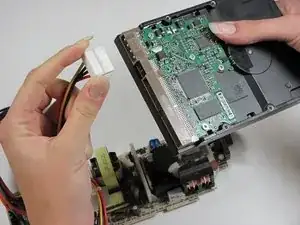
    • Tire el cable plano de datos del disco duro y el cable de alimentación hacia arriba desde el disco duro.

    • Pueden estar firmemente asentados, así que tenga cuidado tratando de eliminarlos. NO tire de los cables ya que podría dañar el conjunto del cable.

    Remember that the new drive will only work if it has been properly prepared, and the Xbox has been modified.

    Ian Butler -

    there is NO way to legally replace the xbox hard drive. it is LOCKED to the motherboard and the xbox will not boot to the OS or make it past the BIOS if the HDD is not the one that came with it from the factory. you MUST use a mod chip and “home brew” to do a HDD swap and expect it to work

    James Vawter -

    Could you point me to a good tutorial on using a modding an original Xbox? All I want to do is swap an HDD in original Xbox with another original Xbox HDD because I want my saved game data. Any way to figure this out? Seems like modding is a !&&* of a burden.

    michaelaugustin2000 -

    Can i replace the original hard drive with new one

    Andrew Veiga -

Conclusión

Para volver a montar el dispositivo, siga estas instrucciones en orden inverso.
rmarstel

Miembro Desde 29/10/09

5355 Reputación

17 comentarios

can you replace the hard drive with one that has windows or linux on it and run windows or linux from the hdd and turn the xbox into a media pc or is the xbox OS not in the hdd but in a chip on the motherboard that cannot be overridden so that it boots from the hdd

Alex Matthiessen -

NO, you cannot.

kaos_engr -

kaos_engr is wrong. You CAN run Linux on a modded Xbox. Although since you also asked about REPLACING the hard drive: I don’t know whether you have to use the original hard drive or can use any IDE hard drive. But Linux is apparently possible on a modded Xbox. See here, and there are more resources on the web too, just search the web for “original Xbox linux”: https://en.wikipedia.org/wiki/Xbox_Linux

As for Windows on an original Xbox. I’m sure I read once that proper drivers wouldn’t exist. Because nobody would have written them. Certainly Microsoft didn’t want you putting Windows on your Xbox. However I just came across this video of someone allegedly running Windows 98 on an Xbox. I’m not sure if they’re somehow virtualising Windows using Linux or something. Maybe have a look and figure out what’s going on: https://www.youtube.com/watch?v=erk_XE-D...

But Linux on an Xbox does look possible, IF you have a modded Xbox.

D C -

http://www.ebay.com/gds/How-To-Determine...

Utilize the information on this website to determine what Xbox version you have so you know what replacement parts to look for.

Navy Vet 2015 -

The repairability score varies on the model...

Stephen Kymn -

greetings- we have an Xbox One that is out of warranty. The Xbox wont turn on. We have replaced the power brick & it still wont turn on. We think the hard drive crashed. Orange light is on on power brick. Should we try to replace the hard drive?

wallis -

Is it an original Xbox, Xbox 360 or the latest Xbox One? Very poor naming of the consoles on Microsoft’s part. Most used to call the original 2001 released Xbox the Xbox 1 after the Xbox 360 was released and now there’s the Xbox One (spelled out) and Xbox One S and Xbox One X. (Argh!!)

Power brick (external power supply) was on the Xbox 360 or Xbox One not the original Xbox. The original Xbox’s power supply was self-contained.

kaos_engr -

This Xbox Hard Drive Replacement Guide mentions nothing about the ATA security employed by the original Xbox’s firmware that prevents easily swapping drives between different consoles. Without first unlocking and relocking the HDD to the new console’s motherboard (HDDKey), you cannot just swap HDDs from one to another.

kaos_engr -

This Xbox Hard Drive Replacement Guide mentions nothing about the ATA security employed by the original Xbox’s firmware that prevents easily swapping drives between different consoles. Without first unlocking and relocking the HDD to the new console’s motherboard (HDDKey), you cannot just swap HDDs from one to another.

kaos_engr - May 9

best comment so far swapping any xbox hard drive may it be the original xbox, xbox 360 etc is not as simple as this guide made it to be.

TavarChynn -

That's because the guide is incomplete. You need a soft nodded Xbox and y splitter cable for hot swapping

Darren Owen -

Missing important step(s): How to prepare the new HDD so that the XBOX is working again. Or does an empty HDD is enough?

Harald-René Flasch -

How do you remove the non-ribbon cables from the hard drive? Not all of us know how to work these plastic caps :/

Cooper Stevenson -

Tengo el error 8 como puedo solucionarlo

Akel yeeaaah -

Before attempting this please keep in mind that the hard drive is locked to the motherboard. You can physically replace it, but you will simply get an error code when you boot. You will need to mod your system in order to boot off of a replacement hard drive.

MP3 -

there is NO way to legally replace the xbox hard drive. it is LOCKED to the motherboard and the xbox will not boot to the OS or make it past the BIOS if the HDD is not the one that came with it from the factory. you MUST use a mod chip and “home brew” to do a HDD swap and expect it to work

James Vawter -

What size of hard drive do you need for the replacement

Wyatt Phillips -

can i double the hhds in one xbox?

Technomancer chuck turbo man -