Introducción

Requisitos previos para extraer el ensamblaje del disco duro de un iMac Retina 4K a finales de 2015 de 21.5 ".

Herramientas

  1. EGSkL6kXHVGCmtmj
    EGSkL6kXHVGCmtmj
    snVMiOLDfgjXKECJ
    lSpidPoWASusAqki
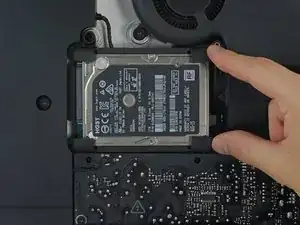
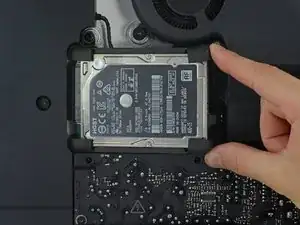
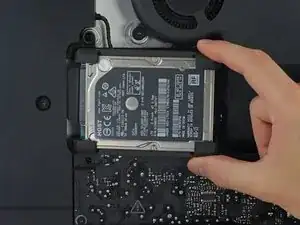
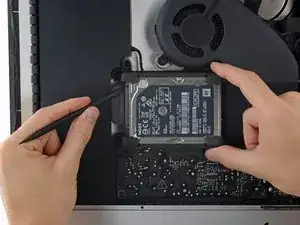
    • Levante el disco duro del borde más cercano a la placa y extráigalo ligeramente de su alojamiento.

    • El disco duro todavía estará conectado por su cable SATA; No intente extraerlo completamente todavía.

  2. lPTZWiOAYX4DCip2
    lPTZWiOAYX4DCip2
    WWAqU5y5tyeOXye2
    Ze5CkUIkcEpVNERw
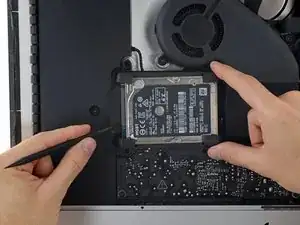
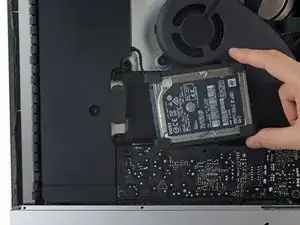
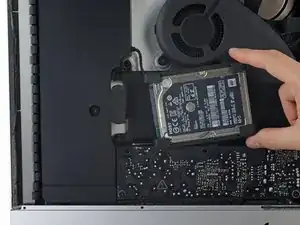
    • Use una punta plana para desconectar el cable SATA individual y sepárelo con cuidado del disco duro.

    • Extrae el disco duro del iMac.

    I’ve found that loosening the T10 screws on the enclosure to the left helps give some room to remove and reinstall the drive. Otherwise reattaching the SATA cable can be a hassle.

    rothgar -

    Not only is it useful to loosen up the speaker next to the SATA connector I found it helpful to use a pen to mark the exact location of the edges of the SATA connector on top of the new drive, so I could guide the connector in place. It also helps to put the bumpers in after you get this SATA connector in place.

    bsmith1 -

Conclusión

Para volver a montar su dispositivo, siga estas instrucciones en orden inverso.

Evan Noronha

Miembro Desde 06/02/15

219277 Reputación

0 comentarios