Introducción

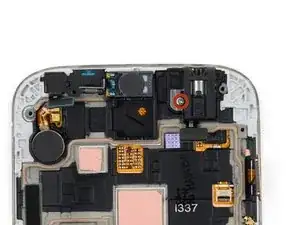
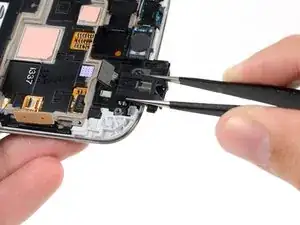
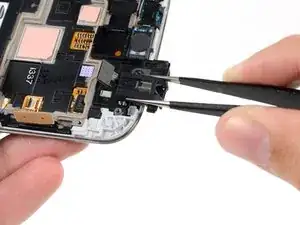
Usa esta guía para reemplazar el ensamblaje de la toma de auriculares, con la luz de estado y el sensor infrarrojo en tu Samsung Galaxy S4.

  1. rjhlmKL4roqDcNeD
    rjhlmKL4roqDcNeD
    ySIEOikDPMFCTh6j
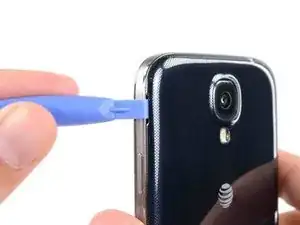
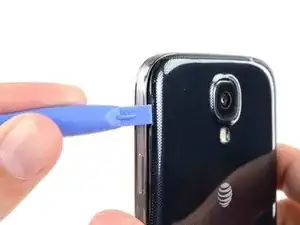
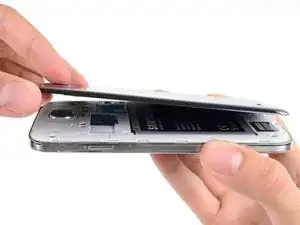
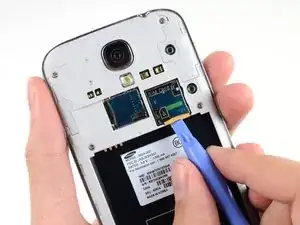
    • Haz palanca con una herramienta de apertura de plástico o tu uña en la ranura a la izquierda de la cámara trasera cerca del botón del encendido.

  2. QoGD1nhUjIK4SYhA
    QoGD1nhUjIK4SYhA
    mYdKICGURgG1VuPm
    EGyVAufYjRnV5oMH
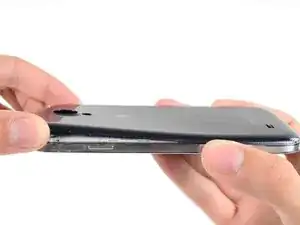
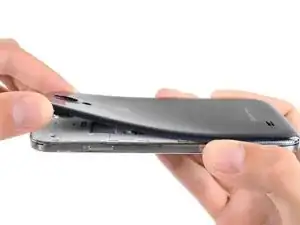
    • Levanta la caja trasera por la esquina más cerca de la ranura y remuévelo del teléfono.

    Where is the divot? Please let me know that

    James -

    I purchased a blue plastic opening tool(AKA: Spudge) like the one used in the above Step 1 rear cover pic and found the divot and was able to take off the rear cover as per the “Step 2 “ instructions.

    Terry Crawford, Jr. -

  3. crygJXPQtUYDKNlg
    crygJXPQtUYDKNlg
    qFUmmdiFJSbJncKZ
    24gAbT1EpiKW1ldS
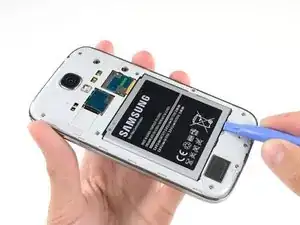
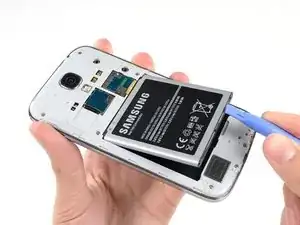
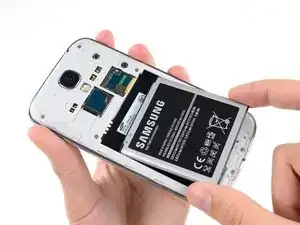
    • Inserta una herramienta de apertura de plástico o un dedo en la muesca del compartimiento de la batería y levanta la batería.

    • Remueve la batería de tu teléfono.

    it worked for me

    John Donovan -

  4. MQ1HoKUOlTYUB2Fl
    MQ1HoKUOlTYUB2Fl
    sHEGGRwOQFo3IeR5
    FldhpEixJL5ycMhU
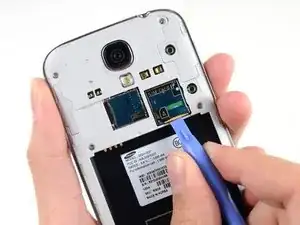
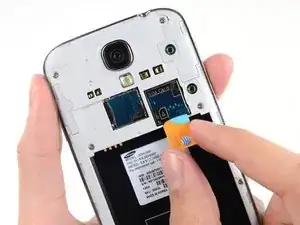
    • Usa esta herramienta de apertura de plástico o tu uña para presionar la tarjeta SIM en su ranura hasta que escuches un clic.

    • Luego del clic, libera la tarjeta y saldrá de su ranura.

    • Remueve la tarjeta SIM.

    • Durante el reensamblaje, empuja la tarjeta SIM en la ranura hasta que encaje en su lugar.

    Looks easy but doesn't work. No one has a plastic opening tool. Using fingernail, you can press SIM card into slot but it does not pop out so you can remove it.

    Laurie McWherter -

    I agree with the comment above

    I also don't have a plastic tool and my finger nail won't pop the card out.

    Grethe Montano. September 22

    Grethe Montano -

  5. EDtlEYuMDEYXrblv
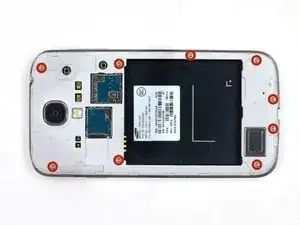
    • Remueve los nueve tornillos Phillips #00 de 4.00 mm que sujetan el marco medio al ensamblaje de pantalla.

    How much it will cost to replace a midframe

    kannan -

    How much cost will be on replace a midframe

    Hiren pedhadiya -

    I'm seeing midframes available on Ebay for around $10.

    Alex -

    I purchased a 1.5x40mm Phillips screw driver and was able to remove all 9 40mm screws from the midframe as per the Step 6 Midframe instructions.

    Terry Crawford, Jr. -

  6. WSuKHwiYL4wEeKPM
    WSuKHwiYL4wEeKPM
    A3gOcQAfyqxkjAeK
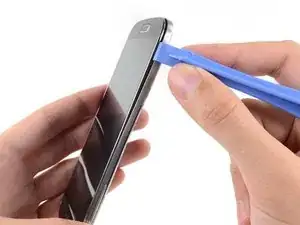
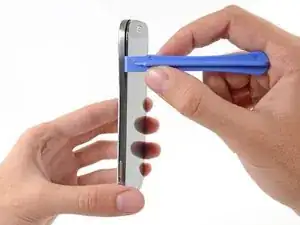
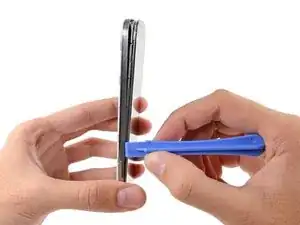
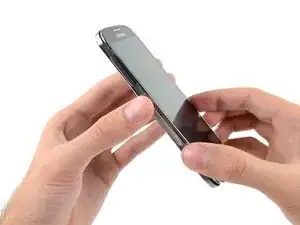
    • El marco medio está asegurado al ensamblaje de la pantalla mediante varios clips de plástico detrás del bisel cromado del marco medio. Los siguientes pasos te guiarán a través de la separación de los clips para liberar el marco medio.

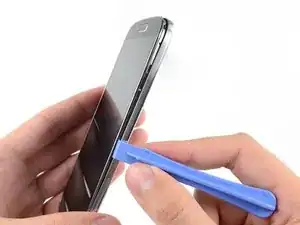
    • Comenzando en el botón de volumen del teléfono, inserta la herramienta de apertura de plástico entre el bisel cromado alrededor del cristal de la pantalla y la pieza de borde cromada más grande. Busca la unión entre los dos.

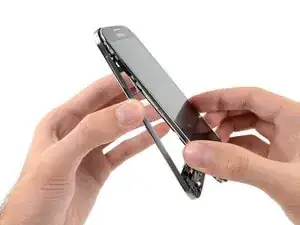
    • Desliza la herramienta de apertura a lo largo de la unión separando los clips de plástico a medida que avanza.

    • Ten mucho cuidado al hacer palanca, y hazlo lo suficiente para separar los clips de plástico; hay varios puntos finos en el bisel del marco medio que pueden agrietarse si los doblas demasiado.

    I used same tool as in the photo and i broke the display. I think you should use a very thin plastic tool, such as a credit card but even more thin and flexible.

    nicosoranno4gxo -

    I purchased a blue plastic opening tool(AKA: Spudger) and was able to remove the midframe from the display assembly as per the Step 7. I had to hold the cell phone firmly in my left hand while I gently forced the spudger between the chrome bezel and the midframe with my right hand and heard plastics clips separate and saw the midframe start to separate from the display assembly. Don’t be afraid to get that spudger in and just gently go down the side of the phone and you will hear the plastics clips detach and the midframe to separate more and more until you are able to separate them 100%. I started at the volume button side of the phone in Step 7 and ended at the power button side in Step 9.

    Terry Crawford, Jr. -

    This blue Case Opening tool has a less rigid edge that is kinder to trim than the hard black Spudger shown in later steps. I was glad to have the right tool on hand at this step. Use it as a wedge and slide it along the gap.

    Tom Huber -

  7. mlLqgVTFjlULZmXr
    mlLqgVTFjlULZmXr
    xbBRETlSI6ZKDpZJ
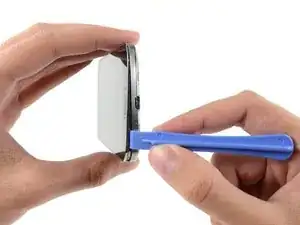
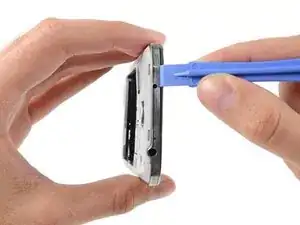
    • Continúa haciendo palanca alrededor de la esquina del teléfono.

    • Desliza la herramienta de apertura a lo largo de la línea entre el marco central y la pantalla a lo largo de la parte inferior del dispositivo, liberando más clips de plástico.

    I purchased a blue plastic opening tool(AKA: Spudger) and was able to remove the midframe from the display assembly as per the Step 7. I had to hold the cell phone firmly in my left hand while I gently forced the spudger between the chrome bezel and the midframe with my right hand and heard plastics clips separate and saw the midframe start to separate from the display assembly. Don’t be afraid to get that spudger in and just gently go down the side of the phone and you will hear the plastics clips detach and the midframe to separate more and more until you are able to separate them 100%. I started at the volume button side of the phone in Step 7 and ended at the power button side in Step 9.

    Terry Crawford, Jr. -

  8. NjGCILVpYvQZSYBN
    NjGCILVpYvQZSYBN
    KTbBqoxDr3GYJkMc
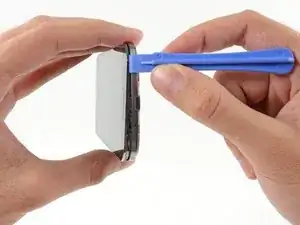
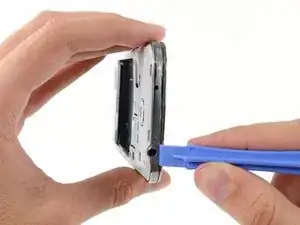
    • Nuevamente, haz palanca alrededor de la esquina hacia el lado del botón de encendido.

    • Desliza la herramienta de la apertura a lo largo de la línea.

  9. YxMui1KI6EfoKuUH
    YxMui1KI6EfoKuUH
    KjQOOeflFdfxLybe
    • Continúa deslizando la herramienta de apertura alrededor de la parte superior del teléfono, liberando el último de los clips y liberando el medio marco del ensamblaje de la pantalla.

    • En este punto, es posible que desees deslizar la herramienta de apertura de plástico a lo largo de todo el perímetro del dispositivo nuevamente, para asegurarte de que hayas soltado todos los clips de plástico.

    On my phone, there was another clip holding the white midframe to the battery compartment, in the middle of the top edge of the battery compartment, near the battery contacts. If you don't release that before removing the midframe, it is easy to break.

    josephoswald -

    I purchased a blue plastic opening tool(AKA: Spudger) and was able to remove the midframe from the display assembly as per the Step 7. I had to hold the cell phone firmly in my left hand while I gently forced the spudger between the chrome bezel and the midframe with my right hand and heard plastics clips separate and saw the midframe start to separate from the display assembly. Don’t be afraid to get that spudger in and just gently go down the side of the phone and you will hear the plastics clips detach and the midframe to separate more and more until you are able to separate them 100%. I started at the volume button side of the phone in Step 7 and ended at the power button side in Step 9. In Step 10 just make sure all the plastic clips are separated from the midframe and the display assembly so you can pull them apart 100% without breaking them.

    Terry Crawford, Jr. -

  10. MDb1XKUptBuYX6Bu
    MDb1XKUptBuYX6Bu
    R6HtRH5JnJXupZRr
    rDyAIYBh3bl6IN2Z
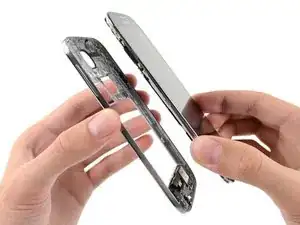
    • Remueve el marco medio del ensamblaje de pantalla.

    here i leave them a video i made doing the work

    https://www.youtube.com/watch?v=85pOvI6O...

    enjoy

    Gabriel Barrandeguy -

    My Sprint S4 was slightly different then the one pictured above but I just completed this repair in under 10 minutes.. It would have been slightly quicker but fooling around with those little screws can be irritating if you have big hands.

    Michael Willis -

    Just did this on my S4. Instructions were extremely helpful, but I had to remove a screw (step 10.5?) to remove the upper display assembly bracket. Other than that, flawless! Thanks!

    JackieME -

    The 3rd image of the 11th step shows that when the midframe is removed, some parts come along with it (at the bottom part of it). What are these parts? should they be removed too and placed in the new midframe? Are they easy to remove?

    Chris -

  11. QOBJ3LFbWBFVVGcA
    QOBJ3LFbWBFVVGcA
    yVD1EFNFEaXchvOf
    63C2pIomgcyGqkCc
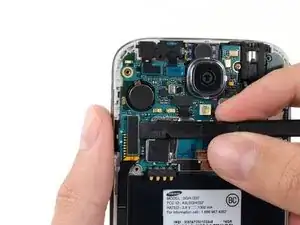
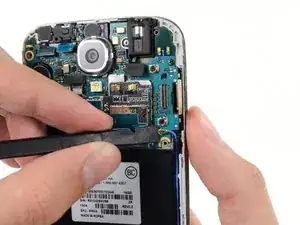
    • Usa el extremo plano de un spudger para desconectar el conector de la placa USB.

    • Desconectar el conector del cable de la cámara frontal .

    • Desconectar el ensamblaje del conector del cable del altavoz auricular.

  12. rNPnmChVeydDDOkQ
    rNPnmChVeydDDOkQ
    XLIVIYF1GdMvaGRN
    epVsggkyQGhUiBBG
    • Desconecta el conector del cable del ensamblaje de la toma de auriculares.

    • Desconecta el conector del cable de la pantalla/el digitalizador.

    • Desconecta el conector del cable de la antena.

    My model had an antenna connection next to the usb board connector in addition to the antenna connection near the display cable connector.

    Drew -

    That's point a, on the daughter board (where the USB is located is point b. You must connect it from a to b

    djweijers1997 -

    I could not get the screen connector to fit on with the motherboard assembly in place. I had to remove the motherboard assembly, attach the screen connector, and then carefully replace the motherboard assembly, with the screen connector still attached..

    Tom4G -

    Same as Tom4G above. When trying to connect the screen connector, it would not give me that nice clear snap indicating a positive connection. The phone powered up with no screen. So, I disconnected the other connectors again, lifted the motherboard out and connected the screen connector by pinching it with finger and thumb from both sides of the motherboard, this time getting a nice snap when it engaged.

    speedrzr -

  13. rj6NCBPKbIQYnvFu
    • Remueve el único tornillo de 2.4 mm Phillips #00 del ensamblaje de la placa madre.

    As Sam Lionheart states at the end of this guide, some of these phones have an additional antenna on the opposite side of the phone. Be sure to detach it before removing the motherboard.

    mcr4u2 -

  14. aePe63fVSmTOtsPY
    aePe63fVSmTOtsPY
    etpnFuSt2fSS2A1Y
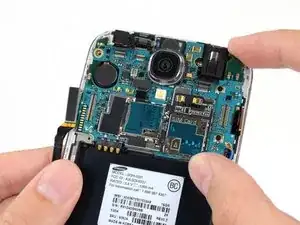
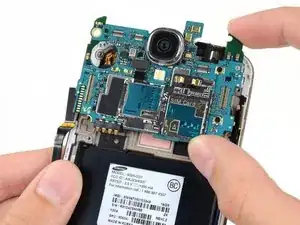
    • Con cuidado remueve la placa madre.

    • Sostén la placa madre de los bordes para prevenir daño por descarga electroestática.

  15. M6LDETEiodQjtxTS
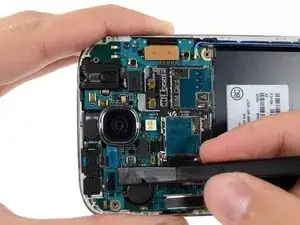
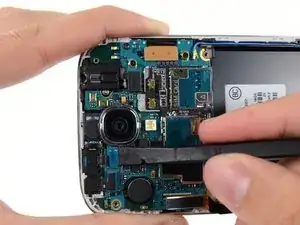
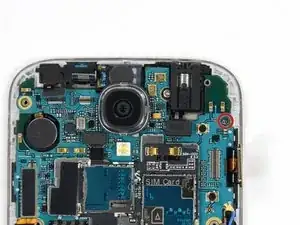
    • Remueve el único tornillo Phillips #00 de 2.4 mm que sujeta el ensamblaje de toma de auriculares al ensamblaje de pantalla.

    My assembly had a silver conductive tape shield over the array of components shown in the middle of this photo. I peeled the old one off and attached it in the same location on my new digitizer.

    David -

  16. Ny4onYB2SMAm2ncs
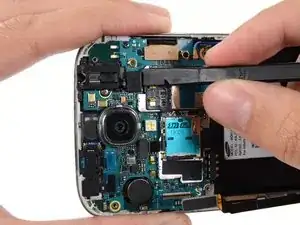
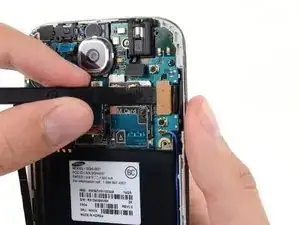
    • Remueve el ensamblaje de la toma de auriculares.

    The headphone jack is surrounded by rubber. It's kind of squeezed in there. You can pry on it to get it out.

    jonathan -

    I had a quick question there's a little white rubber circular gasket piece that the headphone jack covers up

    What's that piece called?

    damian lasher -

    The small rectangular milky-white silicon gasket appears to be a diffuser for ambient light sensor.  I removed it with a small screwdriver, and replaced it in the same location in my new screen assembly.

    Nicholas Crisp -

    The small rectangular milky-white silicon gasket appears to be a diffuser for an ambient light sensor.  I prised it out of the old assembly and placed it in the new screen assembly.  I also started transferring the components as they were removed from the old screen, so the head-phone jack went straight into the new at this point.  I may regret that later…

    Nicholas Crisp -

    The angle of the picture here makes it appear like the head phone jack needs to be slid out of the top of the phone. This is impossible due to small bits of plastic holding it in at the top. If you're having trouble, the headphone jack is in fact supposed to lift straight up out of the phone.

    sigoshi -

    Additionally, there might be a small amount of adhesive holding the headphone jack to the board (there was some in my device). Apply a bit of heat to loosen it up, if needed.

    Mikolaj Banasik -

    it is easy to pop off, if you apply pressure to the right point. Using a plastic pair of tweezers or a pry tool, push at the lower right corner and gradually increase the pressure, if you apply enough pressure it will just pop right off.

    Wissmiller Services -

Conclusión

Para volver a ensamblar tu dispositivo, sigue estas instrucciones en orden inverso.

Sam Goldheart

Miembro Desde 19/10/12

457951 Reputación

8 comentarios

I accidentally inserted an electric pin instead of the auxiliary jack into the head phone jack assembly. There was a loud screeching sound and ever since then the head phones do not work. However, I can play music through the phone speaker and also with Bluetooth. I cannot listen to music with my ear buds or head phones or with auxiliary speakers. I have replaced the jack assembly with a new one and yet it is the same. What more can I do to rectify this?

Guy Paranavitana -

Did you ever get help on this? Having the same problem.

Jace Blackburn -

Me too have same problem....did u got it fixed or not?...if yes how u did it...?

reone -

I too am having this issue. I assume we have fried the amp for external audio with wtv current we happened to let touch our aux ports. Sounds like I bigger issue to fix. Just still wondering if I can.

Zadboy Tanaka -

Where do you even get the part?

Albert Einstein -

Hi all,

I own a Galaxy s4 SGH-I337, No sound comes out of the right earbud with wire.

Bluetooth works fine in stereo.

I suspect the haedphone Jack plug to be broken, i order a new one on ebay now for 5$, i'll let you know when i've tried this repair.

Ewouik -

I own a Galaxy S4 SGH-I337 whose headphone jack does not work for the right ear.

However bluetooth works well in stereo, thus i suspect the jack module.

I am buying a new jack on ebay for 5 $ and will let you know when i receive it and install it.

... to be continued...

Ewouik -

Thanks to Sam Lionheart for this guide. It was clear and easy to follow. It gave me the instructions I needed to solve my problem - headphones etc. were no longer making good connections with my Galaxy S-4 jack - and for about $7 I was able to completely fix the issue.

Steve Heimann -