Introducción

Esta guía es una guía privada usada como pre-requisito.

  1. Y1mxNLVgI4LNsGLe
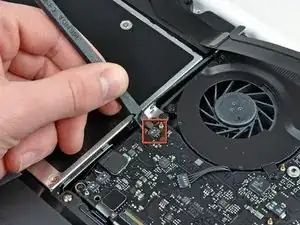
    • Usa el lado plano de un spudger para levantar el conector del cable AirPort/Bluetooth de la placa lógica.

  2. DPsvoLhYGb3w5ITl
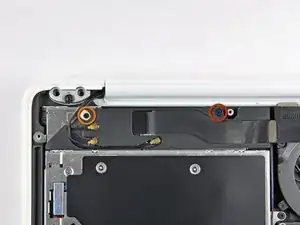
    • Remueve los siguientes tornillos asegurando el ensamblaje del altavoz derecha a la carcasa superior:

    • Un tornillo Phillips de 12mm.

    • Un tornillo Phillips de 3mm.

  3. AZmxqeUFYDppEpVt
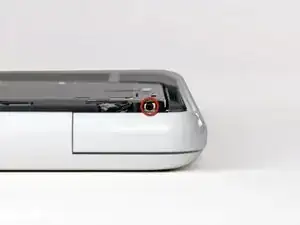
    • Remueve el único tornillo Phillips de 2.2mm insertado horizontalmente en el lado del disco óptico.

  4. lXbB61d2DYL4efRQ
    lXbB61d2DYL4efRQ
    1hHj2NnvTfCAuApX
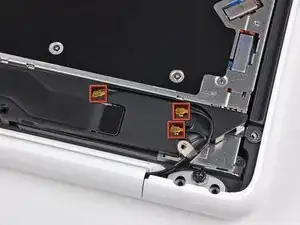
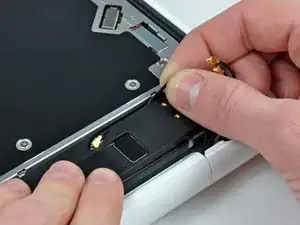
    • Levanta el conector de la antena AirPort y Bluetooth (3 en total) de la tarjeta AirPort/Bluetooth.

    • De-ruta la antena larga de su canal en el ensamblaje del altavoz trasero.

  5. WK63ijerZhK3ABvk
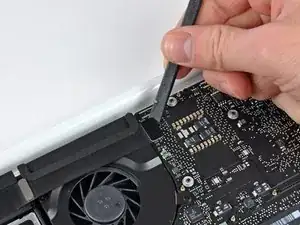
    • Usa el lado plano de un spudger para levantar el conector del cable de la placa lógica.

    This step is NOT necessary!!!

    ulrichkrenmayr -

    Agreed- this step is not needed. If you do detach it, you will have to reattach it. I used my mom's nail glue. I applied a 1mm dot of it on the logic board using a paperclip. I also applied a small amount to the back of the connector. I let it air dry til it was tacky, then carefully placed it on, and got the contacts aligned. Took me two tries, but after the second, I rebooted and had sound!

    Shelly Murney -

    I wasn't able to reconnect this cable and feel like I broke it. There's 2 other cables near that too and part of one seems broken as well. Honestly, why did I even have to remove that cable? Now I'm stuck without good sounds for a while.. :(

    Austin Vareith -

    Broken it also.. better is to remove this step in the instruction

    rikkok -

    +1 for REMOVING this step. The tutorial states to PRY the speaker cable from the logic board which results in BROKEN solders!

    Chris B -

    And now that I have disconnected the connector how to put it back?

    Giovanni Calandro -

    How can I f*****g fix it? You guys can’t be serious…..

    Jack son -

    how the &&^& can i fix this??!!!!!

    Jack son -

    Hilfe. Wie befestige ich dieses Kabel vom neuen Lautsprecher? er hält nicht, sowie auch der alte Stecker. Warum?

    bruno.graziano -

    Hi - how is this step not necessary when you have to remove the old speaker assembly? Does it detach at the other end? I’m about to get my speaker replacement in the mail and I will go through this tutorial.

    David Myer -

    If you're replacing the rear speaker then, of course this is not optional. If you're following these instructions in order to replace some other component (the MagSafe connector seems to be one example), then it probably is optional. FWIW I repaired a damaged speaker by applying some flexible rubbery glue with a toothpick to the cone surround to seal the hole. It doesn't look pretty but it sounds fine.

    John Morley -

  6. BlmaNLt2G4b5TRZZ
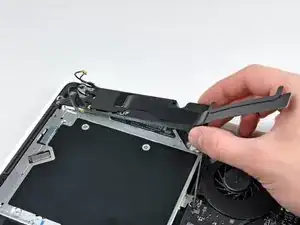
    • Remueve el ensamblaje del altavoz trasero de la carcasa superior.

  7. D3UYFSr2v3jvpOCK
    D3UYFSr2v3jvpOCK
    bdRAfrZCenVSstfK
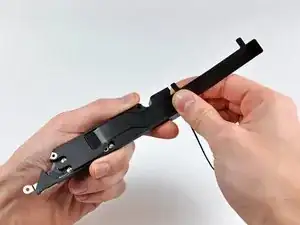
    • Cuidadosamente despega el cable del Airport/Bluetooth de su canal en el ensamble de la bocina trasera.

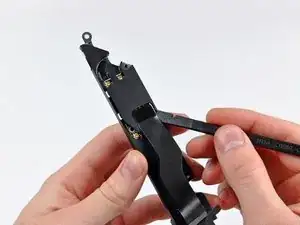
    • Usa el lado plano de un spudger para levantar el cable AirPort/Bluetooth de la bocina trasera.

  8. DbYvIIKXe3Yaytr1
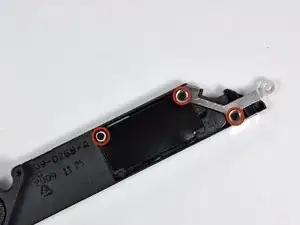
    • Remueve los tres tornillos Phillips de 3 mm que sujetan la placa AirPort/Bluetooth al ensamblaje del altavoz trasero.

  9. wXgF6lOUOnnANWHH
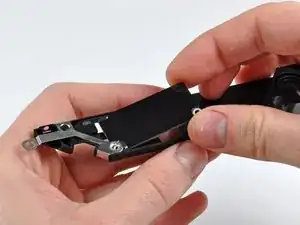
    • Levanta la placa AirPort/Bluetooth del ensamblaje del altavoz trasero.

Conclusión

Para re-ensamblar tu dispositivo, sigue estas instrucciones en orden inverso.

Walter Galan

685928 Reputación

0 comentarios