Introducción

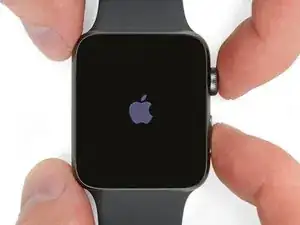
Usa esta guía para sustituir una batería de Apple Watch Series 2 desgastada.

Nota: si tu batería presenta abultamientos, toma las precauciones adecuadas.

  1. 3jETuMAJGuYOyrM1
    3jETuMAJGuYOyrM1
    lENxZXOSlnxhjUKM

    Verify your model. The back of the Cellular model just says GPS, so be sure to check the groves where the watch band goes to determine you model. I made the mistake of just reading the back of the device and since I’d been gifted the device didn’t know it was cellular. Cellular has a different type of touch force gasket, different screen, and different battery connections.

    Ryan Holt -

    From what I just read on Apple, the only differences in watch series 3 is 38mm and 42mm.

    mcr4u2 -

    As a consumer all you need to know are 38mm and 42mm

    Michael Adoga -

    The back will say GPS LTE if it’s the cellular version. If it doesn’t say LTE it is only the GPS version. The displays are different whether or not it is LTE(cellular).

    themepark -

    This alternative method only reboots the watch.

    Gregg Stanley -

  2. dAlO5MlADoI4aHmQ
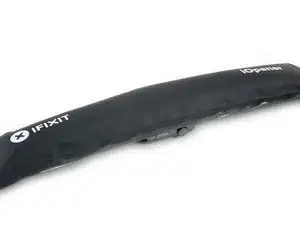
    • Prepara un iOpener (o usa un secador de pelo o una pistola de calor) y calienta la esfera del reloj hasta que esté ligeramente demasiado caliente para tocarla.

    • Deja el iOpener en el reloj durante al menos un minuto para calentar completamente la pantalla y suavizar el adhesivo que lo sujeta a la caja.

    • Es posible que tengas que recalentar el iOpener, o moverlo por la pantalla a medida que las secciones se enfríen, para calentar la pantalla lo suficiente como para levantarla.

    I have heated up the iOpener to 165 degrees and left it on for more than a minute. No way I can lift the screen off with the exact knife. Tried different angles in various places, but no go. I also used a hair dryer un til the watch screen was too hot to touch and even tried a very hard cutting tool blade and also no go. Could n ever get the blade under the face I applied enough force where I could see that the blade left small marks, not very big, but could never get anything to move or lift. What am I doing wrong? I spent 47 years at a global computer company and I am used to taking apart small things and applying force when required. I don’t know what I am doing wrong. Please help me.

    Rafael Blanco -

    Getting the initial gap is not easy. Maybe a playing card could work its way in the tiny gap and cut some adhesive. After that there might be some success with an exacto knife. Or you want to try a piece of aluminum foil (folded for more rigidity) for cutting the adhesive. Be aware of the force touch gasket and that it might get damaged during that procedure.

    Tobias Isakeit -

    I finally used a hot air gun set to 150 deg. C heating up the edges by slowly spinning the watch around before the technique worked. Difficult is the level noted and it’s correct. Finally worked and watch perfectly functioning.

    Chris Giavotto -

    I had to heat the iOpener 2 times and leave it on top of the watch for 10 minutes.

    Axel Trujillo -

  3. TiPIaVjFQZ6OJlTT
    TiPIaVjFQZ6OJlTT
    6hNke1uI3WvUQ3Im
    yys2M1eO4GHOURDx
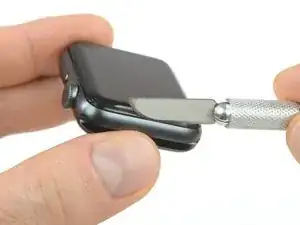
    • Debido a que el espacio entre la pantalla y el cuerpo del reloj es tan delgado, se necesita una cuchilla afilada para separar ambos. Lea las siguientes advertencias cuidadosamente antes de continuar.

    • Protege tus dedos manteniéndolos completamente alejados del cuchillo. En caso de duda, protege tu mano libre con un guante pesado, como un guante de cuero o un guante de jardinería.

    • Ten cuidado de no aplicar demasiada presión, ya que esto podría causar que el cuchillo se deslice y le corte, o dañar el reloj.

    • Usa protección para los ojos. El cuchillo o el cristal pueden romperse, haciendo que los pedazos salgan volando.

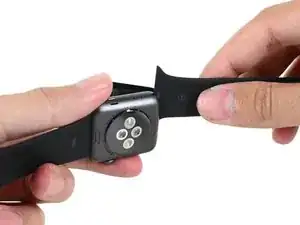
    • No dudes en colocar o quitar la correa del reloj según sea necesario para tener más control al hacer las reparaciones.

    Don’t cut your finger off!

    Mike -

    The Watch 3 stainless Steel has an additional Frame. Where do i have To Open it?

    asteffen@me.com -

    I wore thick gardening gloves just to be safe 😅 and it took a while but the screen did come off.

    Axel Trujillo -

  4. ZkWMSNMJYG6IZhkL
    ZkWMSNMJYG6IZhkL
    NQIDl3ZOwVEC44ZA
    oZFcsBuOlJ6JyOK3
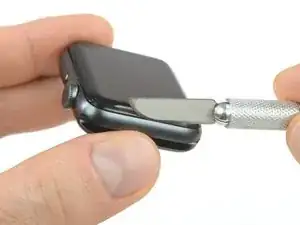
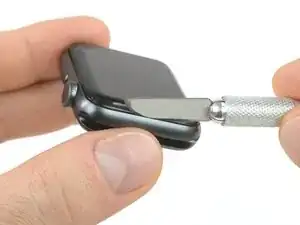
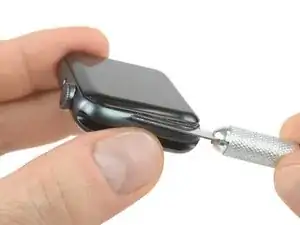
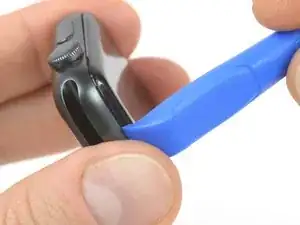
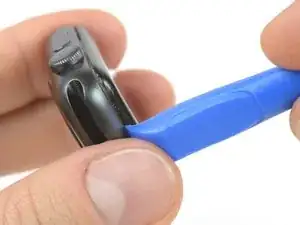
    • Coloca el borde de una hoja curvada en el espacio fino de la pantalla y la carcasa exterior. Comienza en el lado corto de la pantalla, más cercano a la corona digital.

    • Presiona firmemente hacia abajo en el hueco.

    • Una vez insertada, inclina la cuchilla para abrir ligeramente la pantalla.

    • No insertes la cuchilla más de 1/16 de pulgada (~2mm).

    It’s difficult to grip case in a way that keeps fingers safe from the blade but doesn’t hit the side buttons and turn the device on!

    If it’s a struggle to get the display to release, warm case for a few more minutes.

    Kyle Powderly -

    I have tried so may times to get the display to release but nothing works. Should have bought a new watch LOL. Kept the iOpener on 2 times for 10 minutes and it still won't open. There must be a better way.

    Susan E. White -

    Hi Susan,

    if you're struggling to get the adhesive loose enough a hair dryer, heat gun, or hot plate may also be used, but be careful not to overheat the device. The edge should feel slightly too hot to the touch.

    Dominik Schnabelrauch -

  5. AjRJCyCiMOCZ3rad
    AjRJCyCiMOCZ3rad
    ARGTNpwjNblelqda
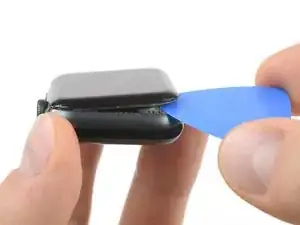
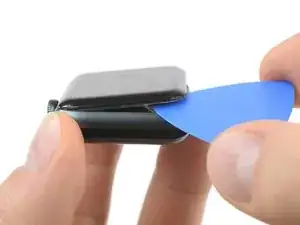
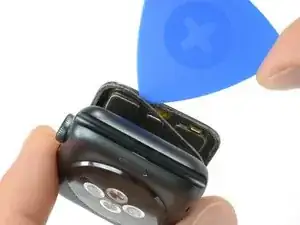
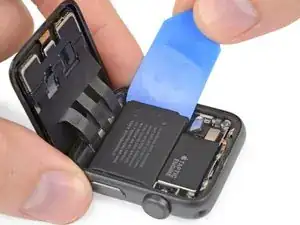
    • Una vez que has abierto un pequeño espacio con la hoja curvada, retira la hoja e inserta el borde mas delgado de una herramienta de apertura en el hueco.

    • Empuja la herramienta de apertura en el hueco. Usando tu pulgar como un pivote para levantar la pantalla abierta un poco más lejos.

    • No intentes abrir o separar la pantalla completamente.

  6. R4FIOpCBksWgGmXY
    R4FIOpCBksWgGmXY
    XUMQGYuCDf4DO6MI
    GWW1SH1I4KqcmfKr
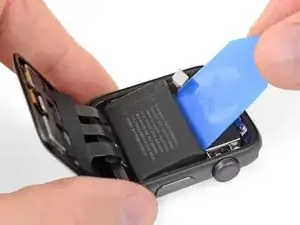
    • Inserta una púa de apertura debajo de la pantalla y separa cuidadosamente la junta de Force Touch de la pantalla.

    • La pantalla iFixit y los kits de reparación de la batería incluyen una junta de reemplazo Force Touch, así que no te preocupes demasiado si la tuya está dañada.

    • De lo contrario, para conservar la junta Force Touch, hurgue con cuidado bajo el borde de la pantalla. Si la junta Force Touch se rompe al levantar la pantalla, o si separa las capas de la junta, también deberá reemplazar la junta Force Touch en sí.

    • Desliza la púa alrededor de la pantalla para separar el adhesivo entre la junta de Force Touch y la pantalla.

    • No insertes la púa de apertura más de 1/16 de una pulgada (~2 mm).

  7. rPZ1tKy2Hq2hQToM
    rPZ1tKy2Hq2hQToM
    vdTqXtcOWsXKFMeh
    x5qVggWBkbWBMNls
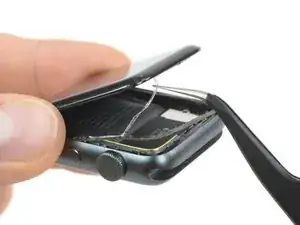
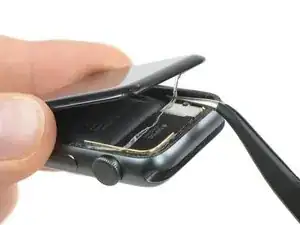
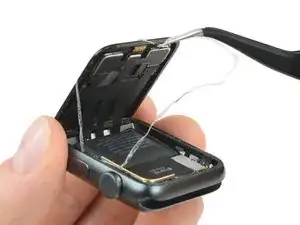
    • Para evitar tensionar los cables de pantalla, no la abras completamente todavía.

    • Abre la pantalla a un ángulo de 45° y usa pinzas para despegar el adhesivo entre la pantalla y la junta de Force Touch.

    • Enrosca el adhesivo alrededor y detrás de los cables de la pantalla para quitarlo completamente.

  8. y1fV1Nd2PZhidSJy
    y1fV1Nd2PZhidSJy
    iJkqEdVVY2YdLKMo
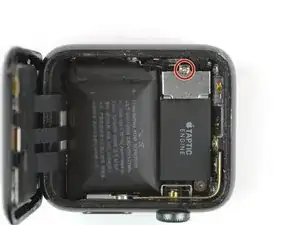
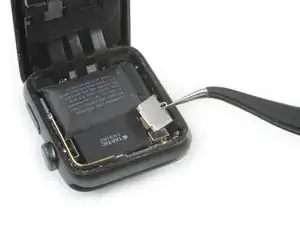
    • Utiliza un destornillador Y000 para quitar el tornillo de tres puntos que sujeta la cubierta metálica del conector de la batería.

    • Remueve la tapa.

  9. rCcSY1GiFOR2oeRP
    rCcSY1GiFOR2oeRP
    USkmJGVUcoYa1Oal
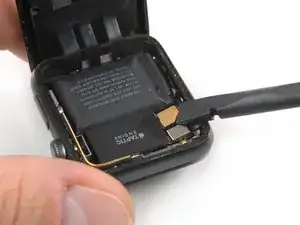
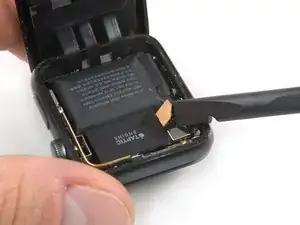
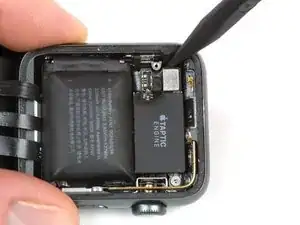
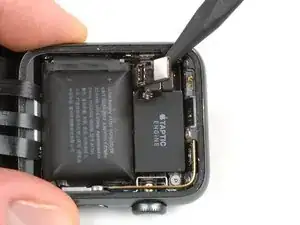
    • Desconecta la batería levantando su conector con el borde de un spudger.

    • Dobla el conector ligeramente hacia arriba para asegurarse de que no haga contacto por accidente.

  10. nDRjCiwFAgKuunO6
    nDRjCiwFAgKuunO6
    ToMknTpJ6LcNTTvW
    yYkkSYHkB6cRuDSc
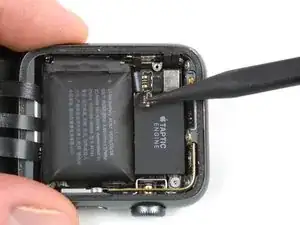
    • Con el conector de la batería fuera del camino, coloca la punta de un spudger debajo de la placa del conector de la batería, que es parte de la batería.

    • Levanta la placa del conector de la batería hacia arriba y fuera de su cavidad.

  11. dINYwkOWkB21mMcw
    dINYwkOWkB21mMcw
    gGuULW3EVHDZQSHH
    TSHBOGfQMwwD6WRk
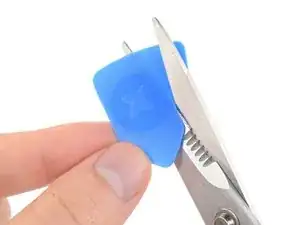
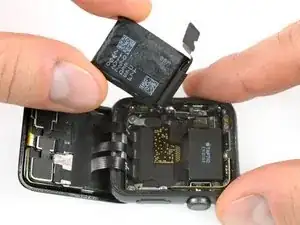
    • Usa unas tijeras para cortar una de tus púas de apertura para que tenga aproximadamente la anchura de la batería. Intenta no dejar bordes afilados.

    • Introduce la púa modificada entre el borde de la batería y la carcasa, en el lado opuesto de la corona digital.

    • Usa una presión constante y estable para extraer lentamente la batería, separándola del adhesivo que la mantiene sujeta a la placa del sistema.

    • Si lo necesitas, también puedes levantar la batería por el extremo superior, pegado al motor táptico.

    • Ten cuidado con los cables de la pantalla, evita dañarlos mientras extraes la batería.

    • Asegúrate de no perforar o deformar la batería, ya que podría incendiarse y/o explotar si resulta dañada.

    Der Akku Wechsel ist absolut unproblematisch danke für die super Anleitung.

    Maximilian Theilig -

  12. 2TvuPVbcdDCB12hg
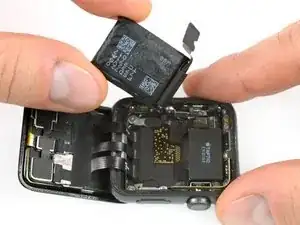
    • Separa la batería

    • Asegúrate de separar el forro protector para exponer el adhesivo de tu nueva batería antes de colocarla en su lugar.

    • Si lo necesitas, prueba a usar de nuevo el adhesivo antiguo para colocar la batería. De forma alternativa, intenta usar un pequeño trozo de cinta de doble cara (como la Tesa 61395) o un adhesivo líquido (como el E6000).

    • Si estás usando un kit de reparación de iFixit, usa el enlace que se adjunta en las conclusiones de esta guía para ver cómo instalar un nuevo sensor Force Touch y sellar de nuevo tu reloj.

    • Alternativamente, si solo estás sustituyendo el adhesivo y no el sensor, echa un vistazo a la guía de sustitución de adhesivos para poder colocar unos nuevos y montar de nuevo el dispositivo.

    If the protective plastic over the adhesive removes the adhesive from the battery, reattach the plastic to the battery. Carefully fold the tab of the plastic back on itself, and look for an edge to the adhesive. Using the blade, CAREFULLY scrape the plastic until you see the edge of the adhesive pull away from the plastic. Tap the edge onto the battery surface, and slowly remove the plastic, ensuring it doesn’t continue to pull at the adhesive.

    Kyle Powderly -

Conclusión

Una vez que tu batería esté colocada de nuevo, sigue desde el Paso 10 de la guía para juntas Force Touch para sellar tu reloj de nuevo y completar tu reparación.

Tobias Isakeit

Miembro Desde 31/03/14

108306 Reputación

10 comentarios

Ordered the kit and replaced the battery, no dice! I believe the components in my watch failed victim to thermal breakdown since the battery got so hot. After the battery replacement my watch acted the same. It got real hot again, so I am not sure what is actually wrong with the watch. I think it is time for a new one.

These directions were easy to follow. The screwdriver in the kit didn’t work at all. luckily I have a good kit with the right tip. If you are confident and able, this procedure should take about 2 hours. Thank you IFIXIT for providing this product an the easy to follow instructions.

Thomas Bole [Abston ES] -

Success! Following this guide and the gasket replacement guide saved having to buy a new watch. Like Thomas mentions in his review, the screwdriver was difficult to use. I eventually got it to turn the tiny screw by holding the watch from the bottom rather than just pressing down with the driver from the top.

A question: should I reset my watch after replacing the battery? Or will whatever throttling WatchOS put in place reverse itself?

dalexgray -

Yay it worked! Was supposed to wait for my boyfriend to do it but got impatient and gave it a go.. easy peasy even with my baby having a hissy fit inbetween ?

Beth Almond -

Thanks ! It worked perfectly in 30 minutes !

Benoit Maillard -

This guide made the repair quite simple. Opening the watch proved to be quite straightforward once it got started. The biggest challenge was actually getting the Force Touch gasket connector aligned and reinserted, but even that wasn’t tough. I’m not sure why this repair is classified as very difficult, unless it’s to discourage people who find everything to be difficult.

I did find that I had to force restart the watch twice after replacing the battery to take care of some strange problems with sluggishness, but after that was taken care of it fixed so many problems and the watch now runs all day without seemingly random shutdowns. Previously if the battery said less than 50% I knew it would probably shut down with a workout. Now it runs like new.

Arle Lommel -

The hardest part was separating the screen, I had to heat the iOpener tool 2 times and leave it on top of the watch for 10 minutes, wait until the watch was almost too hot to touch and ONLY then did the screen came off.

Axel Trujillo -

I agree with Axel, the toughest part was getting the display off. I left the watch on my 3D printer heat bed, set at 80℃, for about 15 minutes. After that the watch was so hot that I had to use a glove on my left hand to hold the watch down. Also, the curved blade is extremely important.

coffee -

How hot is too hot? At what temperature will the display be damaged?

mikefunkpa_c -

As long as you can touch it, your display should be fine. You might avoid anything beyond the ~95°C (~200°F) threshold for an extended time (~5min). But that’s just a rough ballpark. As in life, if anything smells funny, you might not want to continue ;)

Tobias Isakeit -

Success! The kit came with everything I needed and than some. Getting the screen off took some doing as my watch is pretty beaten up and dented in on the sides. Take your time, its not worth breaking it or cutting yourself. I ended up getting it open without slicing the force touch gasket, which was nice. Everything after that was a cakewalk, except for reconnecting the battery to the mainboard. The cables are stiff and very very small, so getting everything lined up was tricky. Don't force them! Overall though it could have been much worse. The watch booted back up without an issue and seems to be holding a charge.

Daniel Schabilion -