Introducción
Herramientas

-
-
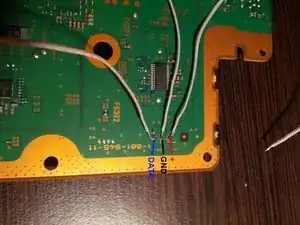
Suelda 3 cables a los 3 puntos en la parte posterior de la placa base. Los 3 puntos están justo debajo del conector del ventilador en el otro lado.
-
-
-
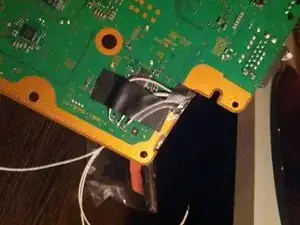
Usa un poco de cinta para fijar los cables en el tablero. Como puedes ver, usé el espacio de la derecha para pasar los cables al otro lado.
-
-
-
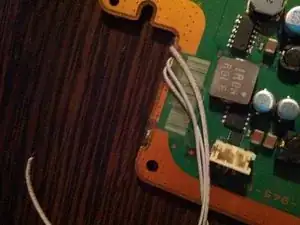
Este es el lado superior de la placa base, también puedes/debes usar un poco de cinta para fijar la posición de los cables. También puedes ver que pegué el conector en la placa (sin conexión eléctrica).
-
-
-
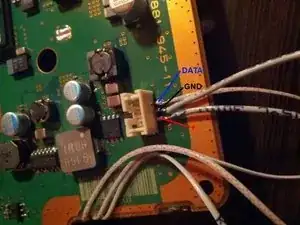
Suelda los cables al Conector que pegaste en la Mainboard, o directamente al ventilador o cualquier otra idea que se te ocurra.
-
6 comentarios
So wait, do I just get any three wires and solder them from the underside to where the fan connector was?
Jianni -
Yes. I used an old IDE Cable which i stripped apart.
Thanks for this guide. Like everyone else, I opened my PS3 to clean it out and reapply thermal paste, which looked like it was just haphazardly applied at the factory, only covering about half the surface area of the both processors, and were also both off center. It hadn't dried up yet, and surprisingly after 7 years of moderate play, there was very little dust. But tried to disconnect the fan cable, was waaaaay too tight in the connector, and even being careful, and wiggling it back and forth, it separated from the board ripping up all 5 solderpads. I thought I was doomed until thankfully after some searching there was this guide. One other guide I saw on youtube had you trying to solder to tiny little traces, and I was like "you've got to be effin' kidding!" And the other videos showing this method were so low quality you couldn't tell where they soldered.