Introducción

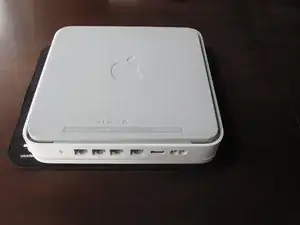
Esta guía te muestra como abrir su Time Capsule por primera vez. Tómese tu tiempo con el primer paso especialmente si su Time Capsule tiene algo de tiempo; el adhesivo se puede volver bastante dificil de quitar.

  1. FFi6INEMTHmStsst
    FFi6INEMTHmStsst
    tXQan2X3WXLNjWkw
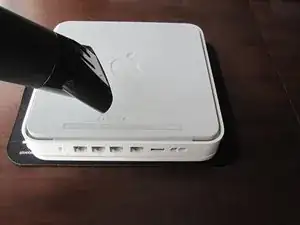
    • Coloque una pieza de tela o un material suave similar en una superficie limpia, plana. Coloca el dispositivo de cabeza abajo sobre la tela.

    • Abra el Time Capsule exponiendo los tornillos que mantienen el dispositivo unido. Los tornillos están ocultos por la base de goma, que es la superficie inferior del dispositivo.

    • Usa una pistola de calor o secadora de cabello para calentar la base de goma, lo cual debilita el adhesivo sosteniéndolo.

    • Empezando en una esquina, levante cuidadosamente la base de goma para prevenir roturas. Puedes usar una pua de guitarra o una pequeña, regla de plástico para ayudar separar la goma del metal.

    • Tómese su tiempo para evitar roturas en el adhesivo. Asegure que no se sobrecaliente el dispositivo.

    • Si se rompe un poco del adhesivo no te, preocupes. El adhesivo existente es mas que suficiente para volver a pegar la base de goma en la unidad durante el re-ensamble.

    • Durante el re-ensamble puede aplicar calor a la base de goma. Esto permitirá que el adhesivo fluya y forme una mejor unión con la carcasa de metal del dispositivo.

    Slowly start peeling at one corner... worked better than shown on the pictures.

    Markus -

    Slow down particularly near the bottom label where it is stiffer. Either that or I needed to give it more heat. Going too fast can risk tearing the rubber base if the adhesive is strong.

    ElvinC -

    If you are wondering if the Time Capsule will still work as a router if you remove the HDD and leave it out, the answer (according to another webpage I read) is YES, it will still work. Apparently, you get a warning with the AIrPort Utility about a missing HDD, but it still works. I wanted to keep and reuse the 1TB Hitachi HDD for offsite data backup.

    CraigH -

    Use an iron instead of a heating gun or hairdryer!

    Gradually raise the temperature while checking for separation, while moving over the rubber. I first cleaned the rubber with some soap, to avoid scorching dust or grease. The setting for synthetic fabrics seemed to do the job with my Tefal iron; probably a little over 100 degrees centigrade. No steam off course!

    Worked like a charm without leaving almost any residual glue.

    Sticking the rubber sole back after the repair was also successful.

    Frits de Bruijn -

    Thanks for sharing this.

    kenatkenichikato -

    Adhesive tape used is Nitto No. 5015. I found a piece of a back-paper left underneath the rubber…

    vesa -

    Is there a possibility to change an already changed 2TB SATA to a bigger one? Mine is full. because I added another MacBook Pro, but I’d rather not buy a newer TimeCapsule

    Bette Rose -

  2. vOfiXMwL1vULiDpf
    vOfiXMwL1vULiDpf
    JocNoHh26TxaqZYY
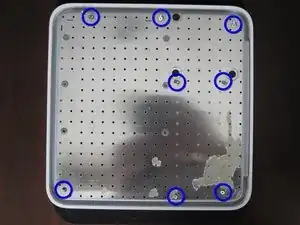
    • Una vez la base de goma esta separada del dispositivo, retire los 8 tornillos Phillips PH00 que unen la carcasa inferior metálica con la carcasa superior de plástico.

    • Use un destornillador Phillips #00.

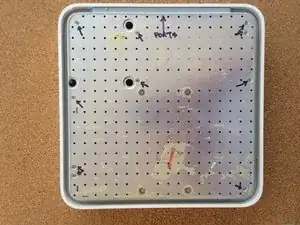
    • Algunas versiones del Time Capsule tienen 10 tornillos. La versión A1254 tiene dos tornillos en las esquinas superior derecha y en la esquina inferior izquierda, como mostrado en la segunda imagen. En esta situación asegurese de retirar los 10 tornillos.

    Confirmimg 10 screws for Model A1355

    pkeenan8 -

    Larger screwdriver size can help with sticky screws.

    ElvinC -

    One of my screws was already stripped by Apple, so I had to drill it out.

    CraigH -

    Instead of removing the rubber floor, I cut windows in the rubber base at the designated places and dug them out. To do this, I had rectified the photo and printed it out as a square with an edge length of 19.8 cm and used it as a stencil.

    Statt den Gummiboden zu entfernen, habe ich an den bezeichneten Stellen Fenster in die Gummiplatte geschnitten und ausgehoben. Dazu hatte ich das Foto entzerrt und als Quadrat mit der Kantenlänge 19,8 cm ausgedruckt und als Schablone benutzt.

    Markus Kluft -

  3. XYdRTJhLR3xFYDep
    XYdRTJhLR3xFYDep
    J1xZt1YQBB25setC
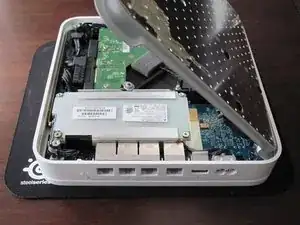
    • Posicione la parte posterior del dispositivo (el lado con conectores Ethernet) de modo que quede frente usted.

    • Levante el lado izquierdo de la placa de metal y lentamente girela al borde derecho del dispositivo.

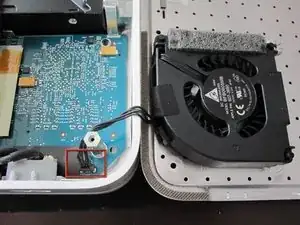
    • Para evitar daños, no levantes la placa de metal directamente hacia arriba o use fuerza. Como se muestra en la segunda foto, el ventilador esta unido a la placa de metal y conectado a la placa lógica cerca del conector de poder.

    • Debido a que mucha gente ha tenido serios problemas rompiendo el conector del ventilador. Es recomendable de NO tratar de desconectar el conector de alimentacion del ventilador. Sea MUY cuidadoso con este conector. Es muy frágil. Si necesita desconectar el ventilador de la placa lógica absolutamente, MUY cuidadosamente usa un spudger o pinzas.

    It is really not necessary to disconnect the fan and you risk breaking it off of the logic board. :(

    rdemby -

    I'd destroyed the connection between my fan and logic board by trying to remove the fan. This is a bigger problem than a broken hard drive. DO NOT TRY TO DISCONNECT THE FAN. Instead be careful with the base (making sure not to stretch the fan wire) as your proceed to step four.

    redmonton11 -

    I wish I had read the comments too!! DO NOT try to disconnect the fan!!!! The connector broke off with out a lot of force. Now I have a worthless piece of metal and plastic!!!!

    mightyquinn6362 -

    This is not my guide, but in order to try to prevent future damage, I've edited the guide to warn against disconnecting the fan from the logic board. Hopefully the update will be approved soon :0\

    Jeff G -

    Replaced 2 x 1500 uF capacitors ant the Time capsule is back to work !

    Thanks for this guide.

    gilberto -

    I had no issues removing the fan plug from the board.

    angelopadilla -

    I used a block to lean the cover on so it didn't fall completely flat on the surface. The wire connecting the fan is too short for that.

    pkeenan8 -

Conclusión

Para re-ensamblar tu dispositivo, sigue estas instrucciones en orden inverso.

rousp

Miembro Desde 18/02/10

6653 Reputación

6 comentarios

I accidentally edited this page, instead of the fan. Could anyone tell me how to reverse that/reverse it for me? Thanks!

Jamy Mahabier -

Just un-edit the page to what it used to be.

Reid Fleishman -

must I put back on the rubber bottom or can I leave it off for maximum airflow?

Strider -

My thought exactly. I left it off and put small felt pads on each corner for noise reduction AND for better airflow.

Tkappock -

cann anyone tell me what kind of screws the timcapsul has on the bottom, I kind of lost them and need to get replacement screws but io can not find anything under PH0 Screws online…

ginol95 -

My TC was made lot of noise and warming. (I thonk was the HDD problem) When I opened and tried disconnect the fan it broken the board plug… Today I use without fan, the noise is over (was the fan) and it continue warming same way…

George Nass -