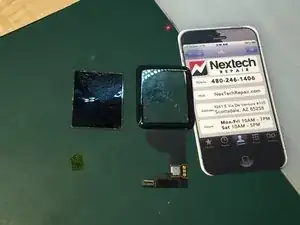
Introducción

Guía detallada paso a paso sobre cómo quitar la pantalla LCD del cristal/digi en un Apple Watch. Esto es solo para técnicos experimentados, requiere maquinaria y herramientas costosas, y se recomienda que lo realicen solo profesionales.

  1. qKOVuSM1cY1vv6rF
    qKOVuSM1cY1vv6rF
    gaicMhJfNpBMCISQ
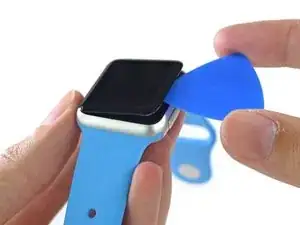
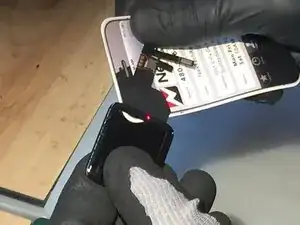
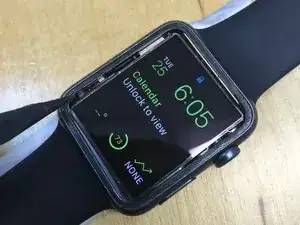
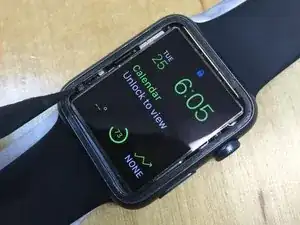
    • Calienta la pantalla para que toda la pantalla y el reloj estén calientes. Asegúrate de apagar el dispositivo primero manteniendo presionada la corona y luego deslizándola para apagarlo.

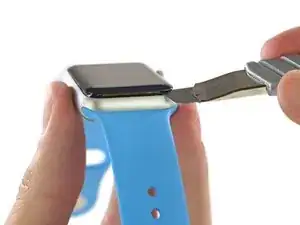
    • Usando una cuchilla afilada, comienza en la esquina inferior derecha y levanta el vidrio lo suficiente para crear un espacio, una vez que tengas un espacio lo suficientemente grande, usa una herramienta de plástico para romper la unión adhesiva alrededor de los bordes.

  2. PfLtdjAYALr6spoc
    PfLtdjAYALr6spoc
    kEQTrH13Ql3dN2IA
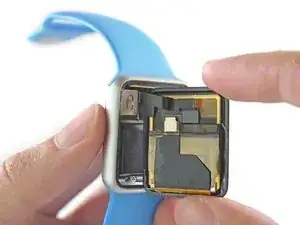
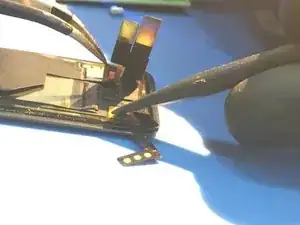
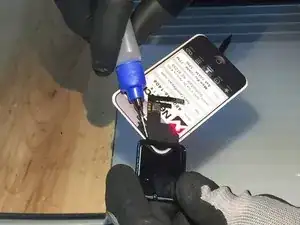
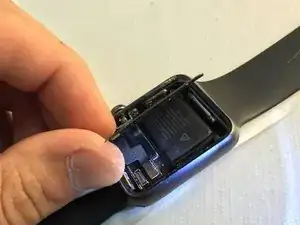
    • Al insertar el cuchillo y las herramientas de plástico alrededor de los bordes, asegúrate de no ir más allá de 1 mm en el AMOLED. La junta Force Touch se encuentra directamente debajo del vidrio y se daña fácilmente si se presiona con demasiada fuerza con un cuchillo u otro objeto metálico.

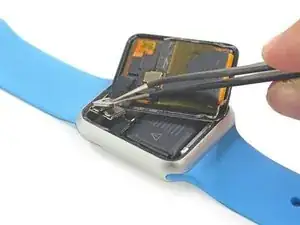
    • El clip FPC es complicado, pero se quita fácilmente con unas pinzas de punta afilada en el borde de la batería.

  3. PQXlxu5vpyjHFQty
    PQXlxu5vpyjHFQty
    lankmXC6OEOBVdoE
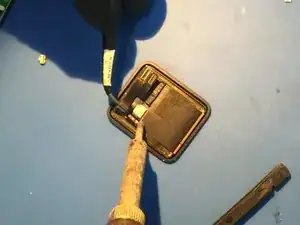
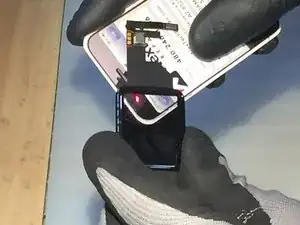
    • Usé una punta de soldador que era más grande que las almohadillas de soldadura. Enciende tu soldador a una temperatura alta, 350C es donde mantuve el mío. NO agregue ninguna soldadura, solo use el calor y las pinzas para retirar las pestañas.

    • Después de desoldar, retira el cable flexible y usa pinzas para retirar el sensor de proximidad del AMOLED. CON CUIDADO.

  4. mQr1HdHaFiENwaaX
    mQr1HdHaFiENwaaX
    fpHHOpCRJqFRXBBx
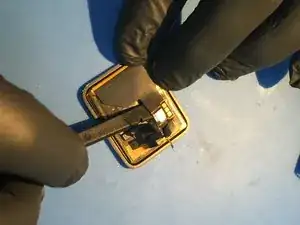
    • Después de desoldar, usa un spudger de plástico en el área exacta que se muestra en la imagen para aflojar el adhesivo que sujeta el digi flex en su lugar. Es mejor si usas una pequeña cantidad de calor, alrededor de 150F, para ayudar a suavizar la unión adhesiva. Dobla el cable digital hacia atrás como se muestra en la segunda imagen.

  5. fAQKTmZLGDlLmokP
    fAQKTmZLGDlLmokP
    JLBO2jj15XUrhi2Q
    VQHSMUDLW4exB15Z
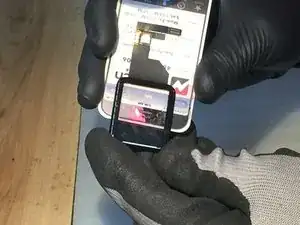
    • Comienza precalentando toda la pantalla a una temperatura uniforme, dejándola reposar bajo aire tibio durante 10 minutos. Mantengo mi pistola de aire caliente en 300F-350F mientras sostengo la pantalla a 3"-6" de la boquilla para variar la temperatura.

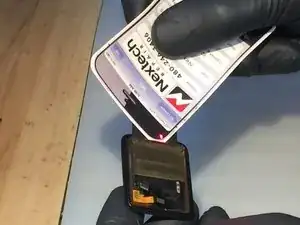
    • Inserta con cuidado una tarjeta de presentación debajo de la pantalla en el lado flexible de excavación. Usa alcohol para debilitar la unión de la cinta OCA y luego mueve la tarjeta lentamente

  6. GHkDhXSSgjRU1Bqs
    GHkDhXSSgjRU1Bqs
    HZLi1TC3ZfDEtJPQ
    CGOVtFDTFw3noCVL
    • Continúe insertando la tarjeta lentamente mientras usas alcohol como desligante y lubricante, además de mantener un soplo uniforme de aire caliente en la pantalla. Mientras sostienes la parte exterior del vidrio, continúa moviendo la tarjeta hacia adelante y hacia atrás hasta que la AMOLED se separe por completo.

  7. ppKpc5ZtTxMAOZVX
    ppKpc5ZtTxMAOZVX
    kYdoxg14MgoMUUpJ
    • La pantalla AMOLED es extremadamente delgada, pero no tan frágil como cabría esperar, recuerda ser cuidadoso y usar calor durante todo el proceso de separación. Para quitar el antiguo adhesivo OCA, usa tu dedo y "desliza" el pegamento, el alcohol isopropílico puro también ayuda a despegar el adhesivo.

    • La pantalla es "resistente al agua", el alcohol que se filtra por los bordes está bien. La pantalla es "resistente al agua", el alcohol que se filtra por los bordes está bien.

  8. kwYvuXMSfbJJU2eh
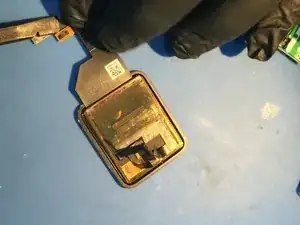
    • Ten cuidado con el cable flexible Force Touch que se adhiere al marco en la parte inferior izquierda de la pantalla mientras retiras el ensamblaje de la pantalla del marco. La junta Force Touch se encuentra alrededor de TODO el borde del reloj y es una membrana delgada de silicona.

    • Prueba tu AMOLED después de la separación antes de continuar con los siguientes pasos.

    Can i replace my apple watch 2 digitizer with apple watch 2 “demo mode” digitizer?

    mohamad3adel -

    • Terminaré esta guía después de que llegue el nuevo conjunto de digitalizador/vidrio. Vienen de China, por lo que aún tardarán unos días.

    Any further information on repairing with digi/glass only thin

    Peter White -

    hi! where do you buy the digitizer/glass from?

    dumycs21 -

    i need the the 42mm glass/digitizer too! please let us know where u ordered yours.. thanks!!

    imach -

    Did you finish the job, what did you use to adhere the screen?

    Andrew Nixon -

    So orders don't take that long even from China..., what's going on?

    Georg Kipp -

Conclusión

Para volver a armar tu dispositivo, sigue estas instrucciones en orden inverso.

donald1oest

Miembro Desde 26/08/15

1034 Reputación

54 comentarios

Hi! When are you getting digitizer? Will you be completing this guide? Am really looking forward to see how you put back the watch. =)

Yeong Sin Tat -

Hello. Any luck with the digitizer? Thank you for the tutorial!

Dave -

please apple watch 38mm lcd screen and digitizer assembly Where sold?help me_

EBRAR ALEMDAR -

Isobyapple, do you still have that LCD/digitizer for the 38mm Apple Watch for sale?

mikeusderk -

Does anyone know where to get the 38mm lcd/digi combo (preferably for less than $200)?

Brian Carthans -

Any Idea where to buy LCD Screen and Digitizer Assembly Replacement for Apple Watch Black 42mm..? I cant find anything online so far. Thanks

sb11201982 -

I just saw it on Amazon and Ebay

Mr Mittens -

Looks like each digitizer has a serialized touch IC chip that seems to be "paired" to the CPU in the Apple Watch. When you replace the digitizer only you also replace the touch IC chip, I have not been able to get the touch working after 3 glass/digitizer only replacements. I assume the same thing would happen if you replaced the entire LCD/Digi/Glass assembly.

Don -

I am having the same exact issue. Digi will not work. Old one does.

Bllie Goff -

Unbelievable!

deivier5 -

(Comment Part 1 of 3)

So they not only make the thing almost impossible to GET INTO to repair (which is understandable - I guess, given how small it is). But NO, they have to pair the touch screen and the CPU together to make it IMPOSSIBLE to replace one without the other?

<extreme sarcasm> I suppose this might have a "reason" if they were going to put a TouchID sensor in the screen and so the "Secure Enclave" would be on the touch ID chip..

I mean, you wouldn't want someone to be able to hack someone's bank account just getting THEIR watch (after somehow stealing it off their wrist..), taking it apart, swapping "their" touch-screen onto another watch's CPU, and then somehow using all that to hack into their bank account, right?? I mean, that would be *too easy*!!</>

I know Steve Jobs started the whole "Thou shalt not get into MY computer, puny human!" thing.. But this is ridiculous. I thought Apple was supposed to be "environmentally friendly". How the !&&* do you (or they, actually) recycle this?

jimwitte -

(Comment Part 2 of 3 - no third part)

Other than perhaps incinerating it and then pulling the base elements (you know, silicon, oxygen, carbon, germanium, any number of other rare-earths..) out of the slag? Somehow. *Can* we do that? When someone figures out how to make custom-designed bacteria that can worm their way through landfills and extract rare-earths "cheaply".. (Put it into the ground at a source point and let it go. Just make sure it has an un-evolvable-around-genetic-off-switch). They will make a mint.

jimwitte -

Is there way to serial hack or make it work?

sb11201982 -

There is a machine that can re-attach the flex cable to the new screen, however I believe it costs upward of $5,000.00 which is too much money just to be able to re-attach a cable. Re-programming an IC chip that is attached to a flex cable would be a very impressive hack. Anything is possible, but that kind of repair is beyond my expertise! I wish there was someone that had more experience with IC chips and could shed some light on the possibility of re-programming or a reason as to why Apple would program a digitizer IC to a CPU. I see no security reasons for it.

Don -

oh boy...may be just to make it difficult for repair community? well anyways, Thanks again Don. At-least you saved me from a lot of pain I would have gone, in order to make it work and only to find out later, that it wouldn't.

sb11201982 -

Where do you find said machine? I might be interested in buying one for our Tampa store so we can offer Apple Watch screen repairs.

applerepairshop -

I will try to google and find out more..thanks for sharing your experience though...

sb11201982 -

are you ever going to finish this quide?

mikeusderk -

Your new touch doesn't work with your old LCD !!!

romnaum -

What is happening here apple watch digitizer impossible to be fixed?

Nigel -

Update on this repair. I am the original author but I forgot my other account password. When replacing the digitizer only it stops working. I believe this is due to each digitizer IC being individually serialized. My first assumption was that each digitizer IC was paired to each logic board CPU. It turns out I was wrong! If you replace the entire assembly (glass+digitizer+LCD) with an originally assembled (not refurbished) then it will work! This would indicate that the digitizer IC is instead paired with each OLED screen instead of the CPU. I can confirm that replacing the entire assembly has worked on two different Apple watches that I have repaired now even tho the digitizer IC serial numbers were different! I hope this info helps out the repair community.

Don -

where can I buy glass+digitizer+LCD for apple watch sport 38??

riccardoalberti -

I guess the digitizer IC being paired to the OLED screen might be because of minute differences in the two that have to be "individually compensated for" somehow at the factory?

jimwitte -

42 mm lcd digi?

Tactical Recon -

Hi, so can this be done or not? Has anyone succesfully installed a new digitizer only? Must the LCD and digitizer be paired? If it is not possible then this post should be removed since this can be deceiving and many of us would try buying the digitizer only and install it with the original LCD.

laptownveracruz -

I purchased a old apple watch and swapped the Entire screen assembly and it didnt work but only on the original it came from. So each screen has to be coded for each watch or something.

stevenmccrorey1 -

I bought the digitizer/glass only and reinstalled with OCA. Then reassembled up to the point of sealing the screen assbly to watch. Went to test and the watch would not turn on. Does anyone know for certain that the digitizer is paired to the LCD ? ? ?

Peter White -

Hi. I have read that you need to reinstall the watch IOS to get it to work!

Phil -

Can anyone confirm this comment from Phil?

Will a reinstall of the IOS do the trick or not?

kristofgorissen -

Please confirm whether it was successful or not?

Gupta Trading Co -

Yes, could someone confirm this?

Uas -

I so wish i read the comments before, i went on to buy just the glass + digitizer....

Nevertheless, thanks for the guide!

spent i dont know how many hours and tools just to find this out, hahahahahaha!

williamfrost -

If anyone is still trying to source an LCD with the digitizer check out Aliexpress. They also have a digitizer for sale which claims to be upgraded with a firmware that makes it work: Look what I found on AliExpress

http://s.aliexpress.com/fueIfMVJ. I haven't tested it, but it has good feedback.

jchalmers1982 -

did it work for you? I think it will not work, typical Chinese hoax they sell all!!

Can anybody say which Touchscreen will work? eBay or ?

thank you

Nik -

Hi, I order a month ago 3 touch screen 42mm, for my surprise the replacements don't work, and after trying the 3 touch I started to read this thread.

I think is firmware related, I get one of the replacement to work, what I did is desolder the original IC ubicated in the flex of the original touch, this is the only IC in the touch screen, I reballed the IC and install it in one of the new touch screen, and after that new touch with the original IC work, unluckily the touch don't work perfect, sometimes gets crazy and sometimes dont work at all. I will rework again the IC and test.

So if you have a shop in your town that repairs touch disease they probably can fix your apple watch with the cheap chinese replacements.

hermann -

Hi hermann, did you rework the IC again ? I have touchscreen only parts and I'm interested in buying a broken Watch.

Martial B -

38mm digitizer only costs about 12$ when full assembly is about 145$ (exc. VAT and other taxes).

Stop blaming Chinese products, everything is made in China, you just need to find the right supplier, and it does not depend on a specific Amazon or eBay seller, but from where the part is sourced.

Full assembly replacement (Digitizer + LCD) works perfectly, and digitizer replacement seems to require the IC replacement which is not reachable for everyone.

I suggest you to keep your de-bonded LCD waiting for a ready-to-use solution ;)

Martial B -

Hi @ll

we are trying to repair Apple Watch Digitizer for a longer time already and like all of you the digitizer does not work after replacing.

We tried 3 digitizers on 2 different Apple Watch.

We checked compatible versions with China and none of the 3 digitizers work.

The old one works.

Because of the short time of our customer we bought a full LCD assemply and the digitizer works, so the reason that the digitizer is linked to the board is not right.

We tried to reset the apple watch too and does not work.

We tried to replace the digitizer IC from the old one to the chinese digitizer and it did not work on first try.

When we get next Apple Watch repair we will try that again to be sure.

So for now we still replace full LCD assemply until we find the solution.

If somebody else has the way to try the IC digitizer reballing again we would like to know.

Greetings

Stefan

Stefan -

But why would the Chinese factories make these screens if it does not work? There should be a solution...

Uas -

Because a lot of people would buy the digitizer to repair the watch but only a very litte % would send it back to china when they notice that they dont work. So, working or not, they earn money ;)

Stefan -

Hello , me to I replace only the touch screen and don't works .

I will try to rebalb the chip AD7166 and see what it will happen. And also one other choice is to replace only the flex with the pin from old touch screen . But I don't check it a lot. I will choose one of them and I will wrote here the conclusion .

Michael migkos -

Also guys good link with all info is this

http://www.techinsights.com/about-techin...

It shows the chip on the flex cable touch digitizer and is th AD7166

And it shows and the chip on motherboard the ADI AD7149 touch controller .

I hope someone with the correct tools try replace that or if anyone knows something better pls wrote it here. Many people wait a good answer and solution

Michael migkos -

Don't know if anyone has tried this repair but apparently i saw on Alibaba that once the new screen is connected you need to wait for a software upgrade and once you do that the new digitizer will mate with the watch. Can someone maybe try this out?

Brent -

I have access to a quantity of broken Apple Watches I can experiment on. Here’s what I’ve discovered:

- Heat is not needed to separate the OLED and digitizer. Isopropyl alone does the job just fine. Series 2 uses a beefier OCA than Series 1 so you have to go a bit slower.

- Most of the OCA stays on the OLED when you separate it. You have to be gentle removing the OCA from the OLED; if you press too hard you will damage the OLED.

- Bonding the OLED to the digi with LOCA and a UV lamp takes two minutes, tops. I’d never used LOCA before.

- The digitizer is not “paired” to the OLED. I took two of them apart, swapped the digitizers, and they still worked.

- I installed a virgin digitizer on a Series 1 watch and it didn’t work. Then I updated the OS on the watch (from 3.2 to 4) and the digi worked. Updating the OS was by far the most time-consuming step in the process.

- I have ordered a widget that connects the maintenance port to a Lightning cable; this is supposed to allow faster DFU-updating the OS in iTunes.

Gordon Hlavenka -

Hi all,

Has anyone been able to sucessfully repair an S2 apple Watch Screen?

Just by replacing the LCD or the full assembly? Did you have to reset anything via the watch’s hidden service port?

From what I’ve read above, sourcing the parts also has its tricks, Aliexpress and Ebay has a scarce offer for the S2 and the few places that do list the full assembly have it as out of stock, So please feel free to share reliable sources.

Thanks

DanT -

I’ve moved display assemblies between S2 watches without any reprogramming. Haven’t bought any new parts for S2 though.

Gordon Hlavenka -

Thanks Gordon,

That is in fact progress, but it does not refute the possibility of having the LCD and the Touch Screen tied up to each other.

I believe that the majority of the repairs will only require the Touch.

thanks

DanT -

Update:

I’ve received the widget and now updating the watch OS takes 15 minutes instead of an hour+.

I had several Series 2 watches that worked after a display (digi+OLED) replacement but wouldn’t pair after a reset. My theory is that the code on the digitizer IC has a compatibility issue with the watch OS… Using the widget, I reflashed the watch OS and now they pair.

The sequence was thus:

1 - Watch pairs and works but has broken glass. Do not reset yet.

2- Replace display (digi+OLED assy)

3- Watch works.

4- Reset watch. Watch will not pair.

5- Reflash OS using widget. Watch pairs.

I don’t think the digi and OLED are linked. Rather, I think the digi IC contains code that must be compatible with the OS version on the watch itself. We bought displays that were advertised as tested and they did in fact work, however watches wouldn’t pair after a new display was installed. Reflashing restored the ability to pair. It’s possible there’s also code on an OLED driver but a reflash fixes whatever is causing trouble.

Gordon Hlavenka -

Hello Gordon and thanks a lot for this all info. Can please help me how you replace the os? Which tool you used? I find an ibus tool that make this reflashe. Is this the tool you used?

Michael migkos -

Michael I used the iBus tool + their “Dongle” software. Occasionally iTunes-compatible files are available that don’t require the Dongle but not at the moment.

Gordon Hlavenka -

Hi their guys i have i watch series 1 42mm with broken glass but touch still works fine

so i ordered the screen

https://gadgetfix.com/display-lcd-touch-...

new screen is struck on apple logo i Don’t know why I’m like what the !&&* did i mess up anything and tried with broken screen it is turning on normally

i don’t know why any suggestions ist a screen or any other issues causing the problem. Suggest some links to buy a screen good one please it should work thanks

Sudheer reddy -

…and the finish ?

Julian -

Hi,i heard the replacement digitizers don’t work with the lcd units,because they’re not coded properly or at all,is that true?

Marin Boras -

Hello. i can't remove the display from the apple watch. What else can I do? i don't want to scratch the case of the watch because it is black stainless steel

Kai Strzebkowski -