Introducción

La pantalla LCD del monitor Thunderbolt de Apple es la primera parte que tendrá que sacarse sin importar qué pieza dentro de este dispositivo debas reemplazarse. Debido a esto, es fundamental saber cómo retirar con cuidado la pantalla LCD del dispositivo. Algo que debes tenerse en cuenta es que incluso después de quitar los tornillos, no intentes sacar rápidamente la pantalla LCD de su carcasa porque todavía está conectada a la placa lógica y de alimentación de la pantalla. Una vez que la nueva pantalla esté en su lugar, asegúrate de que todo esté conectado como lo estaba la pantalla LCD original y que tu dispositivo debería estar como nuevo.

  1. vKYkNXJG6EyYZXwb
    vKYkNXJG6EyYZXwb
    bdoSe25Kx2AEFnuf
    Fy6tFKoYcjhdx4uu
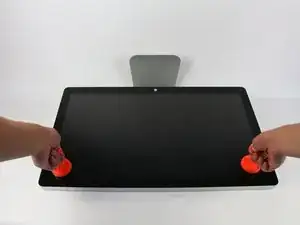
    • Coloca la pantalla con el lado de la pantalla hacia arriba.

    • Dado que la pantalla se puede inclinar hacia arriba y hacia abajo, nos resultó útil sostener la pantalla con un bloque de espuma de poliestireno entre la pantalla y la base.

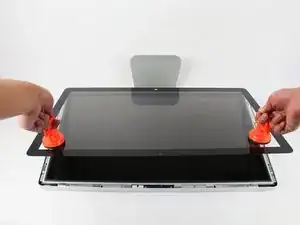
    • Coloca las dos ventosas a ambos lados de la parte superior de la pantalla y asegúresate de bloquearlas en su lugar.

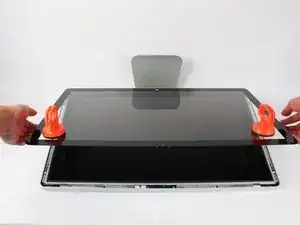
    • La pantalla de cristal está conectada al resto de la pantalla mediante pequeños imanes. Levanta lentamente y la pantalla se apagará de inmediato.

    Instead of $14 foam block, I used a full roll of paper towel and two pillows. While it worked, if I ever did this again, I would buy the block of foam. Since you’re removing a power cable, you need to be able thread it through and I think the foam block would make that easier.

    Josh Miller -

    You can also use a single handle, double cup floor lifting suction cup. Just place it in the centre of the screen near the camera and lift slowly.

    Steve A -

    I just used a toilet plunger to remove the screen and it worked like a charm!

    Philip Jacob -

    That’s what I call resourceful—made my day. I hope your repair was successful.

    Tobias Isakeit -

    Great idea, thanks a lot!

    Yvan Sandoz -

    The glass lifted off the magnets quite easily after just using my fingernails. No suction cups or toilet accessories needed.

    Adrian Gropper -

    I had the same problem and after removal of the fan and a bit of work with the vacuum, the fan is quiet. Thanks to ifixit for the great instructions that made this easy.

    John Perser -

    To keep the screen up, other soft objects might work, but it's important that the hole in the back isn't covered because you will need to thread the new Thunderbolt/MagSafe cable through it and it would be a hassle to do it after everything's been set up.

    Thomas -

    Anybody got any links to glass screen replacement supplier for the A1407 Thunderbolt Display? Im finding it impossible to find a replacement without it being crazy money.

    Michael McMillan -

    Instead of a wedge, I used 4 rolls of toiletpaper, one under each corner.

    jnbruin -

  2. y1QM4GJuH1vKrEUg
    y1QM4GJuH1vKrEUg
    xV1xJRpqEugIUYOL
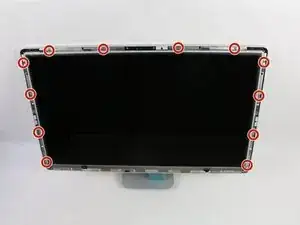
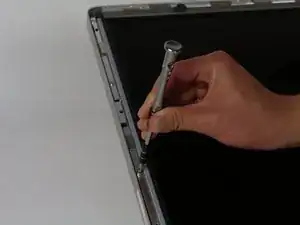
    • Desatornilla los 12 tornillos alrededor de los bordes laterales y la parte superior de la pantalla LCD con el destornillador TR 10.

    The screws marked in orange don't need to be removed, all they do is hold the magnets on the LCD.

    Garrett Mace -

    Yes “orange screws” does not need to be removed.

    You do not need a TR10 screwdriver as written in the text a T10 will suffice (more common and also correctly mentioned in the list of tools).

    A TR10 screwdriver is compatible with the T10, but not the other way around

    Per Lohmann Poulsen -

    On mine, the orange screws did hold the LCD down; the magnets were held in by TR6 screws, and those did not need to be removed.

    jml9904 -

  3. dNtDx1LZQDU1OVbo
    dNtDx1LZQDU1OVbo
    OSaiV2IVJO3u5HPx
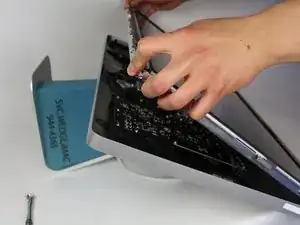
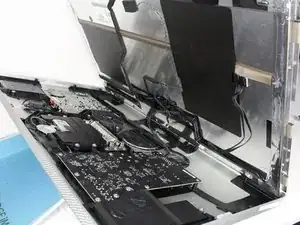
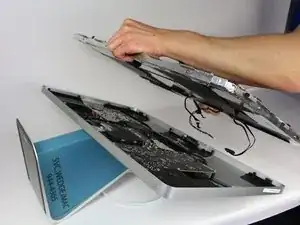
    • Levanta lentamente la pantalla LCD de su ubicación e inclínala hacia arriba.

    • Puede ser muy útil tener un par de manos extra para sostener la pantalla LCD mientras trabajas con los cables debajo.

    • Hay cuatro cables que conectan la pantalla LCD con el resto de los componentes. Asegúrate de no tirar con fuerza y romper ninguno de los cables.

    Add the note that it should be lifted from the bottom edge. It is also important not to twist the display by levering up from one corner.

    Charlie Nancarrow -

    Before lifting the monitor, you should be prepared to start collecting screws and have your TR 10 ready.

    Josh Miller -

    Having a couple of short screwdrivers handy to prop up the LCD (like you would a car hood) while you disconnect the cables helps.

    jml9904 -

  4. vYMImIhPgImDC4sZ
    vYMImIhPgImDC4sZ
    KwPHhIYJrH6vl4ZA
    ltsqwLZEIXOkvKZf
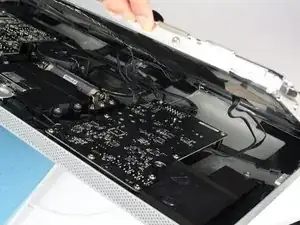
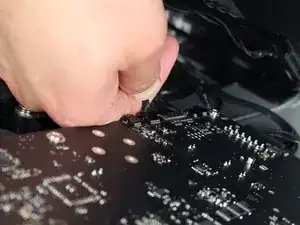
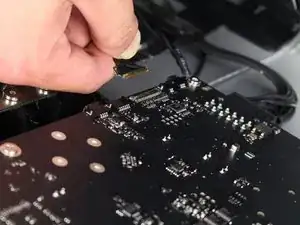
    • Para el primero de los cuatro cables (el más alejado del cable sujeto por un tornillo), sujeta el conector y tira lentamente.

    Note: be sure to pull away but not hard. Wiggle and pull slowly. These are delicate especially due to age.

    Overall this is a moderate repair. Follow step by step and you are good.

    Also, use tape and/or labels to mark which cables go where per the MLB and other parts. Resulting in easier reassembly.

    Ted Teske -

  5. aJXhUDyuRDBEYIPX
    aJXhUDyuRDBEYIPX
    TvkYkf3pUBHBJZEQ
    N6oVUvAxqymMUFXn
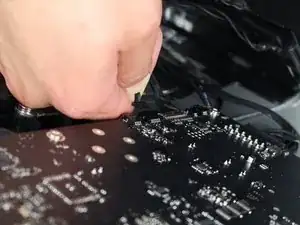
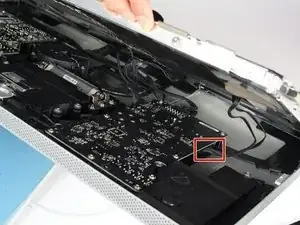
    • Para el siguiente conector, que está justo al lado del cable anterior, hay un trozo de cinta pegado a una barra de metal.

    • Voltea la barra de metal usando la cinta como manija.

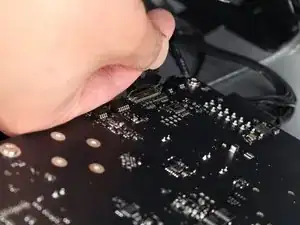
    • A continuación, sujeta el conector y tira de él lentamente para sacarlo del zócalo de la placa lógica.

    What is this connector for?

    pdspanagel -

    I imagine this connector is going to be for display data (i.e. LCD data).

    Scott Havard -

    I pretty much mangled this cable trying to put it back into the slot. Is this something I can order a replacement for?

    Ryan Stryker -

    I also screwed up this wire.

    erybovic -

    I also screwed up this wire. Wondering what the wire name is.

    erybovic -

    Thunderbolt Display 27" LVDS Cable

    Klaus Finke -

    As other’s have said, this cable is super delicate.

    When you replace it, make sure that the small metal handle it firmly reattached to the other side of the port. I thought I’d got it right first time, but had no video signal (thunderbolt detected display, and power was fed to the Macbook Pro).

    I had to reinsert this one again, and one in, firmly press the connector home, then latch the handle over the other side. I also gave it a test pull to ensure it was secure. Then all was well!

    Steve A -

    Managed to remove it but broke one pin putting it back. I don’t understand why they make so fragile with all the space available…

    BAULARD -

    Can anyone provide a photo of this connector so as to give a better understanding of its mechanics? see this cringe worthy effort at guidance; https://youtu.be/A96CUSm_Xhs?t=1050

    Philip Sharp -

  6. yYhUxvsdBk3pv3Io
    yYhUxvsdBk3pv3Io
    EyjpfRYE2bE1xGWk
    a4reZswHC1EsBc11
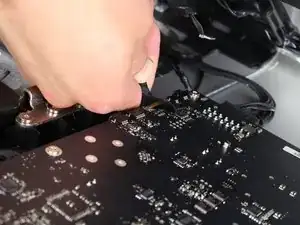
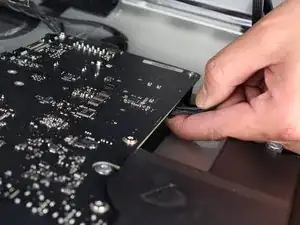
    • Para el conector del otro lado de la placa lógica, toma el conector por debajo y tira con cuidado de la placa.

    To remove this connector, you squeeze the lower tab to unclasp it, and pull it sideways away from the board

    Brad Bell -

    This cable was also taped for me, so remove the tape first

    danmcfalls -

  7. sjOHkIKEoj3IwvE6
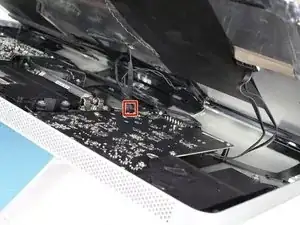
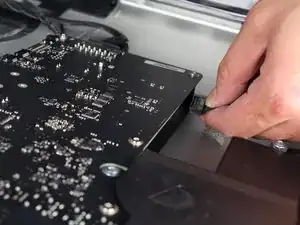
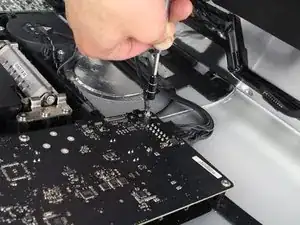
    • Para el último cable que se conecta a la pantalla LCD, usa tu destornillador T 10 para quitar el tornillo.

  8. fGJtJg1gy2EQTqVl
    fGJtJg1gy2EQTqVl
    XNFyMYy5JtA3VvQX
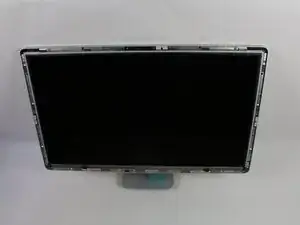
    • ¡La pantalla LCD ahora se ha desconectado por completo de la carcasa y se puede reparar/reemplazar!

    • es mejor colocar la pantalla LCD sobre una cama o sobre una toalla gruesa para evitar dañar la pantalla LCD

Conclusión

Para volver a armar tu dispositivo, sigue estas instrucciones en orden inverso.
Calvin Laverty

Miembro Desde 14/04/15

2126 Reputación

11 comentarios

Now I just need to find the affordable replacement LCD Panel. Mine is not too bad - but it has recently developed a streak on one side that is very irksome.

gigabob -

Love your site! Proved very helpful on multiple occasions and your products are fantastic!

Forgive my ignorance...

Is it possible to (1) Are any of the components of Thunderbolt Display upgrade-able? .... (2) There appears to be plenty of real-estate, can a Thunderbolt Display be turned into mac and/or pc? ... (3) Any way to upgrade to USB 3.0/3.1?...

I like tinkering with electronics and don't mind the complexities or if necessary getting parts, just wondering if any of these are possible and if so, can you give a clue as to where I can find more info... Thank You.

Mark Karasin -

Would like to see a continuation of what it takes to replace the Thunderbolt cable that is attached to the back of the display

Michael Martin -

Hi Michael

What happen to your monitor for you to need to replace the cable. It could be solution as to why my monitor has a black screen.

Any help?

Thanks

Fm34b -

Does the LCD from an iMac 2009 27” fit into the Thunderbolt Display and make it work?

Aldo B -

Actually it’s the same Display but the connectors are different, therefore it’s not that easy.

Peter Rößner -

The Apple Studio Display 27 LCD panel has 2 main flaws that occasionally need fixing The first issue is the LCD panel and backlight are not vacuum sealed, micro dust particles gather between the 3 backlight transparent sheets, then when the air temperature changes is cause the dust to accumulated creating what looks like a water mark/streak. This may not be noticeable too most but if your using it for colour correction this is a major issue. Secondly the connections for powering the LEDS backlight at the bottom corners have a less than satisfactory solder connection causing flickering and turning off, sometimes only on one side, which can be fixed by just running solder along the 90 degree connection.

Martyn Ford -

Fixing one of the two issues requires you to disassemble the panel, not for the faint hearted or not technically skilled.

It is hard to disassemble but impossible to reassemble, must have been assembled by a robot, the plastic frame and get it to click back in place, first time I attempted this i crushed the very thin LED panel.

The half-arse solution to reassembly is to modify the plastic clip as long as you return the silver curved reflector on the plastic frame so that the backlight works at the same brightness.

Martyn Ford -

Tutoriel parfait mais où trouver une dalle LCD de remplacement pour thunderbolt apple 27”

José Maruzzi -

Are the Thunderbolt model screens as same as the cinema display screens?

Asher Haf -